
Many Windows users are reporting that F1 keeps crashing on their PCs, and they are seeking easy solutions to resolve this issue. Here, we provide you with some easy tips to resolve this issue.

Why does F1 keep crashing on Windows?
There are multiple reasons why F1 is crashing on your computer. The very obvious reason is that your computer is not compatible. Therefore, ensure that you compare your system’s specifications with the requirements mentioned below. After Hardware compatibility, you should also check if you have the latest version of Visual C++, because that is important for the game.
However, if your computer is compatible and you are experiencing this peculiar behavior, the issue may be caused by a corrupted file. We have mentioned a way to confirm this.
There are some other reasons for this problem. That’s why we have accumulated a list of all the possible fixes to resolve this issue.
Fix F1 keeps crashing on Windows PC
Before proceeding, it is advisable to update your Windows computer. You can do that quite easily. Just open Settings, go to Update & Security and click Check for updates. If an update is available, download it and check if the issue persists.
These are the suggestions you can follow if F1 keeps crashing on PC. The solutions apply to F1 25, 24, 23, 22 and 21 games.
- Verify Integrity of Game files
- Update your Graphics Driver
- Disable Overlays
- Launch F1 game in windowed mode
- Update Visual C++ Redistributables
- Troubleshoot in Clean Boot.
Let’s discuss them in detail.
1] Verify Integrity of Game files
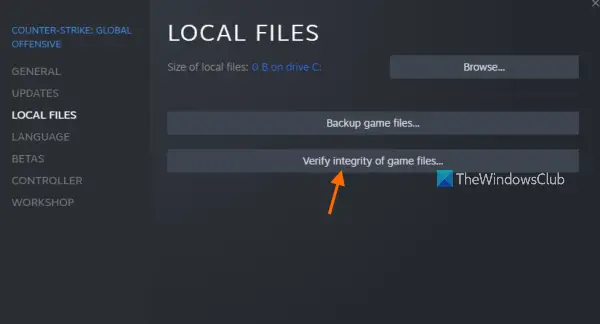
First, we need to ensure that the game file is not corrupted. For this, Steam has a built-in function that verifies the integrity of your game file. To do this, follow the given steps.
- Open Steam and visit your Library.
- Now, right-click on F1 2021 and select Properties.
- Go to the Local files tab and click Verify integrity of game files….
Wait for the process to complete and see if the issue persists.
2] Update your Graphics Driver
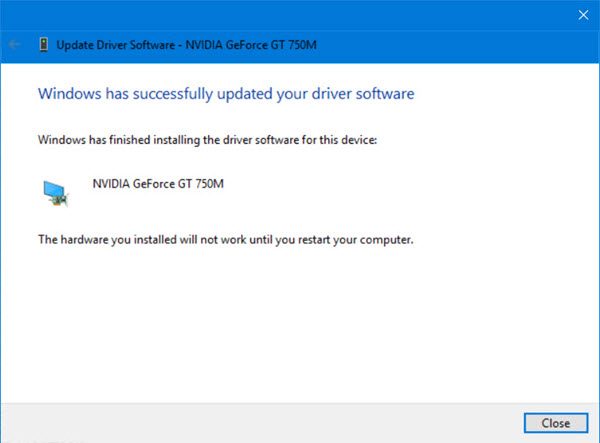
A corrupted or outdated Graphics Driver may cause the issue. So, it is recommended to update your Graphics Driver and see if the issue persists. In most cases, it will resolve the issue for you.
3] Disable Overlays
You should disable overlays and see if it helps as they often conflict with the game. You could disable Steam, Discord, NVIDIA GeForce Experience, or MSI Afterburner overlays and check.
4] Launch F1 game in windowed mode
Run the game using the following safe launch options in Steam and see:
-windowed -dx11
5] Update Visual C++ Redistributables
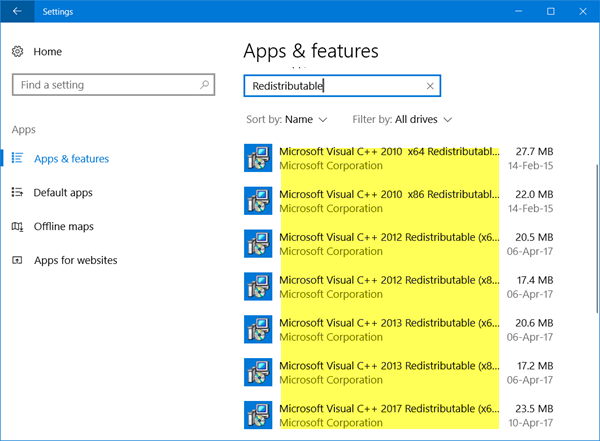
If you have outdated Visual C++ Redistributables, your computer may not be compatible with running the game. Usually, it gets updated as you update your OS (as mentioned above), but sometimes you have to download it manually. So, download it from microsoft.com and see if the issue persists.
6] Troubleshoot in Clean Boot
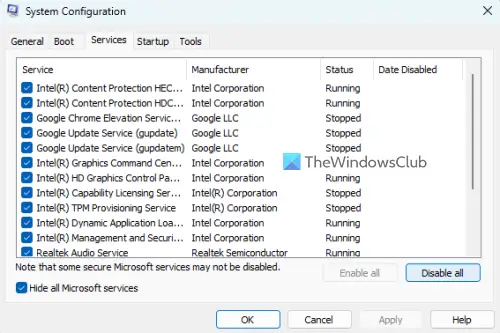
Sometimes, the issue can be because of a third-party application interfering with your program. So, we recommend you troubleshoot in Clean Boot. This way you will be able to narrow down the cause and remove it to fix the issue.
Hopefully, you will be able to solve the issue with the help of the given solutions.
What are the System Requirements to run F1 2025?
The Recommended Requirements are:
- OS: Windows 11 or Windows 10 64-bit (Version 21H1 or newer)
- Processor: Intel Core i5-9600k or AMD Ryzen 5 2600X
- Memory: 16 GB RAM
- Graphics:
- NVIDIA RTX 2070 (for VR) or RTX 3070 (for ray tracing)
- AMD RX 6600XT / RX 6700XT (VR) / RX 6800 (RT)
- DirectX: Version 12.
What are the System Requirements to run F1 2021?
Sometimes, you may encounter issues while running F1 2021 if your computer is not compatible. Therefore, it is advisable to familiarize yourself with the system requirements for running F1 2021 and verify if your system is compatible.
- Operating System: Windows 10 64-bit (Version 1709)
- Processor: Intel Core i3-2130 or AMD FX 4300 (Minimum), Intel Core i5 9600K or AMD Ryzen 5 2600X (Recommended).
- Memory: 8GB (Minimum), 16GB (Recommended).
- Graphics: NVIDIA GTX 950 or AMD R9 280 | For Ray Tracing: GeForce RTX 2060 or Radeon RX 6700 XT (Minimum), NVIDIA GTX 1660 Ti or AMD RX 590 | For Ray Tracing: GeForce RTX 3070 or Radeon RX 6800 (Recomended).
- DirectX: Version 12.
- Storage: 12GB
- Sound Card: DirectX Compatible
So, make sure that your computer is compatible before running the game.
Read Next: 10 best free Racing Games for PC from the Microsoft Store.
