
You should now realize that Windows 11/10 came packed without a few iconic games that were a part of Windows 7. These games are some of the best if you only want to waste some time and test your brain. Now, you might be wondering if it is possible to get these games for Windows 11/10, and we would like to point out that it is indeed a possibility.
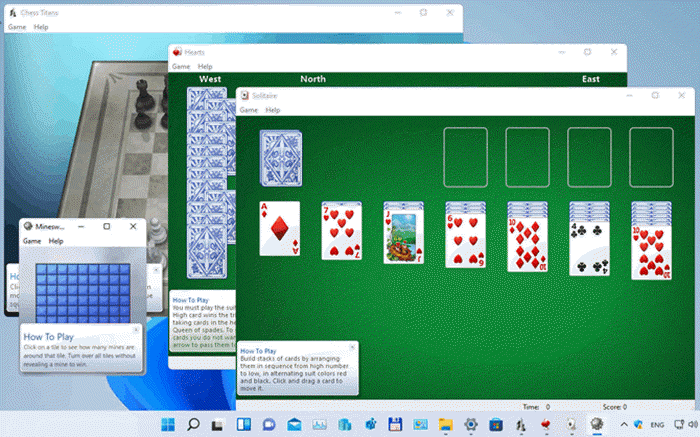
Do Windows 7 games work on Windows 11/10?
Yes, Windows 7 games are compatible with Windows 11 and 10. Just download this setup file, install the games you want and start playing to your heart’s content. Since there are no major application security models or driver architecture changes in Windows 11/10 compared to Windows Vista, if your games ran on Windows Vista, they’ll be able to run on Windows 11 and Windows 10.
What type of Windows 7 games are available for download?
The following titles are what you should expect to find as part of the package of Windows 7 Games for Windows 11 or Windows 10:
- Solitaire
- Spider Solitaire
- Minesweeper
- FreeCell
- Hearts
- Chess Titans
- Mahjong Titans
- Purble Place
- Internet Spades
- Internet Checkers
- Internet Backgammon
Not a bad list, right? We agree.
Install Windows 7 games on Windows 11/10
You can download, install and play classic Windows 7 games on Windows 11 or Windows 10. When it comes to retrieving older titles for the new operating system, we recommend reading the following information to gain a deeper understanding of the process.
1] Download Windows 7 Games for Windows 11 and Windows 10
The first step is to download a file called Windows 7 Games for Windows 11 and Windows 10. Do this by clicking on this link, and be sure to save it on an easy-to-find location on your computer. From what we can tell, the overall file size is approximately 147MB, so ensure you have sufficient space before beginning the download and installation processes.
2] Extract the games from the zip file
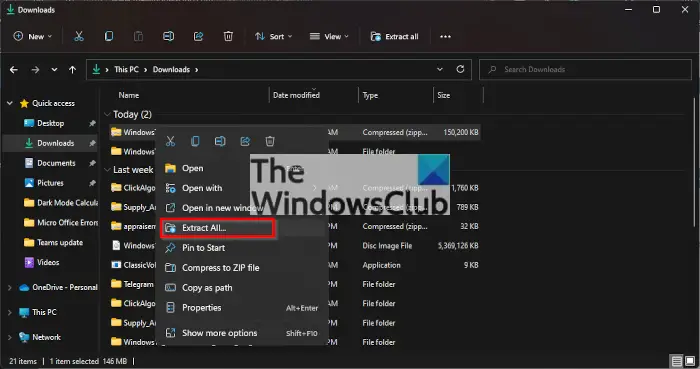
After you’ve downloaded Windows 7 Games for Windows 11 and Windows 10, the next thing you want to do here is to right-click on the file, then select Extract All > Extract. Wait for the extraction to complete, and right away it should automatically load the correct folder with the installation file inside.
Bear in mind, the speed of extraction depends on the power of your computer.
Read: How to run old Games and Software on Windows 11.
3] Install the Windows 7 games you want
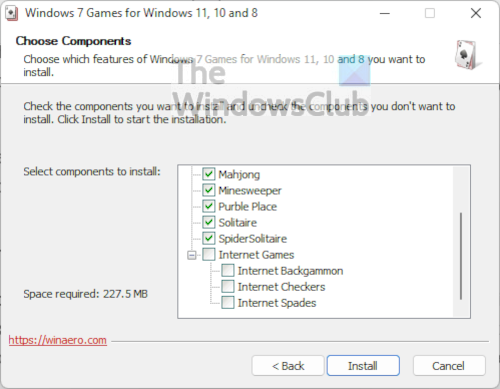
When it comes down to installing your favorite Windows 7 games on Windows 11, you should open the executable file, and from there, select the games you want to install, and that’s it.
That’s all! hope it helped.
Read: Best Free download full version PC games for Windows PC.
Can you play Windows 7 games on Windows 11?
Yes, you can still play classic or old Windows games on Windows 11. You can play Windows 7 games or even DOS games on Windows 11/10. The Microsoft Store too has a good collection of games. You can head to the Microsoft Store, download the game, and start playing on your Windows 11 or Windows 10 computer.
PS: Go here if you like the Classic 3D Pinball Star game.
