
Should I run SFC or DISM first to repair file or system image corruption on my Windows 11 or Windows 10 computer? Most websites suggest running one or both of these tools. When should you run each or both? This post explains.
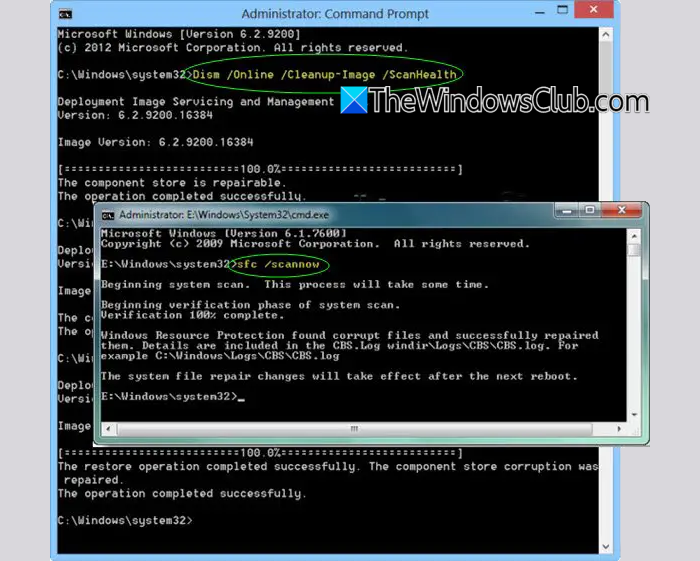
The System File Checker is integrated with Windows Resource Protection, which protects registry keys and folders as well as critical system files. If it detects changes to a protected system file, it restores the modified file from a cached copy in the Windows folder.
You can use the DISM Tool or Deployment Imaging and Servicing Management to update the files and correct the problem. This tool can help if System File Checker isn’t working, to fix Windows component store corruption, or to make a Windows image unserviceable.
Should I run SFC or DISM first?
This is the way I look at this question.
1] Run System File Checker or SFC to fix any system file corruption from the resident component store. It is faster.
In an elevated CMD execute the following command:
sfc /scannow
This does not require Internet access.
If this does not help or if SFC reports it could not fix some files, you may need to repair the Windows Component Store itself.
Windows Component Store is the source SFC uses for repairs.
2] To do this, you need to Run DISM.
In an elevated CMD execute the following command:
Dism /Online /Cleanup-Image /RestoreHealth
This will fix any system image corruption from a Windows Update source. This may require internet access.
This should resolve all issues.
3] After running DISM, you should again run SFC.
This will fix potential system file corruption from the newly repaired component store and verify that DISM was successful in repairing the errors.
4] DISM repairs the system file source cache in the WinSxS folder. This is the source that SFC pulls from to repair system files if needed. If the system file source cache is corrupted and DISM doesn’t fix it first, SFC ends up pulling files from a corrupted source to fix problems. In those cases, run DISM first, then SFC.
I hope this helps!
Incidentally, our freeware FixWin for Windows lets you run both SFC and DISM with the click of a button!
TIP: This post will help you if DISM is not working in Windows 11.
