
When deleting a partition using the Diskpart command, if you receive a Virtual Disk Service error, The operation is not supported by the object then this post will help you solve the problem. The problem occurs when the rest of the partition is under the control of the System partition but is located on another drive, unlike the usual case where all related drives- Recovery partition, EFI System, Microsoft reserved partition, and Windows are on the same drive. In short, the situation is not smooth and is so tangled that recreating everything might look simple in the end.
Diskpart Virtual Disk Service error, The operation is not supported by the object
Since the end goal is to merge the partitions into one and then create separate partitions, follow these methods
- Delete Partition Override
- Delete and Recreate Partitions
You will need an admin account to execute the suggestions.
1] Delete Partition Override
Delete partition is the command that is often used to remove a partition using the Diskpart tool. Delete Partition Override is an extension of the same command that removes any locks preventing deletion. The steps are similar to those for any partition deletion, except for the last step.
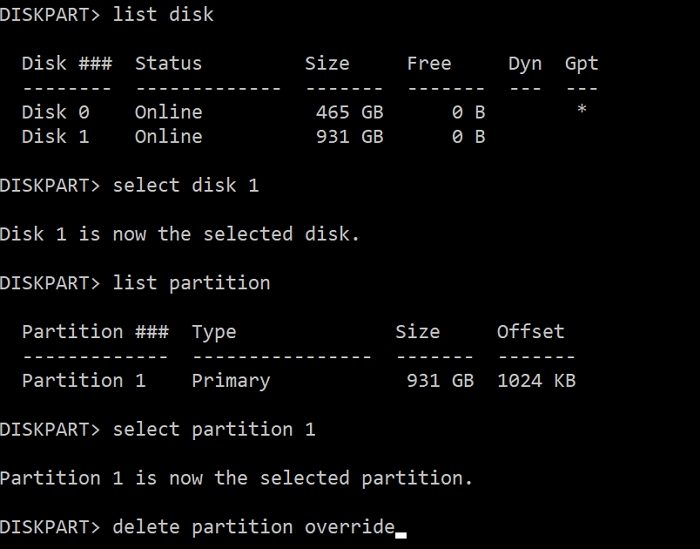
- Open the Run prompt using Win+ R, type diskpart, and press the Enter key.
- Display the list of disks using
list disk, and then select the disk using theselect disk <disk-no>command - Next, use
list partitionto display all the partitions on the selected disk. - To delete a partition, note down the number, and then use
select partition <disk-no>and press Enter. - Type
delete partition overrideand press Enter key. It will then force delete the selected partition. - Once done, type
exitand close the tool.
2] Delete and Recreate Partitions
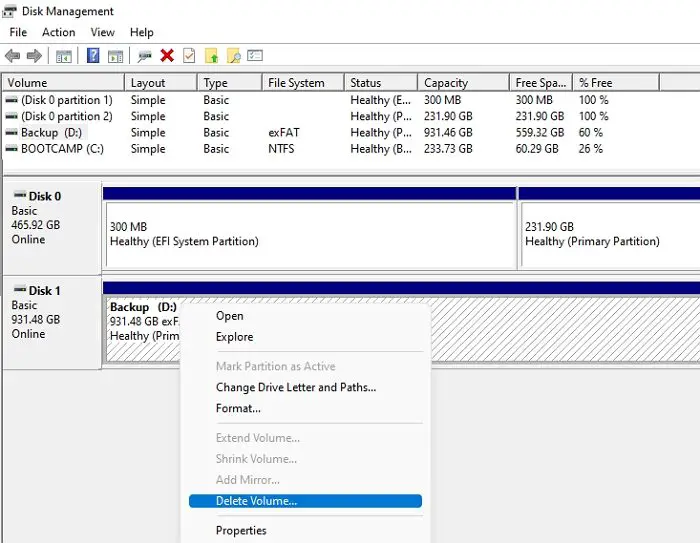
The best option is to temporarily copy any data you need to keep to another drive. Then in the Disk Management, right-click each partition on the drive and select Delete Volume. You can now right-click on the whole drive to create a new simple volume and accept the defaults when it appears as one unallocated space. As a result, you will have a clean hard drive for data storage. Then, you can copy your files back to it.
The method is necessary because individual partitions cannot be removed, and you need to merge existing partitions into a single unit. While you can choose Merge, it will take a lot of time.
I hope the post was easy to follow, and you were able to get rid of the Diskpart virtual disk service error: The object does not support the operation.
Related:
- Diskpart Virtual Disk Service Error: The service failed to initialize
- Diskpart Virtual Disk Service error, The specified disk is not convertible
- Diskpart Virtual Disk Service error, There is not enough usable space
- Diskpart Virtual Disk Service error. Delete is not allowed
- Diskpart Virtual Disk Service Error, The volume size is too big
- Diskpart Virtual Disk Service error. The operation timed out
Does removing partition delete data?
Yes, when you remove or delete a partition, the data stored on it will be lost. If you have accidentally deleted it, you will need to use recovery software to recover data from any removed partition.
Can I delete the Reserved partition?
No, the reserved partition cannot be deleted because it contains critical system files. The recommended way to delete a partition is to use a disk partitioning tool. If you’re trying to delete a system partition, you’ll need to use a disk partitioning tool like Disk Management or fdisk. However, if you’re just trying to delete a regular partition, you can do so by right-clicking on the partition and selecting “Delete.”
