
Microsoft has been striving hard to make technology accessible to everyone. In India, the company has initiatives like Kaizala, an app that helps in real-time governance. With the steadily increasing internet penetration in India, it has become imperative to step up the game and develop digital initiatives for India and other developing countries. Earlier, Microsoft implemented Artificial Intelligence and Deep Neural Networks to facilitate better real-time language translation for Hindi, Bengali, and Tamil. Microsoft has hit the right note with email address support for Indian languages.
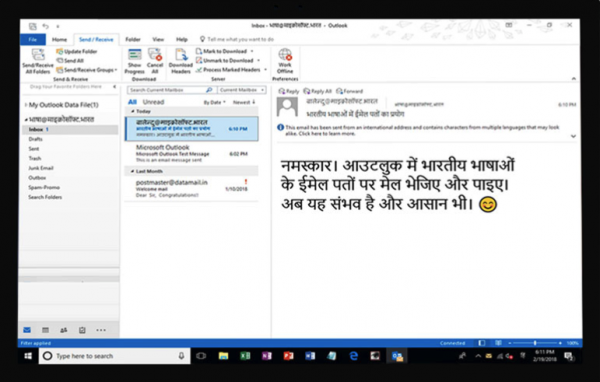
The new support means that Indians can now use Microsoft 365 in the regional language. Apps including Microsoft 365, MS Outlook 2024/21, Outlook.com, and Outlook apps for Android and iOS all support the Indian languages. This is the direct result of Email Address Internationalisation, which aims to offer an equitable Outlook experience by using email addresses in local languages.
Configure Outlook in Indian language
The process is similar to changing the language in Outlook from English to any other. One can use the IMAP and SMTP protocols to send and receive email messages. Check out our step-by-step guide to help you work with an Indian-language email account.
First things first, Open Outlook and go to the File Menu.
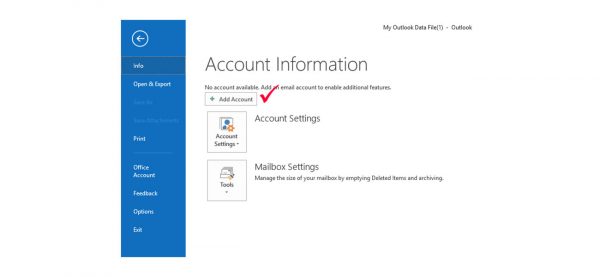
In the next step Select ‘Add Account’.
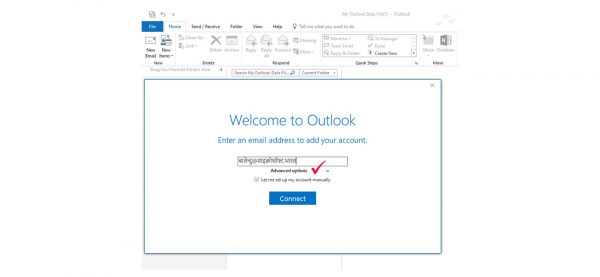
Enter the Indian language email address and click on ‘Advanced Options.’.
Now select ‘Let me set up my account manually’ and finally click on the ‘Connect’ button.
Choose the type of email account to sync with the Outlook app. For instance, press the IMAP icon if you want to configure an IMAP account.
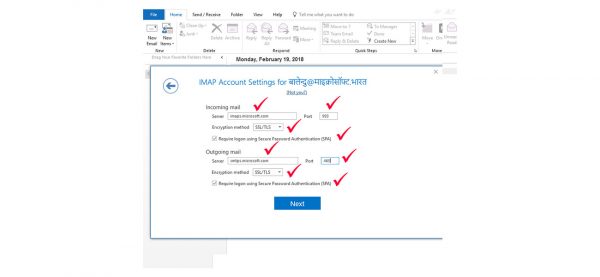
Enter all the details about the mail service provider. If the mail server uses encryption, then ensure that you specify the encryption method and select ‘Require logon using Secure Password Authentication (SPA).’ For the incoming mail section, you can enter the server’s IMAP address, e.g., imap.microsoft.com or imaps.microsoft.com. Similarly, enter all the required info for the Outgoing mail section.
After completing all the steps above, your Indian language and email address should be up and running! All the Outlook features, including Calendar, will now be displayed in the Indian language of your choice. Users can reply, send, and compose emails in their regional language using their email addresses. I liked how Microsoft implemented regional language in Outlook without changing the software’s look or feel.
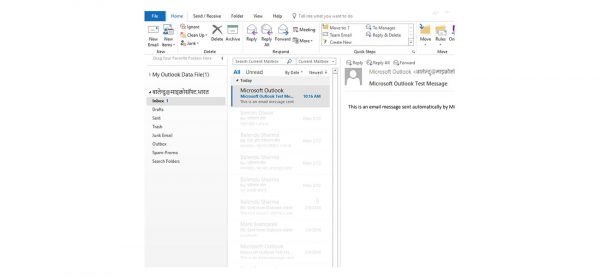
Microsoft’s efforts in bringing regional languages to the forefront
This might be a bit off-topic, but it is important to understand how all of this was made possible. Microsoft began working on Project Bhasha in 1998 and enabled Unicode-based text for three local languages on Windows XP in 2000. Fast forward to 2022, and Microsoft is using AI technologies and Deep Neural Networks to make real-time translations and speech recognition available across several Indian languages.
How do I change the typing language in Outlook?
Instead of changing anything in Outlook, it’s best to change the typing language on Windows. Click the language icon on the Language bar, located on your taskbar near the clock, and select the language you want to use. Keyboard shortcut: To switch between keyboard layouts, press Alt+Shift. Make sure you have the language installed on your PC, and it will work with your PC.
Why does my Outlook language keep changing?
It happens when the automatic language detection in Outlook is turned on. You need to turn it off by going to Outlook > New Email > Proofing Group > Spelling. Click on the Language Button image, then un-check the Detect language automatically box. You can also go to Tools > Options > Languages and remove what you don’t need. Outlook will stop switching.
