
If you want to use the command-line version of Microsoft Support and Recovery Assistant (SaRA) on a Windows 11/10 computer, here is how you can do that. It is suitable for remote diagnostics of problems related to Microsoft Office or Microsoft 365. Here is how you can download and set up SaRA CMD on Windows 11/10 computer.
There may be times when you need to provide support for a remote computer related to Microsoft 365 apps. If using downloading the Microsoft Support and Recovery Assistant is not possible due to some reasons, you can use the command-line version to get the job done.
How to use command-line version of Microsoft Support and Recovery Assistant (SaRA CMD)
To use the command-line version of Microsoft Support and Recovery Assistant to uninstall Office, follow these steps:
- Download SaRA from the official website.
- Extract the DONE folder.
- Search for cmd in the Taskbar search box and click on Run as administrator.
- Click the Yes button.
- Use cd command to navigate to the DONE folder.
- Enter a command like:
SaRAcmd.exe -S OfficeScrubScenario -AcceptEula
Before you begin, make sure all Office-related processes are closed – or best to restart and use the SaRA CMD tool.
How to use SaRA command line
First, download the Enterprise version of SaRA from the official Microsoft website. After downloading, extract the DONE folder and save it elsewhere.
Next, you have to open Command Prompt as administrator. For that, search for cmd in the Taskbar search box, click on the Run as administrator option and select the Yes option.
Next, navigate to the DONE folder. Let’s say you have that folder on your desktop. For that, enter the following command:
cd C:\Users\username\Desktop\DONE
Now, you can enter commands to use the command-line version of Microsoft Support and Recovery Assistant. The following commands are available to use:
SaRAcmd.exe -S OfficeScrubScenario -AcceptEula -OfficeVersion All
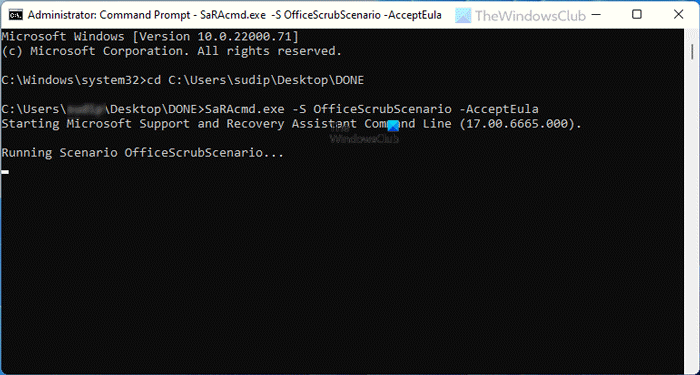
In the above command, -S is a switch that denotes the type of diagnostics/scenario you want to perform or go through. There are other switches such as -AcceptEula, -DisplayEULA, -Help, and -?.
For instance, to uninstall Office 2024, use:
SaRAcmd.exe -S OfficeScrubScenario -AcceptEula -Officeversion 2024
To uninstall Microsoft 365 Apps, use:
SaRAcmd.exe -S OfficeScrubScenario -AcceptEula -OfficeVersion M365
OfficeScrubScenario is the specific uninstall mode within the SaRA CMD tool.
Depending upon the issue, SaRA will decide what to do next. As per the taken action, it may show various messages in the Command Prompt window, and some of them are like these:
An Offline scan was performed because Outlook is either not running or it is running elevated (as Administrator). See <filename> in %localappdata%\saralogs\UploadLogs.
A Full scan was performed. See <filename> in %localappdata%\saralogs\UploadLogs.
And so on.
SaRa CMD Tool will write the logs to the %localappdata%\SaRALogs folder.
If the job is carried out successfully, you will see the following message:
00: Successfully completed this scenario. We recommend you restart the computer to finish any remaining cleanup tasks.
Scenario finished with exit code: [0].
The best thing about this tool is that you don’t have to choose an action. SaRA CMD tool automatically chooses the action on its own.
You can read more and download it from docs.microsoft.com.
In case you did not know, the consumer version of Microsoft Support and Recovery Assistant (SaRA) has been deprecated. Microsoft officially ceased support for the tool in November 2024. Despite the deprecation, the Enterprise version of SaRA, which is a command-line tool, is still available for download from Microsoft’s official site, for now.
TIP: First, the Microsoft Support and Recovery Assistant was deprecated, and then on March 10, 2026, the SaRA command-line utility was deprecated. This has been replaced by the new, more secure Get Help Command Line tool. Visit this link to learn how to use the new Get Help command-line tool in Windows 11.
What is Microsoft Support and Recovery Assistant?
Microsoft Support and Recovery Assistant is a diagnostic and troubleshooting tool that lets you run tests to identify issues with Microsoft 365, Outlook, and other services. It is possible to run the app as a command-line tool.
Why does Microsoft Support and Recovery Assistant take so long?
At times, Microsoft Support and Recovery Assistant may need to resolve multiple issues to improve your user experience. While fixing multiple problems, SaRA may take longer than usual to run on your computer.
How does SaRA tool work?
Microsoft Support and Recovery Assistant, or SaRA, runs a scan on your computer to identify the error related to Outlook, Microsoft 365 apps, etc. If it detects anything significant, it takes numerous troubleshooting steps to resolve the issue. At times, you might need to open SaRA with administrator privileges to perform the task it is intended to perform.
How do I run Microsoft Support and Recovery Assistant?
There are two methods to run Microsoft Support and Recovery Assistant on a Windows 11 or Windows 10 computer – use the GUI mode or the command-line tool. To learn more about the GUI mode of Microsoft SARA, you can follow this tutorial. To learn more about the command-line method, this article is for you.
