
Managing documents can be challenging. If your documents are scattered around folders, searching for them can be time-consuming. However, this is where you can get help from AI. There are several AI tools that help you manage your documents more effectively. They will help you search for your files rapidly, extract key information, and offer other useful features. In this article, we will look at some of the best AI document management systems. Later in the post, we also list some of the best free Document Management software for Windows PC.
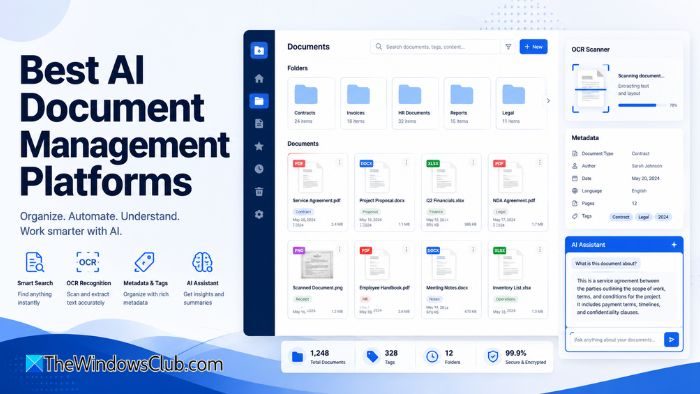
Best AI Document Management Systems
Here is a list of the best AI document management software to help you organize, access, and manage your documents using AI:
- M-Files
- Microsoft SharePoint
- dMACQ DMS+
- Google Workspace
- Laserfiche
1] M-Files
M-Files is a metadata-driven document management system. It organizes your documents based on what they are, not where they are stored. It uses a metadata-first approach with an AI intelligence layer called Aino. The AI system uses agentic and generative AI to organize information, automate daily work, and unlock knowledge and insights through natural language.
2] Microsoft SharePoint
Microsoft SharePoint is one of the most widely used document management systems. While it has existed for a long time, it has recently gained AI features. As a result, it can now let you ask questions about your content, generate summaries, compare files, create autofill columns, and more. However, the only drawback is that SharePoint can be complicated to set up.
3] dMACQ DMS+
dMACQ DMS+ is a highly specialized document management platform engineered specifically for heavy-duty corporate workflows and data extraction. It uses advanced OCR technology and machine learning to read, comprehend, and catalog incoming physical scans and digital PDFs. There is no need for manual typing of invoice numbers or client names. Instead, AI does the heavy lifting.
4] Google Workspace
Google Workspace is another popular tool for document management. If you use Google Docs, you can use its AI features. You can easily search for your documents, summarize them, generate new content, and much more. Plus, you can compare documents like catering proposals, highlighting cost differences and key contract clauses, and gain a deeper understanding of your information without ever leaving Drive. However, if most of your documents are offline, you will need to upload them to Drive before you can start using it.
5] Laserfiche
Laserfiche is one of the strongest enterprise options out there. It is a good option if your organization is in a regulated industry. The platform has recently added AI features, including AI-enabled data extraction via Smart Fields, the Smart Chat AI assistant, improved metadata experiences, and enhanced data lookups, all designed to make content structured, accessible, and ready for AI consumption. The goal of the tool is to help you turn your static document repositories into something your team can actually query and act on.
| Platform | Best suited for | Main strength | Main consideration |
|---|---|---|---|
| M-Files | Metadata-driven enterprises | Contextual document organization | Requires metadata planning |
| SharePoint | Microsoft 365 organizations | Integration and collaboration | Can be complex to configure |
| dMACQ DMS+ | Paper- and process-heavy businesses | OCR and workflow automation | May require workflow customization |
| Google Workspace | Individuals and smaller teams | Ease of use and collaboration | Less specialized records management |
| Laserfiche | Governed enterprise processes | Capture, governance, and automation | May be excessive for simple needs |
There is no single best document management platform for every organization. Google Workspace is a sensible starting point for smaller teams, while SharePoint is likely to suit companies already invested in Microsoft 365. M-Files stands out for metadata-driven organization, dMACQ DMS+ for document capture and operational workflows, and Laserfiche for governance-heavy enterprise processes.
Before choosing, consider the types of documents you handle, how many approval steps are involved, whether physical records must be digitized, and how the platform will connect with your existing business applications.
Best free Document Management software for Windows PC
If you are looking for good free document management software for Windows PC? Here is a full list of some of the best free document management software that allows you to upload, store, organize, manage, and monitor your documents in one centralized place. You can organize your documents into folders, share them with others, track your revision history, etc.
Here is a list of the best free document management software that let you store, organize, access, and manage your documents on your Windows 11/10 PC:
- KRYSTAL DMS
- LogicalDOC
- Feng Office
- OpenDocMan
- Alfresco
1] KRYSTAL DMS
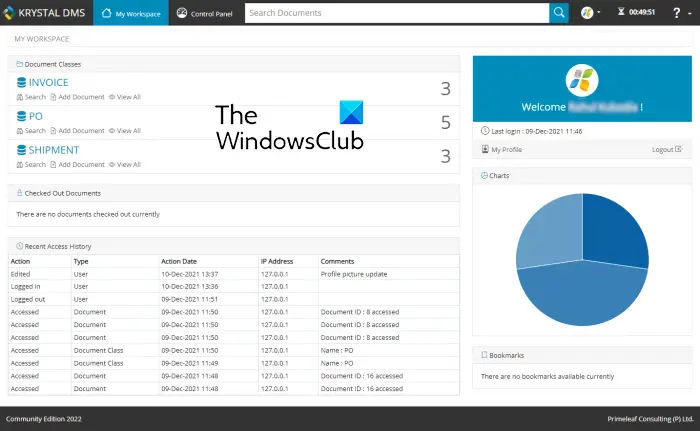
KRYSTAL DMS is a free, feature-rich document management software for Windows. This software makes it easy to save, organize, track, and simply manage all your documents in one centralized place with all essential document management functions. You can easily maintain a collection of your important and not-so-important documents using this software.
Note: You are required to have JAVA Runtime Environment on your computer to run this software. As for database software, KRYSTAL DMS – Community Edition has an embedded database. So, you don’t need external database software to use it.
It supports almost all popular and commonly used document formats. You can save documents in formats including DOC, DOCX, PPT, PPTX, XLS, XLSX, TXT, XML, HTML, CSV, ZIP files, and many more. It provides a dedicated feature to create multiple folders and organize your documents into them. This makes it easy to manage different types of documents. If you want, you can download a document in PDF or ZIP format.
This software also provides a Pie Chart feature. It monitors and displays statistics for the documents you have stored. These statistics include the number of folders, the number of documents in each folder, the size of each document, and more. A Recycle Bin is also provided in it to view or restore all the documents that you have deleted intentionally or unintentionally.
In addition to storing and organizing your documents, you can share them with other users. It lets you set up permissions for users; if they can view the document, edit the document, or both. A Checkout feature for restricting document access is also available.
KRYSTAL DMS also provides some document security features. It keeps track of the last login and logout dates, IP address, and folder name, and also offers a document encryption feature. You can use it to password-protect your documents and prevent unauthorized access.
Highlights of KRYSTAL DMS:
- Document Viewer: You can open and view your documents in the in-built KRYSTAL Document Viewer.
- Document Search: It lets you quickly search and access specific documents.
- Document Indexing: To retrieve documents even faster, you can index or tag the documents using their metadata.
- Version Control: It enables you to access the most recent version of a document.
- Detailed Audit Reports: This feature helps system administrators to monitor and analyze system audit reports. The reports contain detailed information and statistics on all domain activities as well as resource usage.
- Multilingual Support: It supports multiple languages that include English, Hindi, French, German, Spanish, Italian, and more.
All in all, it is one of the best document management software for Windows. 11/10. It is primarily commercial software, but it also provides a Community Edition which is free and open source.
You can download this free and open-source document management software from here.
See: Best Free File Manager software for Windows.
2] LogicalDOC
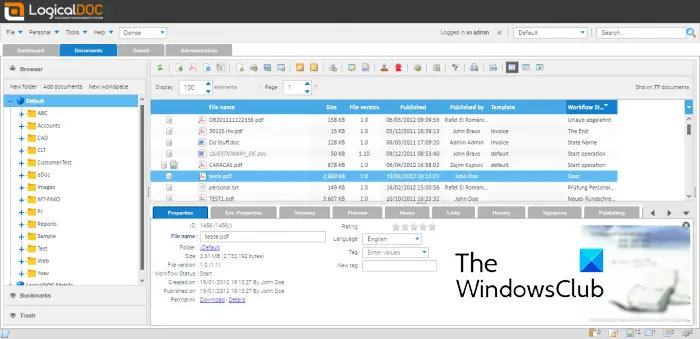
LogicalDOC is a nice document management software for Windows 11/10. It is free and open-source, suitable for personal and professional use. Just store all your documents in one place and manage them effortlessly. It provides a single point of access, which basically ensures data security, and the documents can only be accessed by authorized users.
It lets you upload documents of different formats and organize them accordingly. You can open, view, and modify your documents. In order to store documents of similar types or categories in distinct folders, you can generate new folders and organize your documents into them as required. It also lets you bookmark your documents for future reference or use.
An administrator can also add several users who can view and access the documents. You also get document restriction features to allow or deny specific users from viewing or editing documents. The users can easily share the documents.
It provides advanced document search options that let you find documents even if you have forgotten the title. You can search for your documents using different parameters, including ID, date, folder name, department, etc. There is also a Search bar present in this software. This software also automatically backs up the added documents at regular intervals.
Highlights of LogicalDOC:
- It supports powerful Multilingual Full-text Indexing and Document Searching features to quickly get the documents when needed. You can search documents using tags, expressions, folder, size, created date, published date, etc.
- You can even create documents from scratch in it and then upload them onto your remote document management system.
- It lets you view and customize the properties and metadata of documents including Author, Subject, Coverage, and Date.
- An inbuilt Task Manager is provided in it to monitor, automate document management tasks, and manage all the tasks is also provided in it. This feature can be used by the system administrator.
- It creates a log for all check-in/ check-out operations.
- You can lock/ unlock documents, update a new document, etc.
- It allows you to share documents with users outside your organization via Email or Download Ticket.
- Multiple security features including Users and Groups, Password History Enforcement, Security Policies on Menus, Security Policies on Folders, and Document Encryption are also provided in it.
- You can retrieve basic statistics and other reports related to your documents for analysis purposes.
- It supports WordPress explorer, Joomla explorer, and Dropbox integration.
- The protocols supported by it include HTTP/ HTTPS, Web Services (SOAP & RESTful), WebDAV, and CMIS.
Do note that LogicalDOC requires Java and Tomcat web container to run. It is a web-based service and can be used in web browsers including Google Chrome, Mozilla Firefox, Microsoft Edge, etc.
It is a good free and open-source document management software. You can download LogicalDOC from here.
Read: Best Free Cloud Project Management Software and Tools.
3] Feng Office
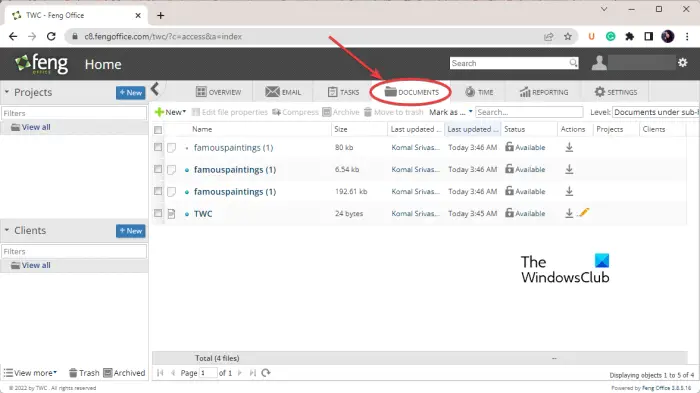
The next free document management software that you can use is Feng Office. It is a web-based project management application that also includes a dedicated document management module. It is like an office suite that lets you create, edit, organize, track, and manage your documents. In the free version, you can add a document up to 2 MB.
You can view a dedicated DOCUMENTS tab on its main GUI. Just click on it and you will be able to upload, save, and manage your documents. In this tab, you can click on the New button to create a new document from scratch or upload an existing document from your PC. You can also create a presentation document in it.
As project management software, it offers many great tools and features. In the Overview tab, you can view the activities performed and document history. The Tasks tab lets you assign specific tasks to different users. You can also assign time slots to users to finish their projects using the Time tab. If you want to generate custom project and other reports, go to its Reporting tab. It also lets you customize settings for Permissions, Templates, System modules, Billing, Invoice, etc.
Coming back to its document management features, it lets you perform various Actions on your document. These actions are:
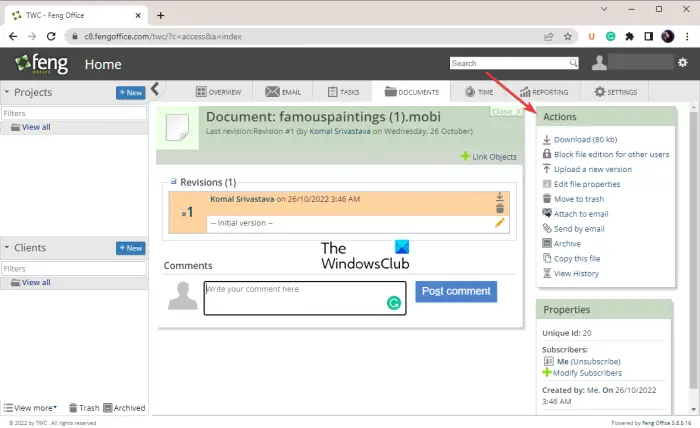
- Download: You can download the current version of the document to your PC. The size limit is 80 kb.
- Block file edition for other users: If you want to prevent editing of your files, you can block users from editing a document.
- Upload a new version: In case there is a newer version of a document available, you can upload it.
- Edit file properties: You can modify document details including a description, linked objects, clients, projects, etc.
- Move to trash: Simply delete and move a document to the trash can.
- Attach to email: This feature lets you attach a document to your emails.
- Send by email: You can share your documents via email.
- Archive: It lets your archive your documents.
- Copy this file: You can create a copy of your documents.
- View History: As the name suggests, this feature lets you view the history of actions performed on a document with a time stamp.
Get it from fengoffice.com. Also, it is based on PHP. Hence, you need hosting software like XAMPP and a web browser to run it.
See: Best Free Reference Manager software for Windows.
4] OpenDocMan
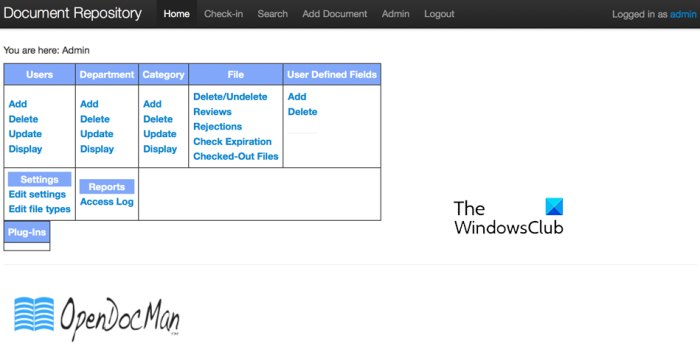
OpenDocMan is another good free document management software for Windows. Like other software, it allows you to store and manage your documents effortlessly.
You can upload a document of almost any file type and organize them in one centralized place. While doing so, you can categorize documents by department. This makes it easy to organize similar documents without much effort. It also lets you create custom document properties. The uploaded documents are stored on a server.
It provides useful search features for quickly looking up specific documents. You can use author, department, or category to search for documents. It also provides a full search option to find documents by metadata, author, department, category, filename, comments, etc.
Some workflow features that it supports include the Automated document review process and Automated file expiration process. The Reviewer may accept or reject a new or edited document.
For security purposes, it offers a secure URL feature and provides fine-grained user access control options for each document. Apart from that, there can be three different types of users with different access permissions, including User, Admin, and Super-Admin.
The good thing is that it supports multiple languages. These languages are Chinese, Croatian, Dutch, English, French, German, Italian, Portuguese, Spanish, and Turkish.
It requires a PHP 5-enabled web server, such as Apache 2 or IIS, to work.
Read: Best free Markdown Editor software for Windows.
5] Alfresco
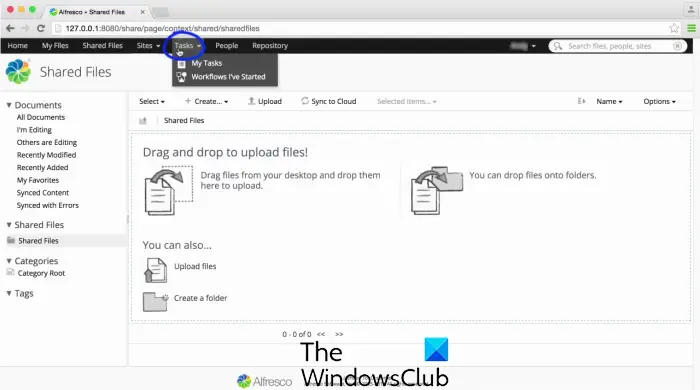
Another free document management software you can use is Alfresco. It provides a community edition which is free to use. Plus, its source code is available for download.
It is primarily a Secure Content Management Solution for managing your documents. You can upload, store, and organize your documents as needed. It provides powerful search features, such as instant search suggestions and filters, to efficiently retrieve the documents needed at the moment. You can even group your documents into different folders.
It provides a My Files tree from where you can access, create, edit, or delete your documents. Documents shared with authorized users can be viewed in the Shared Files section. It also lets you view active, completed, and pending tasks, plus more, from the Tasks menu. Security features such as user access control and passwords are also available. You can access your documents from anywhere using a mobile, desktop, or web.
You can download its free and open-source community edition from here.
Read: Best Free LaTeX Editors for Windows PC.
Does Google have a document management system?
Google Drive is used by many individuals and organizations as a cloud-based file management system. It allows you to create, edit, store, manage, and share your documents. Therefore, you can consider it as a document management system powered by Google.
What is the best document management software?
KRYSTAL DMS is one of the best document management software in my opinion. It has great document management features, including advanced search options, document security, a built-in viewer, detailed audio reports, a pie chart of recent activities, and more. Alfresco is also a good one.
Now read: Best Free Open Source Document Editor software for Windows.
