
In this post, we will cover the best AI font generators that let you create custom, fancy fonts. While some of these tools allow you to turn your own handwriting into a digital font, others transform the text you type into stylized fonts that mimic calligraphy, signature, or realistic handwriting.
An AI font generator is a tool that uses artificial intelligence to transform plain text into a variety of fancy and decorative font styles. Unlike traditional font makers that require you to draw or design each letter manually, AI font generators generate a complete, usable font from your handwriting samples, typed text, or even a single character.
Best AI Font Generators to turn your writing into unique fonts
Here are some of the best AI font generators that can help you create unique fonts from your handwriting or typed text:
- HandFonted
- Handwrite
- Refont.ai
- Text to Handwriting
- InsMind AI Handwritten Font Generator
- Calligraphr
Let us see these in detail.
1] HandFonted
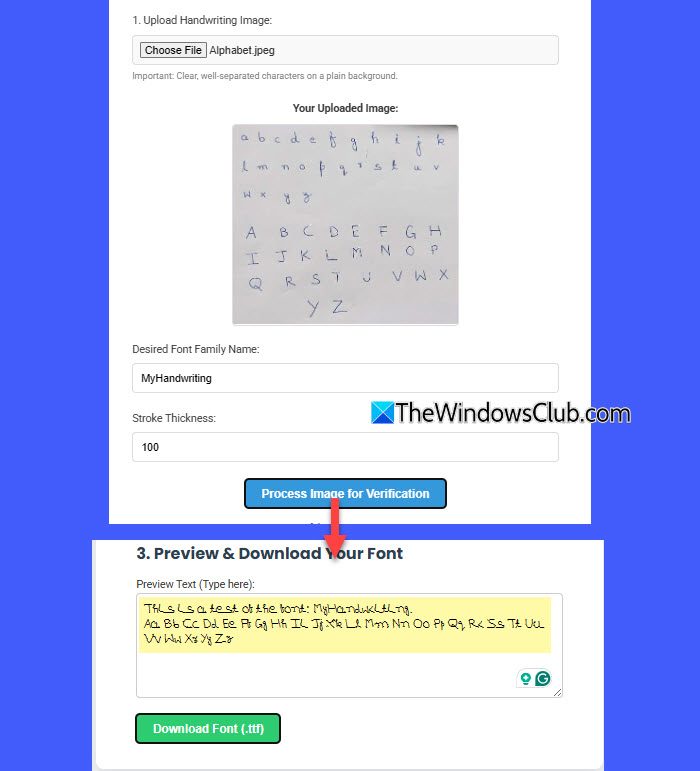
HandFonted uses deep learning and computer vision to convert your handwriting into a usable TrueType (.ttf) font. It takes an image of your handwriting as input, processes it, and then produces an output font file that you can install and use in any app or design project.
To use HandFonted, first write the alphabet in both uppercase and lowercase on plain white paper using a dark pen. Then scan or photograph the sheet and upload it to the tool. Once uploaded, HandFonted will process the file and detect each character, which you can review and correct if needed.
Note: HandFonted requires a clean, high-contrast image. If the handwriting is connected, overlapped, written on lined paper, or poorly lit, the tool may misinterpret or fail to segment characters correctly.
Finally, preview your custom font and download it as a .ttf file.
I tried this twice. The first image I uploaded was not very clear, so the tool could not read the letters properly. On my second attempt, I used a high-contrast image. The results were much better, and I got a neat, usable font.
Click here to use HandFonted for free.
2] Handwrite
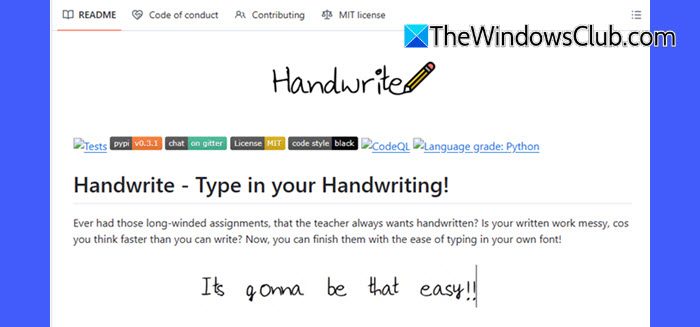
This open-source project on GitHub uses AI and computer vision to convert handwriting samples into vector-based fonts. Although it’s not as beginner-friendly as the others (requiring some coding setup), it’s a free and flexible option for those who want to experiment with handwriting-to-font generation using AI.
Click here to visit builtree.github.io to use Handwrite.
3] Refont.AI
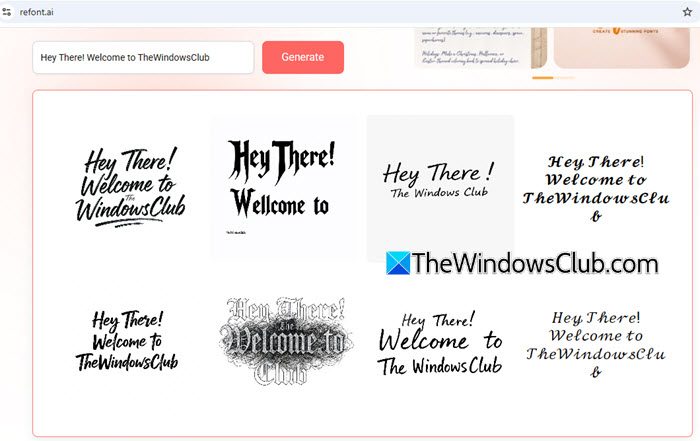
Refont.AI is a web-based tool that lets you create beautiful, AI-generated fonts. It takes your typed text as input and transforms it into unique, decorative font styles that mimic handwriting, calligraphy, or signature-like scripts.
Using Refont.AI is pretty simple. Visit Refont.AI, enter your text in the input box, and preview how your content looks in available AI-generated styles. You can then download the styled font or copy it for use in social media, design projects, or documents.
Currently, Refont.AI does not support font downloads, but you can download the outputs as high-resolution images (.png), which are free for both personal and commercial use. The tool supports both Chinese and English, making it versatile for a wide audience.
Click here to use Refont.AI for free.
4] Text to Handwriting
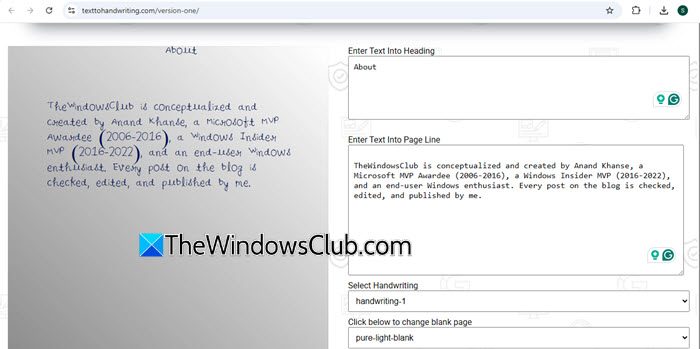
Text to Handwriting is another AI-powered online tool that converts your typed text into a realistic handwritten-style output. While it doesn’t let you upload your own handwriting or create installable font files, it offers a quick and easy way to add nostalgia and a personal touch to your content.
To use Text to Handwriting, visit its official web page (link is given below), then type or paste your content directly in the lined-page preview on the left. You can select a handwriting style from the 8 available options, change the pen color, and adjust the font size. If you prefer a plain page, click Without Line Pure Blank Page, which opens a new tab. Here, you can type or paste your content in the boxes provided on the right of the preview, customize the heading and body font size, and choose a gel pen style for a more realistic handwritten look. After setting your preferences, preview your content and download the output as an image or PDF.
These realistic handwritten outputs are perfect for publishing an article on your website or sending a personalized note to a loved one, or any creative project where a personal handwritten touch is desired.
Click here to use Text to Handwriting for free.
5] InsMind AI Handwritten Font Generator

InsMind is an AI-powered tool that generates stylish handwritten and calligraphy-like fonts from typed text. It allows anyone (even without any prior design experience) to quickly create visually appealing text for things like logos, invitations, notes, or branding.
To use InsMind AI Handwritten Font Generator, visit InsMind and sign up for a free account. Then, on your dashboard, enter the text and choose from the available font styles. You can preview your content in real time and then download it as a high-resolution image for personal or commercial use.
While the tool is free, there are limitations on the number of free credits available for certain features. After exhausting these credits, you need to upgrade to a paid plan to continue using the service.
Click here to try InsMind AI Handwritten Font Generator.
6] Calligraphr
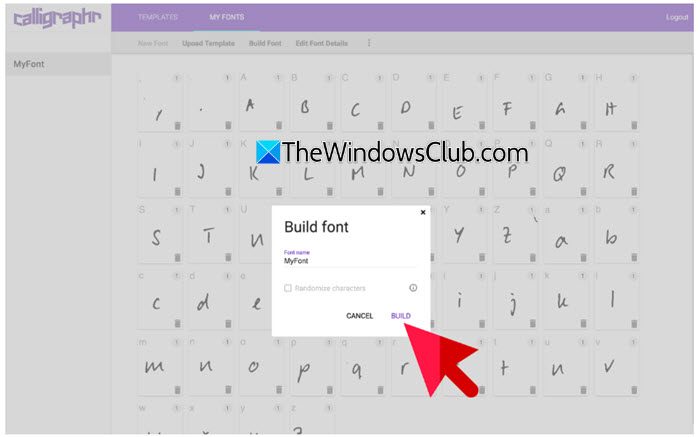
Calligraphr is a traditional font-making tool, not an AI-powered generator. It converts your handwriting into a digital font by using a printable template that you fill in by hand. Once uploaded, the tool processes your letters and outputs a TTF or OTF font file.
Even though it doesn’t use AI, Calligraphr deserves a spot in this list because it has long been one of the most reliable and accessible ways to turn handwriting into fonts. Unlike AI tools that analyze and refine your style automatically, Calligraphr gives you an exact replica of your writing, preserving every stroke, quirk, and imperfection.
Click here to use Calligraphr for free.
I hope you find this useful.
Read: Best free AI tools to create AI Talking Avatar.
Can I turn my own handwriting into a font?
Yes, you can turn your handwriting into a digital font using specialized tools. You write the alphabet on a sheet, scan or photograph it, and upload it to a handwriting-to-font generator. Some AI-powered tools, like HandFonted, refine and clean your letters automatically.
How can I create my own font for free?
You can create your own font for free using online tools like Calligraphr or HandFonted. These tools let you either upload handwriting samples or design letters directly in a template. Once processed, you can download the font in TTF or OTF format.
Read Next: How to generate Art from Text using Simplified AI Art Generator.
