
If you use a Windows 11 PC to record YouTube videos, tutorials, podcasts, or social media content, and want to sound more natural while following a script, here are some of the best AI-enabled teleprompter apps you can try.
A teleprompter is a tool that displays a script on a screen while you speak, so you can read your lines while looking toward the camera instead of memorizing them. While traditional teleprompters rely on fixed scrolling speeds, AI-enabled teleprompters use speech recognition to follow what you say. They can automatically scroll as you speak, pause when you stop, and adjust to changes in your speaking speed, helping you deliver scripts more naturally.
Best AI-enabled Teleprompter apps for Windows 11
Here’s the list of the best AI-enabled teleprompter apps we’ve curated for you:
- Teleprompter.com
- BIGVU
- PromptSmart Studio
- Speakflow
Let’s take a closer look at these.
1] Teleprompter.com
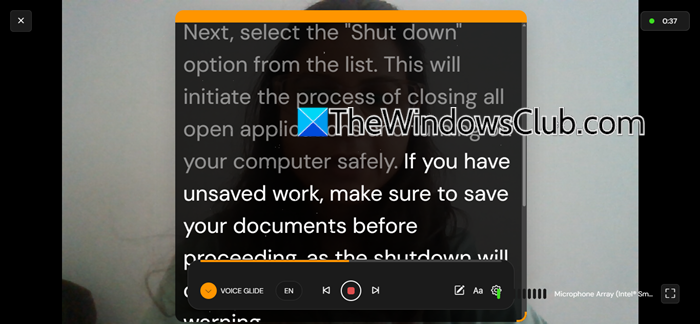
Teleprompter.com is a web-based teleprompter and video recording app that lets you record talking-head videos, tutorials, and educational content without memorizing a script. It displays your script on the screen while you record, helping you deliver your lines while looking toward the camera. You can import scripts from Google Drive, Dropbox, iCloud, and other cloud services, or instantly generate camera-ready scripts using its free AI Video Script Generator.
What caught my attention about Teleprompter.com is its VoiceGlide feature. Instead of making me keep pace with a fixed scrolling speed, it uses on-device AI speech recognition to follow my voice and adjust the script as I speak. If I pause to gather my thoughts, the scrolling pauses too and resumes when I start speaking again. I also like that VoiceGlide works offline and is available even on the free plan.
Teleprompter.com can be set up in just a few minutes. Create a free account, then import your script. Supported formats are DOC, DOCX, TXT, and PDF (max 10MB).
Customize the font size, scroll speed, and display settings to suit your needs, then start recording. Teleprompter.com offers four scrolling modes:
- VoiceGlide: Uses voice recognition to adjust scrolling to your speaking pace.
- Fixed Speed: Scrolls the script at a constant speed that you set.
- Timed Scrolling: Adjusts scrolling to fit a specific recording duration.
- Words Per Minute: Lets you set the reading speed based on your preferred words-per-minute rate.
You can choose a scrolling mode and customize its settings to suit your needs.
Once the recording is done, you may access additional features, such as trimming unwanted sections from the video, adding subtitles, and reducing background noise. Recordings made with the free plan include a watermark. You may upgrade to the Pro plan to remove it and add our own watermark. Other prominent features available in the Pro plan include voice-activated scrolling, 4K video recording, cloud script sync, and multi-platform live streaming to Instagram, TikTok, YouTube, and LinkedIn.
After recording and editing your video, you can sync it to the cloud or export it as an MP4 or raw video file.
Click here to try teleprompter.com.
2] BIGVU
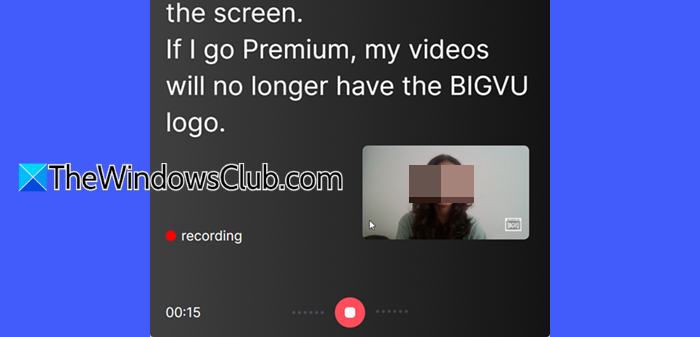
BIGVU is a browser-based video marketing platform that offers a teleprompter to create YouTube videos, sales outreach, training, presentations, and social media content. The teleprompter does not offer AI-powered voice-tracking scroll like Teleprompter.com’s VoiceGlide, though it offers some AI-assisted features such as script generation, automatic captions, and eye-contact correction to enhance your recorded videos.
Getting started with BIGVU is simple. Open its official website and create an account. Start a new project, add your script, and begin recording. You can manually adjust the teleprompter’s scrolling speed to suit your speaking pace and pause whenever needed.
Once you’re done recording, you can review your video and edit it within BIGVU. Among its various features, the two that caught my attention the most are:
- AI Eye Contact Correction: This feature adjusts your gaze in a recorded video to make it appear as though you are looking directly at the camera, even when you are reading from a script.
- Video Sequencer: This tool lets you combine multiple recordings into a single video. You can trim unwanted portions, add other clips, and rearrange them using drag-and-drop controls to create the final video.
BIGVU offers a free plan with limited features, while some advanced editing and AI tools require a paid subscription. You can check its official pricing page for the latest plan details.
Click here to try BIGVU.
3] PromptSmart Studio
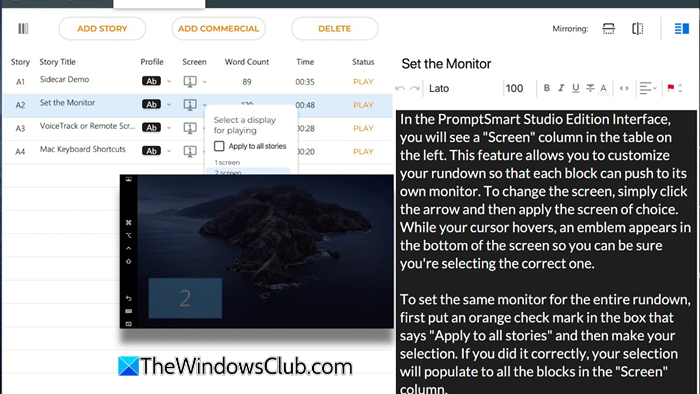
PromptSmart Studio is a desktop teleprompter app that helps you deliver presentations, tutorials, and other scripted content without memorizing every line. You can display your script on your computer screen or use the software with a physical teleprompter setup. Although PromptSmart Studio lacks a built-in video recording feature, what I found particularly useful about it is its VoiceTrack technology and semi-transparent overlays.
- VoiceTrack uses speech recognition to adjust script scrolling to your speaking pace, similar to the VoiceGlide feature we covered in Teleprompter.com. It pauses when you stop speaking and resumes when you continue, helping you maintain a natural delivery without manually controlling the scroll.
- Semi-transparent overlays let you place the teleprompter window over video conferencing apps such as Zoom and Microsoft Teams, making it easier to refer to your script during live presentations and calls.
PromptSmart Studio is part of the broader PromptSmart ecosystem that combines desktop and mobile teleprompter apps with web-based script management and synchronization tools. It offers a seven-day free trial, after which a paid subscription is required.
Click here to try PromptSmart Studio.
4] Speakflow
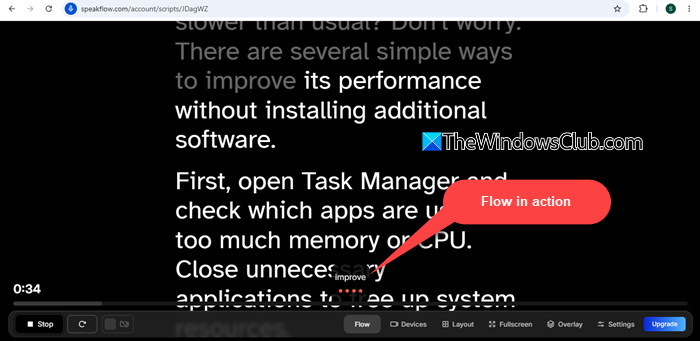
Speakflow is another AI-powered teleprompter app for content creators, educators, and professionals who record videos, deliver presentations, or participate in online meetings. Like PromptSmart Studio, Speakflow offers voice-activated scrolling, along with a floating teleprompter overlay.
Speakflow’s Flow mode advances the script as you speak, while Auto and Manual modes let you choose fixed-speed scrolling or control it yourself. Its floating desktop teleprompter can stay on top of apps such as Zoom and Microsoft Teams. You can resize the overlay, adjust its opacity, and position it wherever you prefer. Speakflow also offers an AI writing assistant that can generate, rephrase, simplify, and proofread scripts, helping you prepare camera-ready content.
Speakflow also includes a built-in webcam recording feature, allowing you to record videos while reading your script. However, recording and storing videos require a paid plan, and storage limits vary by subscription tier.
Click here to try Speakflow.
I hope you find this post useful.
Read: How to use PowerPoint as a Teleprompter.
Which app is best for teleprompters?
The best teleprompter app depends on your recording needs and budget. Traditional teleprompters scroll scripts at a fixed speed, while modern AI-powered teleprompters offer features such as voice-following scrolling, AI script generation, and eye-contact correction. These features make them particularly useful for today’s content creators, educators, and professionals who want to deliver natural, engaging videos and presentations.
Is CapCut teleprompter free?
CapCut offers a teleprompter feature that lets you read your script while recording videos. However, its availability and pricing may vary by device, region, and app version. Some countries have banned CapCut due to government restrictions, which may limit access to its features. If you only need a simple teleprompter, consider dedicated tools such as Teleprompter.com or Speakflow.
Read Next: Top 5 Vertical Video Editors for Windows, Powered by AI.
