
Microsoft has been at the forefront when it comes to offering the best fonts for different needs. The Office products like Microsoft Word have been the go-to option for folks as it also supports fonts for regional languages. Apart from that, one can also download and install fonts from third parties and use the same across Microsoft products. Microsoft offers “Microsoft Font Maker” a Microsoft Store app for Windows 11/10 that allows anyone to create their own fonts for free.
Create custom fonts with Microsoft Font Maker
Fonts often add value to your text and help convey your message efficiently. However, in some cases, you need to design your own fonts. Custom fonts not only let us express our creativity but also help capture readers’ attention. This is where Microsoft Font Maker comes into play.
Microsoft Font maker is likely to shape up as a quintessential tool for graphic designers and artists. Before we begin the Font Maker is not compatible with all the PC’s and would require an Integrated Touch Function to work. We recommend downloading the app to see whether it supports your Windows machine.
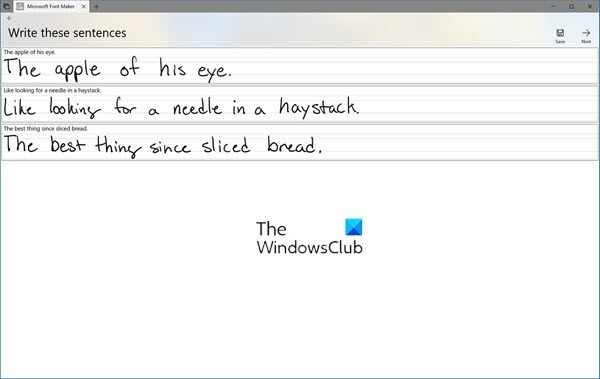
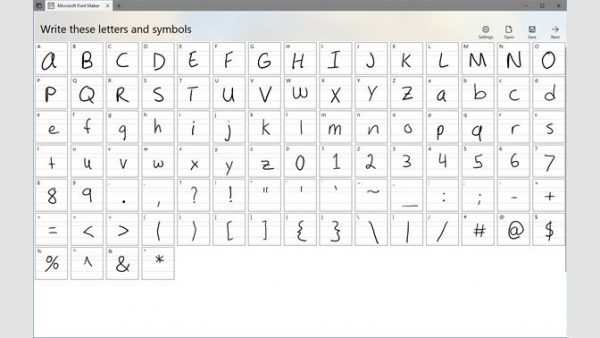
This is how the Microsoft Font Maker works. The program begins by displaying all the letters and the symbol. Users must use an electronic pen to draw each letter within the box. Once you are done drawing all the letters and the symbol the program automatically ports it into a font file that you can use across Windows products. That being said the app doesn’t let you use the mouse to draw inside the boxes. And while creating a font, make sure you don’t commit a mistake midway as you would be required to start all over again.
In order to install the fonts, head over to Control Panel > Font. Now paste the Font file into this location. After doing this the font will be installed automatically and you will be able to use the same across different programs.
If you like it you can download it from the Microsoft Store.
