
Attack Surface Reduction is a feature of Windows Defender Exploit Guard that prevents actions that are used by exploit-seeking malware to infect computers. Windows Defender Exploit Guard is a new set of intrusion-prevention capabilities that Microsoft introduced as part of Windows. The four components of Windows Defender Exploit Guard include:
- Network Protection
- Controlled Folder Access
- Exploit Protection
- Attack Surface Reduction
One of the significant capability, as mentioned above, is Attack Surface Reduction, that guard against common actions of malicious software that execute itself on Windows 11/10 devices.
Let us understand what Attack Surface Reduction is and why it is so important.
Configure Attack Surface Reduction (ASR) in Windows Defender
Emails and office applications are the most crucial part of any enterprise’s productivity. They are the easiest way for cyber attackers to gain access to PCs and networks and install malware. Hackers can directly use office macros and scripts to perform exploits that operate entirely in memory and are often undetectable by traditional Antivirus scans.
The worst thing is, that for malware to get an entry, it just takes the user to enable macros on a legitimate-looking Office file or to open an email attachment that can compromise the machine.
This is where Attack Surface Reduction comes to the rescue.
Advantages of Attack Surface Reduction
Attack Surface Reduction offers a set of built-in intelligence that can block the underlying behaviors used by these malicious documents to execute without hindering productive scenarios. By blocking malicious behaviors, independent of the threat or exploit, Attack Surface Reduction can protect enterprises from never-before-seen zero-day attacks and balance their security risk and productivity requirements.
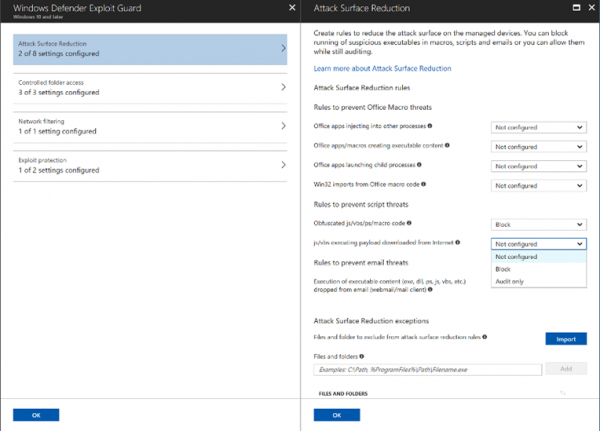
ASR covers three main behaviors:
- Office apps
- Scripts and
- Emails
For Office apps, the Attack Surface Reduction rule can:
- Block Office apps from creating executable content
- Block Office apps from creating child process
- Block Office apps from injecting code into another process
- Block Win32 imports from macro code in Office
- Block obfuscated macro code
Often, malicious office macros can infect a PC by injecting and launching executables. Attack Surface Reduction can protect against this and also from DDEDownloader, which has lately infected PCs across the World. This exploit uses the Dynamic Data Exchange pop-up in official documents to run a PowerShell downloader while creating a child process that the ASR rule efficiently blocks!
For the script, the Attack Surface Reduction rule can:
- Block malicious JavaScript, VBScript, and PowerShell codes that have been obfuscated
- Block JavaScript and VBScript from executing payload downloaded from the internet
For email, ASR can:
- Block execution of executable content dropped from email (webmail/mail-client)
Nowadays, there has been a subsequent increase in spear-phishing, and even an employee’s personal emails are targeted. ASR enables enterprise administrators to apply file policies to personal email in both webmail & mail clients on company devices to protect against threats.
Read: Remote Code Execution attacks and Prevention steps
How Attack Surface Reduction works
ASR works through rules that are identified by their unique rule ID. To configure the state or mode for each rule, they can be managed with the following:
- Group Policy
- PowerShell
- MDM CSPs
They can be used when only some rules are to be enabled or are to be enabled in individual mode.
For any line-of-business applications running within your enterprise, you can customize file- and folder-based exclusions if your applications exhibit unusual behaviors that may be impacted by ASR detection.
Attack Surface Reduction requires Windows Defender Antivirus to be the main AV, with real-time protection enabled. Windows Security baseline suggests most of the rules in block mode mentioned above should be enabled to secure your devices from any threats!
This post will help you if the Attack Surface Reduction Rules are not applying or working.
To know more, you may visit docs.microsoft.com.
Read: How to add a File or Folder to the Antivirus Exception List.
