
Windows uses pagefiles to increase the availability of active applications, rather than letting them idle. If the page file size is low, you will get a message stating “Your system is low on virtual memory”. In this post, we will learn how to increase Page File size or Virtual Memory in Windows 11/10.
Read: What is the best Page File size for 64-bit versions of Windows?

Increase Page File size on Windows 11/10
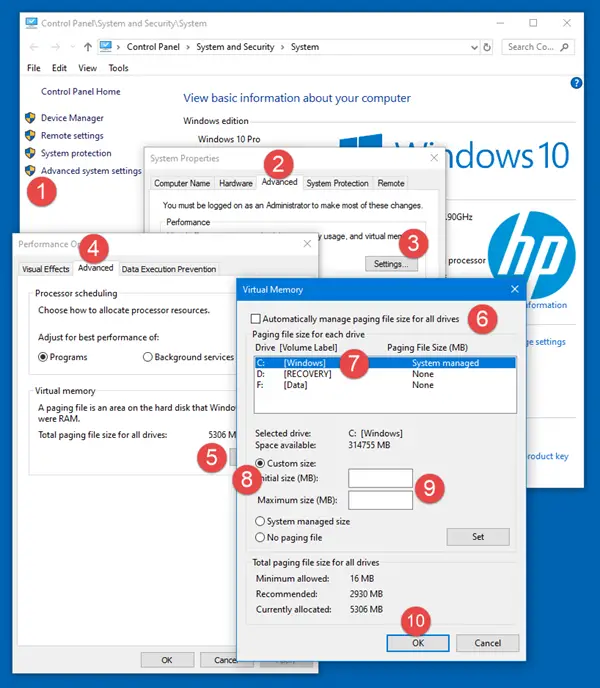
If you get such an error message, you may have to increase the size of your virtual memory or page file or paging file – although for most users, leaving the Page File size at its default value should be good enough.
Read: How to Back up or Move PageFile.sys.
To increase Page File size via System Properties in Windows 10, follow these steps:
- In the Taskbar Search, type “Advanced System“. You will see View Advanced System Settings. Click on it.
- Or you can navigate to it via the Control Panel (Search “Advanced Settings” in the search box and then click View advanced system settings under the System option)
- In System Properties, click the Advanced tab
- In the Performance section click the Settings button
- Performance Options will open. Click Advanced tab
- Here, under Virtual memory, select Change
- Uncheck Automatically manage paging file size for all drives
- Highlight your Windows system drive
- Select Custom size
- Change the Initial size value and the Maximum size value to a higher value
- Click Set
- Finally, Click Apply/OK all the way.
Read: You don’t have enough system and video memory to start the game
Where is Page File located in Windows?
The page file or swap file is also known as Virtual memory, and is situated on your system drive; e.,g. C:\pagefile.sys. In addition to physical memory or RAM, Windows, and its applications use it as and when required.
Read:
What happens if I increase Paging file size?
Increasing the Paging file size can slow down your computer as it adds extra work for the hard drive. It should only be done as a temporary fix when encountering out-of-memory errors. Instead, consider adding more memory (RAM) to your computer for better performance.
Also Read: MemInfo – A Real-time Memory & Page file Usage Monitor.

