
Having a strong password is very important. If someone steals your passwords, they can use your name to open new credit card accounts, apply for a mortgage, or pose as you in online transactions. You can prevent this by creating strong passwords.
How to create a Strong Password
The strongest passwords look like a random string of characters to attackers. But random strings of characters are hard to remember.
You can, therefore, make a random string of characters based on a sentence that is memorable to you, but it is difficult for others to guess.
- Mix uppercase and lowercase letters and numbers. – Introduce intentional misspellings.
- Substitute some special characters
- Use symbols that look like letters, combine words or replace letters with numbers to make the password complex.
- Make sure it’s at least 8 characters long.
This is how Microsoft suggests you could go about it:
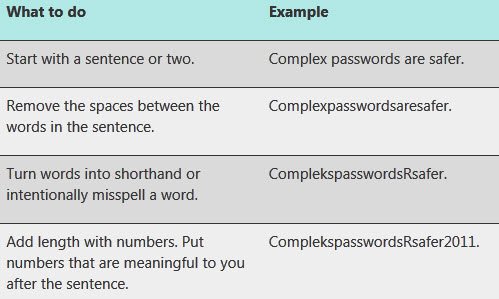
You can also use ASCII characters to make passwords stronger!
Having done that, test your new password with Microsoft’s Password Checker. The Password Checker evaluates your password’s strength as you type. You could also check out Password Security Scanner from Nirsoft. GRC’s Ultra High-Security Password Generator will be of great help to you if you want to generate long, high-quality pseudo-random passwords.
TIP: You can also generate strong passwords using Excel.
Don’t use weak, easy-to-guess passwords
Here is a list of some common Passwords to avoid:
1] Avoid sequences or repeated characters. “12345678,” “222222,” “abcdefg,” or adjacent letters on your keyboard do not make secure passwords.
2] Avoid using only look-alike substitutions of numbers or symbols. Criminals will not be fooled by common look-alike replacements, such as to replace an ‘i’ with a ‘1’ or an ‘a’ with ‘@’ as in “M1cr0$0ft” or “P@ssw0rd”.
3] Don’t use any part of your or your wife’s name, birthday, social security number, or similar information for your loved ones.
4] Avoid dictionary words in any language
5] Avoid using only one password for all your accounts
6] Avoid using online storage.
There are several random online password generators available. Our freeware PassBox is a handy little tool that will remember all your passwords and even generate strong passwords for your account. You can also check out this portable freeware Password Generator.
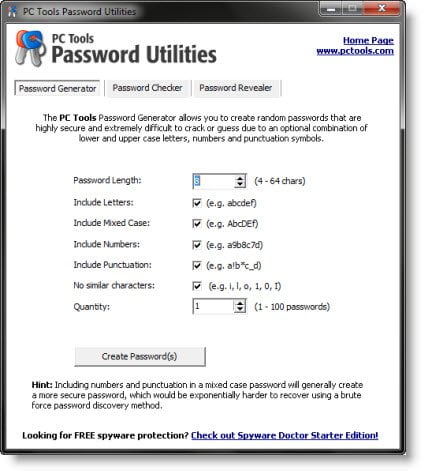
It also has a Password Checker and a Password Revealer tool too. Using this tool, you can generate completely random passwords.
PWGen is another free tool that will let you create cryptographically secure passwords or passphrases.
What is a good way of creating a strong password?
There is no ‘good’ way to create a strong password. However, you need to keep a few things in mind while creating a password for any account. That said, your password must not be short, and it should have digits, special characters, symbols, etc. No matter whether you want to create a password for an online banking account or Facebook, you must follow this basic guideline.
What are 3 things that make a strong password?
Although there are so many factors in creating a strong password, you can consider these three points all the time. First, your password’s length – it should not be five or six characters long. Second, your password should have a special character ($%^&). Third, you should not use one password for all of your online accounts.
Stay safe!
Need help in managing your passwords? Try one of these free Password Managers for Windows.

