
We have always emphasized the importance of having a strong password for all your logins, as the first line of defense against hackers and malicious actors. Some of you may be familiar with the Microsoft Password Checker. Password Security Scanner is a newly released tool from Nirsoft, that will check the strength of your passwords and award scores to them.
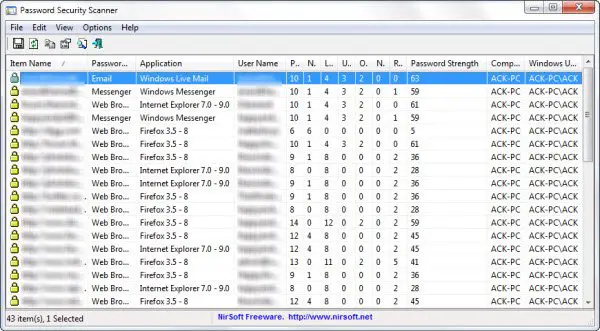
Password Strength Checker for Windows PC
You do not need to enter any passwords to test them. The Password Security Scanner will scan the passwords stored by popular Windows applications, such as Outlook, Edge, Chrome, and Firefox, and display security information about all these passwords. The tool, however, cannot scan the passwords of Firefox if a master password protects them.
The strength of the password is then calculated based on several parameters, including the total number of characters, the frequency of repeating characters, the type of characters used in the password (such as lowercase, uppercase, ASCII, non-numeric, and numeric characters), and others.
Based on this, the tool calculates and gives out a score for your passwords, as follows:
- 1 – 7: Very Weak
- 8 – 14: Weak
- 15 – 25: Medium
- 26 – 45: Strong
- 46 and above: Very Strong
The tool also lets you display only insecure passwords. To do so, you will need to go to Advanced Options and select the option to display only weak passwords.
I think it might be a good idea to download this tool and check the strength of your passwords. Better late than never! And if you need some, you can go and check these tips on how to create strong passwords.
