Fix: Microsoft Word has stopped working

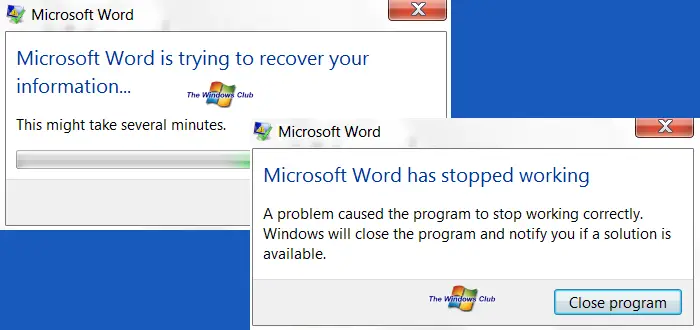
When I started getting this error Microsoft Word has stopped working – A problem caused the program to stop working correctly. Windows will close the program and notify you if a solution is available, on my one month old Office 2010 installation, I was a little like, hey WTF! I just could not open any Word documents. Well, in case you face the same issue, you can try this.

When you try to open any Word document, you get get these error dialog boxes and error message:

Microsoft Word has stopped working

word crash error 400x213 Fix: Microsoft Word has stopped workingword stopped working 400x199 Fix: Microsoft Word has stopped working

Add-in’s are a very common cause why you could get such errors. What we need to do is disable the trouble-making add-in.

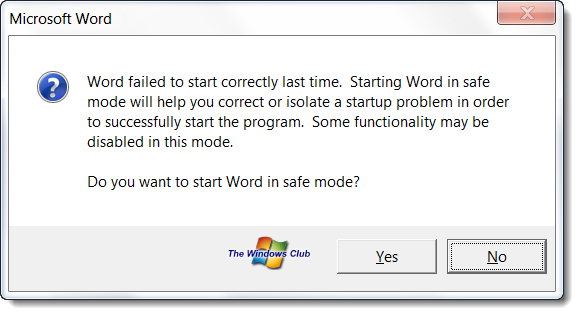
Type winword.exe /a in your Windows 7 or Vista start search and hit Enter. This will prevent Word from loading its add-ins. When asked if you want to open Word in Safe Mode, click on Yes.
word safe mode 400x217 Fix: Microsoft Word has stopped working

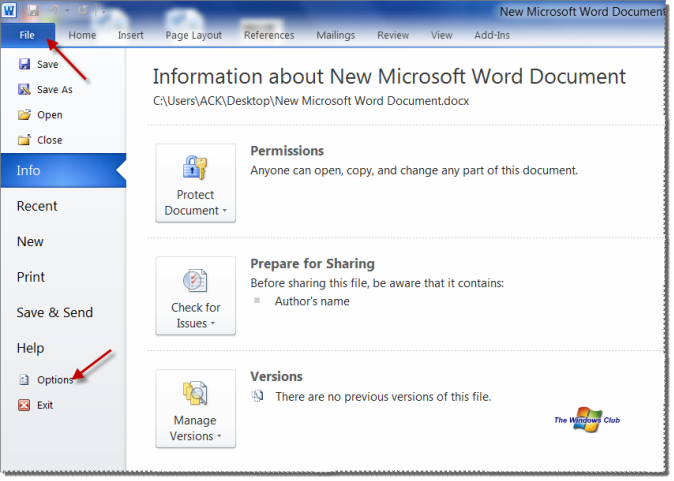
This will open Word in Safe Mode. Now click on File tab and select Options.

word 2010 options 600x428 Fix: Microsoft Word has stopped working

In the Word Options, select Add-Ins.

word options Fix: Microsoft Word has stopped working

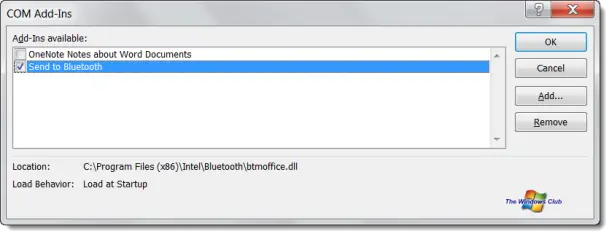
Browse the active Add-ins for one’s you think may be causing Word to crash. In my case it was the Send to Bluetooth add-in which caused Word 2010 on my Windows 7 to crash. Click on Go to manage this add-in. Uncheck the trouble-making add-in and click OK.
disable word addins 600x231 Fix: Microsoft Word has stopped working

Close Word.

Now try to open any Word document. It should work!

If it doesn’t help you can try to reset Office Registry settings to default values.

If it still doesn’t help the best option would be to Repair Office. This post on how to repair Office 2010 or uninstall individual Office 2010 programs will show you how to do it.

If you have liked this post, you might want to check out some more, on topics like , .

About AnandK@TWC

Anand aka HappyAndyK is an end-user Windows enthusiast, a Microsoft MVP in Windows Desktop Experience since 2007, and the Admin of TheWindowsClub.com, TheGeeksClub.com & WinVistaClub.com. Creating a System Restore Point before trying out a new software or a tweak is always recommended.

Ads

Random Posts

  • Hejje

    Amazing! Thanks!! :)

  • Hejje

    Amazing! Thanks!! :)

  • Hejje

    Amazing! Thanks!! :)

  • Herd

    Brilliant!! I’ve been looking for this fix for days!

  • Martin Seccombe

    This article is a real practical help. Many thanks. It seems that this is a common problem and this article needs to be readily available to help others who are frustrated as I have been….!

  • Bin Yousif

    Gr8 solution … works for me perfectly.. Big Thanks

  • http://pulse.yahoo.com/_WKN6E2E7MU5OJMZHIWVBZ7HHI4 Aap ka Dost

    Thanks!
    The Fix is working.
    Great…!

  • mahesh pujari

    Great Tip, it worked for me.
    I had tried from reinstallations to latest path updates, nothing worked.
    Thanks a lot.
    Regards,
    Mahesh.

  • Verso67

    Great!! Worked for me..
    ASUS N55S W7 HP x64 Office x64 Pro Plus

  • Anonymous

    Having had problems with Outlook 2010 then Word 2010 crashing the next day I thought I was never going to get my new laptop built and up and running. Thanks guys brilliant easy directions and bang on the button- excellent.

  • WiWi Naka

    Excellent!!!!!!!!!!!!!! Thanks a lot. :D

  • TC

    Thank you sooooo much! This was driving me insane!

  • Kedigotu

    Allah raz? olsun bro. Çok te?ekkür ederim eme?ine sa?l?k

  • Derek

    whoa! thanks a million!!

  • Paddy

    great article, many thanks.

  • Paddy

    great article, many thanks.

  • Ali

    Thank you so much to the author of this article…

  • http://www.facebook.com/people/Lilla-Rasztik/100000718777128 Lilla Rasztik

    thankyou!!!!

  • Justposting

    Thank you… it was driving me insane..

  • Eliza

    Many many thanks for clear and easy to follow instructions that provide a solution to an extremely frustrating problem.

  • Adryannegorden

    i dont have this problem. When I start word it start and after like 3 seconds it says WINWORD.EXE has stopped working an it just closes. and yes this is the 2010. version any help?

  • Tm

    Thank YOU SO FREAKING MUCH!!!!

    I REALLY Appreciate it dude i’ve surfed everywhere and couldnt find a solution

  • Majdi O

    Finally!
    Been suffering from this issue for a while, disabling the same Add-in fixed the problem.

    Thanks much :)

  • Jim_titmuss

    Simple to follow instructions that fixed my problem.
    Now to get ms to fix blue-tooth add-in

  • Carlos Vila

    A lot of thenks!!!!!!

  • Guest

    THANK U !!! what an anooying problem finally fixed. What a dum idea Microsoft did, to add addons to word!

  • Negril19th

    fantastic! Thanks soooo much!!!!

  • Wyndham

    Me too. Many, many thanks.

  • Elikagumba

    Hello you are my hero it just worked. Thank you

  • Jocot

    NICE IT WORKED thx

  • Robert Denk

    I tried this fix and it skipped through safe mode but fixed the issue Thank You Robert Denkewalter Rob @ Hrpayroll,com and again this is a sincere Thank You

  • Yeebhaam1990

    Glad that i found this solution…i was afraid i had uninstall the software and go through other sorts of problem but luckily i found your post and it fixed it.
    Thank you so much!!!

  • Guddi_18

    Excellent.. Thanks a lot it worked..

© 2012 The Windows Club All Rights Reserved