
Windows OS comes with an inbuilt File Explorer which everyone uses on a daily basis. Even though there are many Explorer alternatives available, the default files explorer remains the most used mostly because it’s pretty much straightforward and easy to use for anyone. That said, it also remains the most underused application on Windows 10, and there are so many things you can do with File Explorer. In this post, I am talking about some of the best File Explorer Tips and Tricks for managing your files.
Read: How to Open File Explorer in Windows 10.
Windows 10 File Explorer Tips & Tricks
These tips will help you get the best out of Windows 10 File Explorer. The tricks we cover are:
- Share Files instantly with Windows 10 Apps
- Find More Apps for your Files
- Open This PC by default
- Delete Recent Files History
- Rename Multiple Files with the name of your choice
- Show Recycle Bin in the Sidebar on Demand
- Disable Advertisement in Windows Explorer
- Create new file types, and more!
1] Share Files instantly with Windows 10 Apps
Windows 10 now comes with native sharing which allows one to share multiple or a single file with apps like Twitter, Facebook, Messenger, Fresh paint, OneNote, Paint 3D and so on.
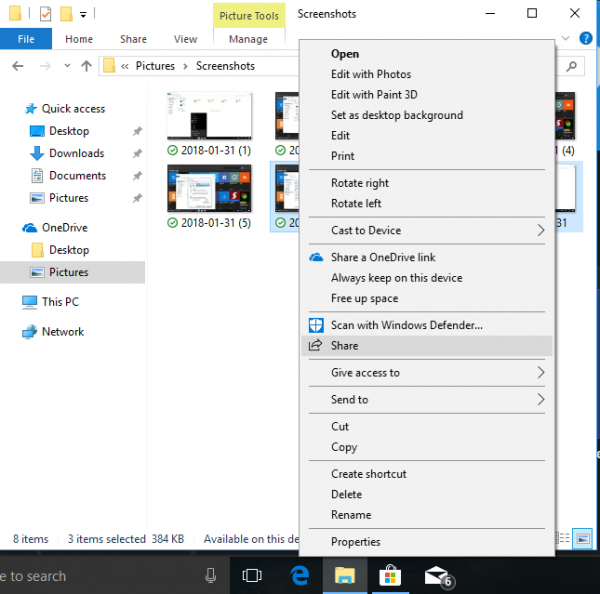
- Select multiple files, right-click, and click on Share.
- This will open up Share menu which reveals the list of frequently contacted people, and the list of apps that support it.
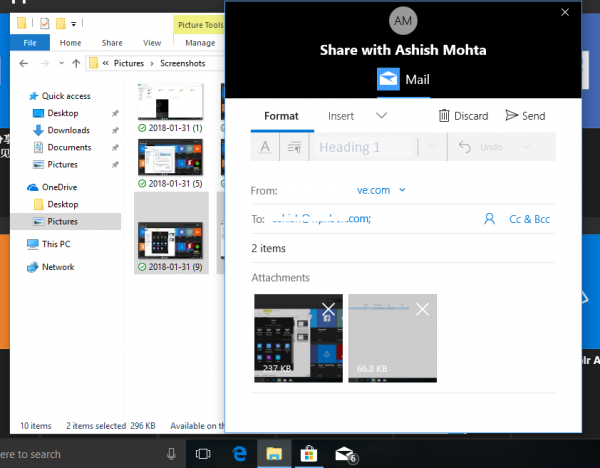
- Select the app or contact with which you want to share, and it will open that app with all the files attached.
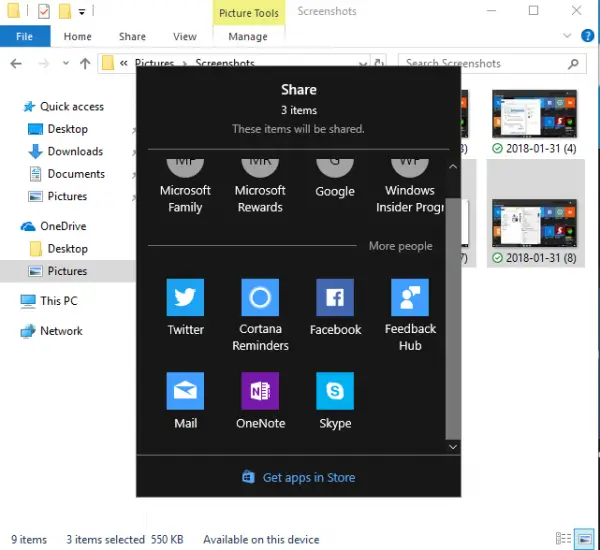
In case you cannot find the app in the menu, you can choose to Goto Store option, and download the app. Only if the app supports this feature, it will be listed.
It is also the best way to directly email a bunch of files to anyone. Interesting to note, that Windows 10 doesn’t open the full outlook, but offers you an inline way or everything under a small window for a seamless experience.
TIP: See how you can show encrypted or compressed files in color.
2] Find More Apps for your Files
There are a lot of apps in the store which might offer to do more things than the native app that comes preinstalled on Windows 10. So for example, if you want something better than notepad, all you need to do is:
- Right-Click on the file.
- Go to Open With and then select “Search the Store.”
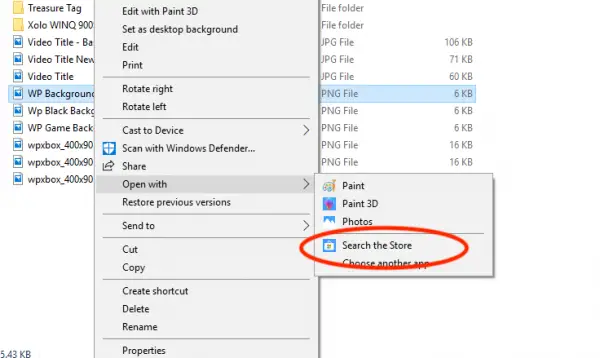
This will search the Microsoft Store for apps that select the file type. You can then decide which apps to try based on their description, and rating.
Read: How to count the number of items in a folder.
3] Open This PC by default
Remember the days when clicking on the files explorer icon opened “My PC” revealing the list of hard drives, your CD Rom, and another connected device? That’s not the default case anymore, and now you get to see a “Quick Access” section that reveals your frequently used files, a bunch of shortcuts. While they are useful, you can always access them by right-clicking on the File Explorer icon on the taskbar.
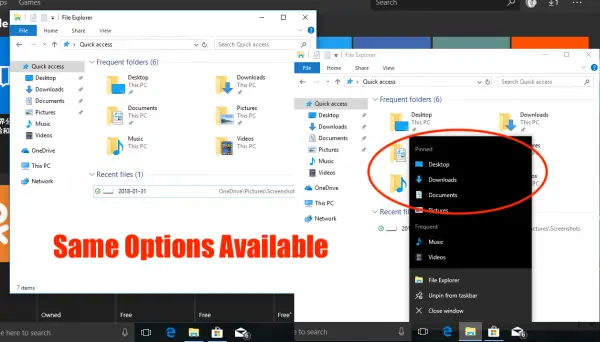
So here is how you can make File Explorer open to This PC instead of Quick Access.
- Open File Explorer, and right-click on the “Quick Access” icon on the left panel. Select Options.
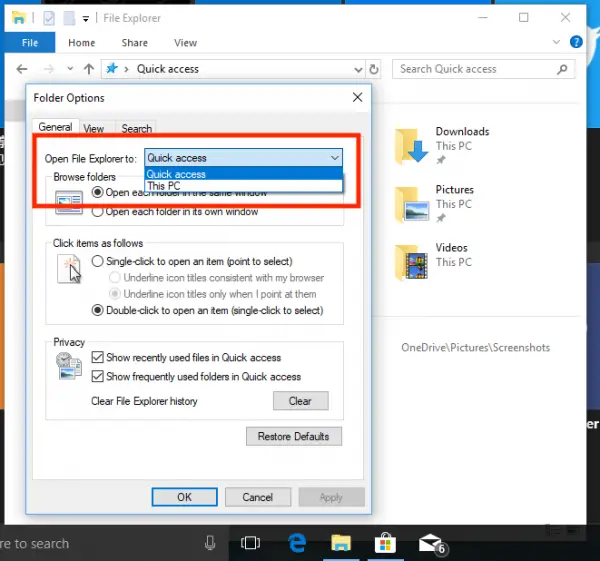
- This opens the “Folder Options” Window.
- In the General tab, look for a label that says “Open File Explorer to.”
- Select “This PC” from the drop-down.
- Save, and exit.
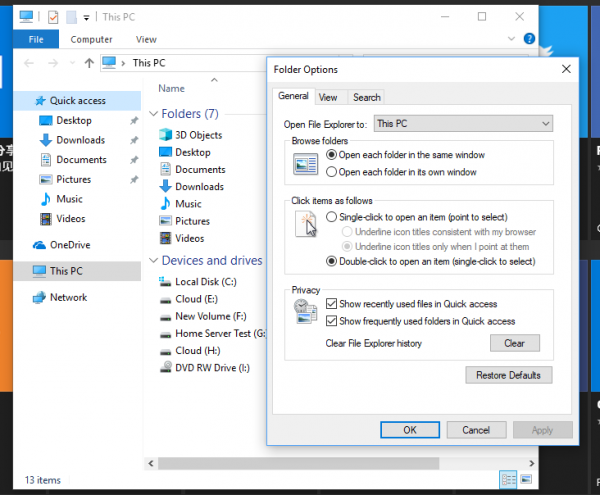
This will make sure Windows File Explorer will open “This PC” which shows all hard-drive partitions, and folders.
TIP: This post will show you how to add Delete Folder Contents to Context Menu.
4] Delete Recent Files History
If you have a PC that is used frequently, it’s a good idea to delete the recently or frequently visited files. It’s always a good idea to create a separate user account for yourself and a guest account for others, but if that’s not the case and a family member has the privilege to log in to your account, you need to be careful about it.
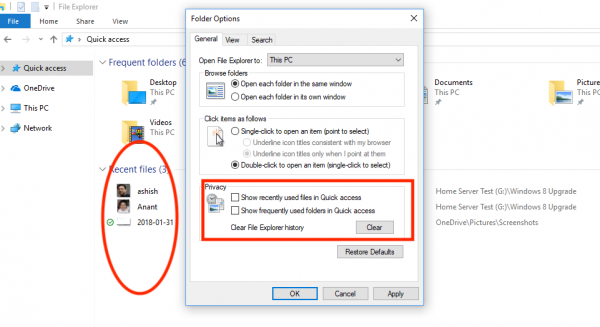
- Open Folder Option by following the steps mentioned above.
- Look for the “Privacy” section.
- Here you have two options.
- Show recently used files in Quick Access
- Show frequently used folders in Quick Access.
- Uncheck both of them.
This will make sure nothing gets listed and shown to everybody. To clear all recent file list till now, click on the clear button to clear File Explorer History.”
TIP: Hold ALT and double-click a file in Explorer to open its Properties box.
5] Rename Multiple Files with the name of your choice
If you been using Windows for a long time, you already know that when renaming multiple files, Windows takes the name of the first file you choose, and then adds suffix with numbers in brackets. Like you see in the picture below.
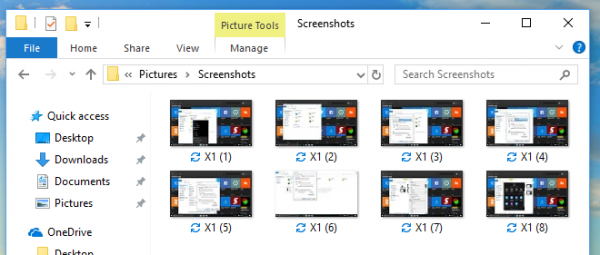
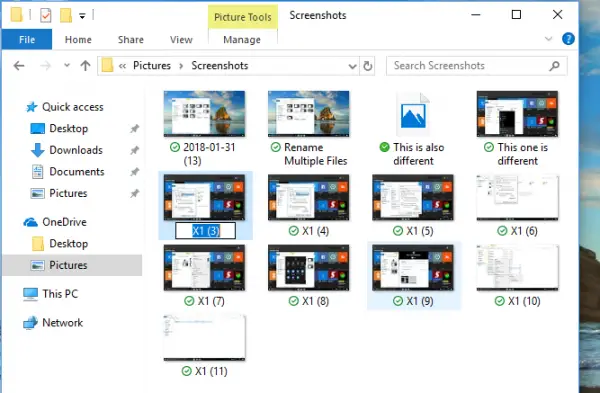
Now, what if you want to rename multiple files, but every name should be different, and you don’t have to use the rename menu or press F2 for every file? That’s possible and here is how you do it.
- Select the first file, press F2 or right-click > Rename.
- Once you are sure of the name, press TAB.
- You will see that the next file is in “Rename Mode” and here you can enter the name of your choice.
- Keep pressing TAB till you are done. In case you want to skip a few files in between, just press Tab to skip.
TIP: You can also batch rename files and file extensions using CMD.
6] Show Recycle Bin in the Sidebar on Demand
Windows 10 hides a bunch of folders including Recycle Bin from the Windows Explorer Navigation bar on the left. While you may argue that pressing delete is better than drag, and drop, but many might prefer drag, and drop files to be available right away. Apart from this, it also helps to quickly access the recycle bin in case you want to restore some of the deleted files.
- Right-click anywhere on an empty place on the Navigation bar panel.
- This will open a list of options including “Show All Folders.”
- Select it, and it will display Recycle Bin.
The only annoyance is it also reveals a bunch of folders that you might not like. So to hide, just retrace the option in a similar way.
TIP: You can also display Recycle Bin in This PC folder or pin it to Quick Access.
7] Disable Advertisement in Windows Explorer
Microsoft promotes its own apps to Windows consumers, and along with the Start menu, and Notification panel, the advertisement appears in File Explorer as well. Even though the intentions are good, these are distracting when you are occupied with work. Luckily, these ads in Explorer can be disabled.
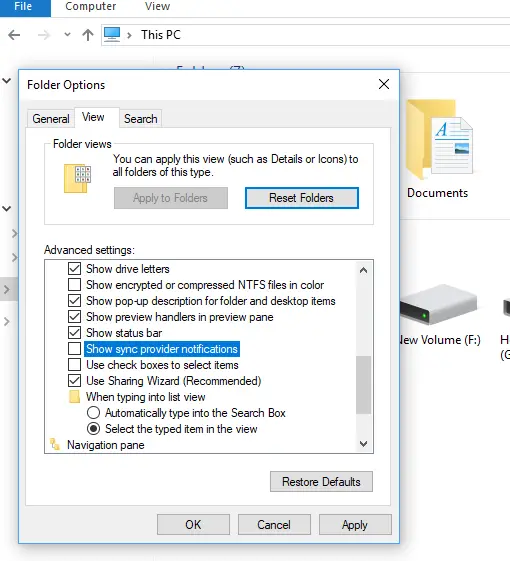
- Open the Folder Options, then switch to View Tab.
- Under Advanced Settings, scroll down to look for a checkbox that says “Show Sync Provider Notifications.”
- Uncheck it. Then click ok, and all those advertisements will be gone.
TIP: If you have a bunch of files and folders in a directory or on the desktop and you want to locate one starting with say ‘B’, then press the B key and a file starting with B will be highlighted. Continue pressing till the focus shifts to the next file and the next.
Read: Useful Commands to Manage Files and Folders through CMD in Windows 10.
8] Miss Creating new file types? Here is the hack
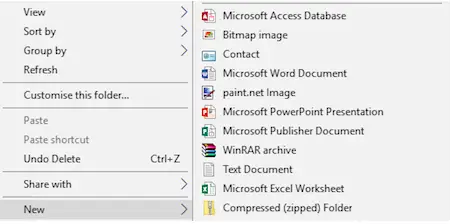
In previous versions of Windows, there used to be an option that allows you to quickly create a file type including image files, a notepad, and so on. It used to come super handy when I had to quickly note something. You might have a different use case, but you get the idea. Windows 10 doesn’t have this option, but you can easily add a new file type in the New item of the context menu with a registry modification.
Warning: This is only for those who understand the registry. If you don’t, do not try it.
- Open a Notepad and paste the following:
- Windows Registry Editor Version 5.00
[HKEY_CLASSES_ROOT\.XXX\ShellNew] “NullFile”=””
- Replace the “.XXX’ with any desired file type such as .png, .docx, etc.
- Now save the file as “ADD PNG.reg”. You will be asked to confirm your action.
- Once done, double-click on this reg file, and it will add the extension under “new.”
Once you have added the needed file types, it should look like the image below.
Much has changed post-Windows 10 now, and File Explorer has got more features that integrate with the rest of the operating system, bringing it close to a mobile-like experience, and it fit wells with this generation of users.
ADDITIONAL TIPS:
Using Default Folders For Managing Files
When you install Windows 10, it gives you four folders by default:
- Documents
- Pictures
- Music and
- Videos
These are also called Libraries, as you can tag and add files to these folders without having to move the files from their original location. For this section, we will focus on actually saving files to these folders.
Since the folders are already renamed in a way that users can recognize the contents of these folders, it is advised that you save your files accordingly. If they are Word documents, you can save them to the Documents folder. If you are saving music files, you can put them in the Music folder and so on.
The only drawback of using default folders for file management in Windows is that these folders are particular to each user of the system. This means that if the user profile goes corrupt, you are at risk of losing these files. This also means that you have to make sure you back up these folders before reinstalling Windows or before upgrading from one edition to another.
Read: Managing Files and Folders in Windows 10 – Tips & Tricks
Use A Separate Drive And Create “Organized Structure” For Folders
Personally, I do not recommend storing any kind of data files on a system drive other than system and temporary files. For data files that are necessary for you, use a separate drive. This ensures that you still have the files intact in the event of your user profile going corrupt without you backing up the files. In fact, I even store the Outlook PST files to a separate drive so that when I reinstall Microsoft Office, I do not have to miss out on previous emails, contacts, reminders, and tasks. I can simply add the PST to my Outlook to get all the emails, contacts, tasks and calendar back.
Windows allows you to use up to 255 characters (including spaces and some special characters) to rename files and folders. You can utilize this feature to name your folders clearly – so that a simple glance can tell you about their contents. For example, if you are into business accounting, you can create a master folder named “Accounts”. Inside this folder, you create folders indicating fiscal years. Inside each of these, you can create folders indicating months: “April”, “May”, “June” and so on. If you have more than one client, you can further create subfolders where you will store files related to each client. That means that a subfolder, say, “2019-202o” can have a subfolder named “May” wherein there are subfolders indicating your clients: “client1”, “client2” and more. Here is an example of a structured folder hierarchy.
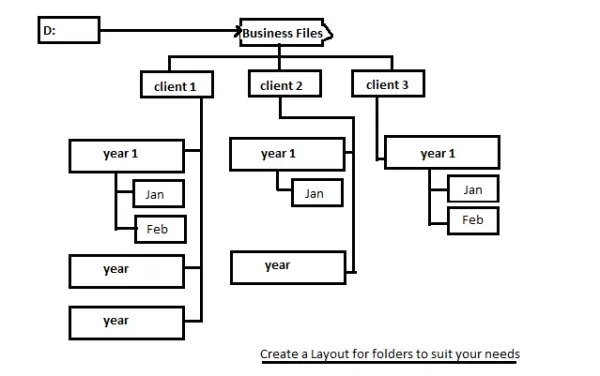
Alternatively, you can create a master system using client names as topmost folders within which, you create folders relating to year and months. This helps you manage your files according to your priority: either by fiscal years or by clients. You can use paper and pen to give a thought to your needs and design a structure before actually implementing it on your computer. This will help you reflect better on your file storage and access needs. Give it a try and let us know if it proves to be a better way to manage your files in Windows.
You could also store a copy of this entire folder structure to cloud-based storage just as a precaution. There may be cases when you cannot access your hard drive or you may have to access those files from somewhere else. In such a case, you can access your cloud-based copy using a web browser. Microsoft OneDrive provides for the synchronization of your local files with its cloud storage and vice versa. You can create a free account and download the desktop client for syncing files from skydrive.live.com. When installing the OneDrive sync folder to your hard disk, select a drive that is different from the one containing system files – for reasons the same as those mentioned in the first section of this article.
Using Libraries For File Management In Windows Efficiently
Libraries allow you to categorize your files. In addition to the four default libraries already mentioned above, you can create as many libraries as you wish. If you wish to save music according to the genre, you can create libraries named “pop”, “rap”, “classical”, “reggae” and more. Similarly, if you wish to save documents according to your clients, you can create libraries saying “client1”, “client2 “and more. While the folders can be anywhere on the local disk, you can right-click on the folder icon and select one of the existing libraries or create a new library to add the folder to. Remember that the libraries will contain only pointers to the original files so in event of deletion of these libraries, you will not lose your files. This image shows you how to go about creating a new library using Windows Explorer.
If you do not wish to add entire folders but only files, open Windows Explorer and right-click Libraries in the left pane. In the resulting context menu, select New and then Library to create a new library. You can then drag and drop individual files to the new libraries. For adding many files at once, use SHIFT or CTRL to select more than one file.
Use Jump Menus To Access Files
Jump menus contain two types of files – ones that you recently used and ones that you pinned to the Jump menu so that you can access it easily. To open a jump menu related to any application, right-click on the application when it is on the taskbar. This may mean you will have to open the application before accessing the Jump menu. When the Jump menu opens, you can see files that you recently used. To pin a related file to the Jump menu, open Windows Explorer and drag the file to the application. When the file icon is placed on the application icon in the taskbar, you will get a message in the following format: Pin <file name> to <Application name>. You can then release the file icon to pin it to the Jump menu of that application.
Dock Parent Folder To Windows Taskbar
If you regularly use some folders that are contained in another folder, you can dock the parent folder to the Windows taskbar so that you need not open Windows Explorer and navigate to get to your files. For this trip, let us use the above example, where we created a file system based on years, months and then clients.
Right-click on any empty space on the Windows taskbar. In the context menu that appears, click Toolbars and then New Toolbar. You will get a Select Folder dialog box. Browse to the parent folder, which in this case is Business. Select the folder and click Choose Folder. Remember to choose the parent folder and not open it else you will get an error. The parent folder is docked to the Windows taskbar. You can now click on “>>” sign next to this folder name to access its contents (all the sub-folders and files) without having to open Windows Explorer.
Clicking on this folder will show you its content in form of cascading menus. You can browse to any sub-folder to open it and click the file you wish to open. Since the main folder is always visible on the taskbar, it saves you a lot of time too. And yes, you can dock the entire drive or frequently used folders to the taskbar if you want.
If you have any tip which you think is worth noting, sound off in the comments!
Also read:
