
Ever wondered which devices support Windows Hello, Fingerprint verification, and critical biometric data – and where they store that data? Storing this data on your computer or phone can be risky. This is where TPM or Trusted Platform Module comes into the picture. In this post, we will learn about the Trusted Platform Module and learn how to check if you have a TPM chip.
What is Trusted Platform Module
Trusted Platform Module or TPM is a specialized and dedicated chip which stores cryptographic keys. It acts as endpoint security for the devices that support it.
When someone owns a device, it generates two keys —
- Endorsement Key
- Storage Root Key.
These keys can only be accessed on the hardware level. No software program can access those keys.
Apart from these keys, there is another key called as Attestation Identity Key or AIK. It protects the hardware from unauthorized firmware and software modification.
Related: How to clear and update TPM firmware.
How to check if you have TPM chip
There are multiple ways to check TPM chip availability. However, you should know that it should be enabled at the hardware level so that security software like BitLocker can use it.
- Using TPM Management
- Enable it in BIOS or UEFI
- Using the Security Node in Device Manager
- Using WMIC command.
1] Open Trusted Platform Module Management
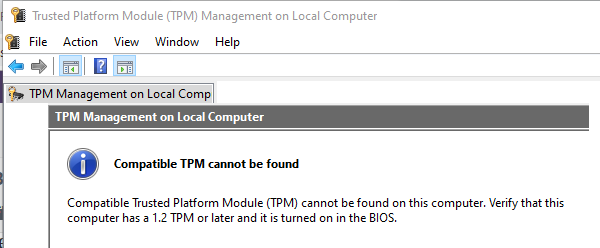
Type tpm.msc in the Run prompt, and hit Enter. It will launch the Trusted Platform Module Management.
If it says:
Compatible TPM cannot be found on this computer. Verify that this computer has 1.2 TPM or later and it’s turned on in the BIOS.
or anything similar, then you do not TPM on the computer.
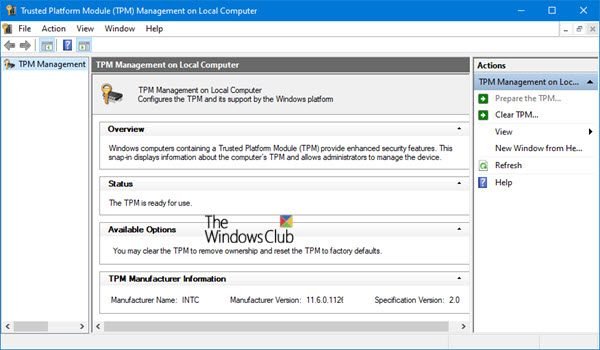
If it says:
The TPM is ready to use
You have it!
You can use TPM Diagnostics Tool in Windows 11 to find out the Trusted Platform Module chip information of your system.
2] Check in BIOS or UEFI
Restart the computer and boot into BIOS or UEFI. Locate the security section, and check if there is a setting similar to TPM Support or Security Chip or anything else. Enable it, and restart the computer after saving the settings.
Read: TPM vs PTT: What are the main differences?
3] Check with Device Manager
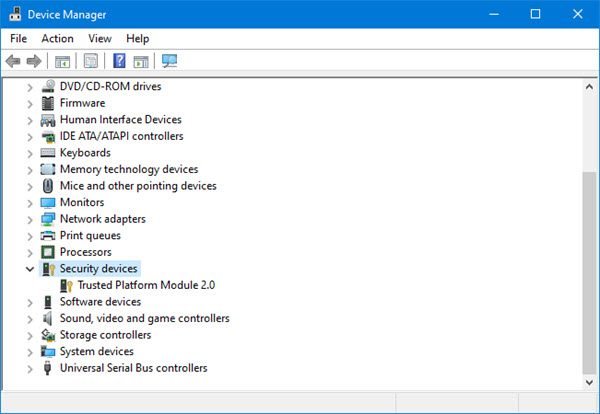
Use Win+X+M to open the Device Manager. Find if there is a Security devices node. If yes, expand it and TPM with the module number.
4] Use WMIC in the Command Prompt
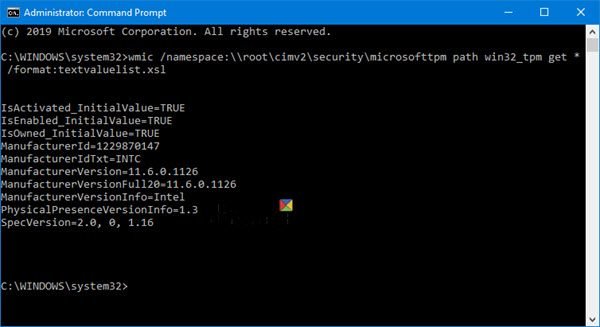
In an elevated command prompt, execute the command:
wmic /namespace:\\root\cimv2\security\microsofttpm path win32_tpm get * /format:textvaluelist.xsl
It will display a list of key-value pairs.
If you see True in the result, it means that TPM is enabled; else you will see No instances available.
How do I check TPM 2.0 in PowerShell?
To check TPM 2.0 in PowerShell, run it as an administrator and enter the command get-tpm. Look for the TpmVersion field; if it shows ‘2.0’, your system has TPM 2.0 enabled. Additionally, ensure TpmEnabled is marked as ‘True’ to confirm TPM is correctly functioning on your computer.
We hope the guide was straightforward enough for you to figure out if the computer has TPM chipset.
Do all PCs have a TPM chip?
Not all PCs have a TPM chip. Most PCs manufactured after 2016 include TPM 2.0, essential for Windows 11. Older models might have TPM 1.2 or lack a TPM chip entirely, which could affect compatibility with newer operating systems. Checking your PC’s specifications will confirm the presence and version of a TPM chip.
Do all motherboards have a TPM chip?
No, not all motherboards have a TPM chip. While many modern motherboards include a TPM header, some do not. It’s essential to check your motherboard’s specifications to determine its compatibility with TPM features, ensuring secure boot and system integrity. Always confirm with the manufacturer’s documentation before purchase.
How to check if a server has a TPM chip?
To check if a server has a TPM chip, use the TPM Management Console (tpm.msc), explore Device Manager under Security devices, or run the “get-tpm” command in PowerShell. Accessing BIOS or UEFI setup during startup can also reveal TPM presence. These methods confirm TPM installation.
Read: How to bypass TPM requirement and install Windows 11?
