
Sword and Fairy is one of the most advanced and demanding games that can be played on a Windows 11/10 PC. However, many users are complaining that Sword and Fairy 7 keeps crashing on Windows 11/10. In this article, we will explore how to resolve this issue.

Why does Sword and Fairy keep crashing on Windows PC?
One of the reasons why a demanding game like Sword and Fairy 7 might crash on your computer is due to incompatibility issues with your system. However, most gamers tend to check the requirements before installing the game. If you didn’t check earlier, scroll down and check the System Requirements to run Sword and Fairy 7. Other reasons why your game may crash include corrupted game files, outdated drivers, and unnecessary strain on memory.
Sword and Fairy crashing or freezing on Windows 11/10
If Sword and Fairy 7 keeps crashing on your computer, first of all, you have to update your computer. Sometimes, updating can resolve the issue, but if it persists, you have to check the following solutions to resolve the problem.
- Verify Integrity of the Game
- Update your Graphics Drivers
- Install the latest Game Patch
- Disable Overlays
- Troubleshoot in Clean Boot State
- Reinstall the Program
Now, let us see the solutions in detail.
1] Verify Integrity of the Game
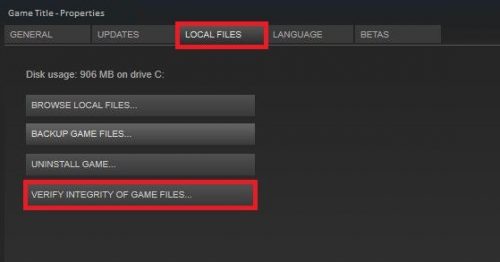
As mentioned earlier, the issue can be because of corrupted game files, and to resolve it we need to verify the integrity of the game. So, follow the given steps to do the same.
- Open Steam and go to the LIBRARY tab.
- Right-click on the game and select Properties.
- Go to the LOCAL FILES tab from the left panel and click Verify integrity of game files.
The process will take some time and your issue will be fixed.
2] Update your Graphics Drivers
If the issue persists, you have to update the Graphics Drivers as the game can crash because of outdated drivers. So, do that and see if the issue persists.
3] Install the latest Game Patch
You need to install the latest version of the game as the issue can be because of a bug. Usually, the developers tend to resolve the bug with a new update, so, you have to go online, download the latest game patch, install it on your computer and check if the issue persists.
4] Disable Overlays
Overlays can forbid you from playing a game. If you are running the game in Steam then this situation is more apt. To disable In-game Overlays, you have to follow the given steps.
- Open Steam and go to LIBRARY.
- Right-click on the game, and select Properties.
- Uncheck Enable Steam Overlay while in-game.
- Reopen the game and see if it crashing issue is resolved.
You should also try to disable any other Overlay options that you have enabled in your Graphics Settings.
5] Troubleshoot in Clean Boot State
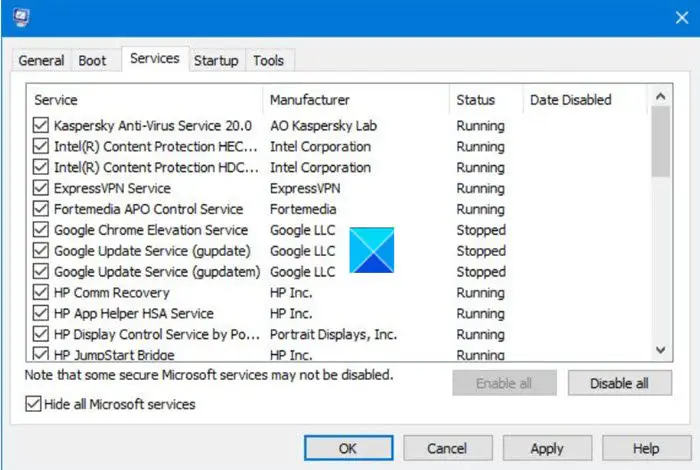
Finally, if nothing works, then you have to troubleshoot in Clean Boot State and if there is any program that’s interfering with your game. After that, you can decide what you want to do with that program.
6] Reinstall the Program
If nothing works then your last resort is to uninstall the game and reinstall its fresh copy. This way, if there is a file that the first solution can’t fix, it will be resolved by this one.
Hopefully, you will be able to resolve the Sword and Fairy 7 crashing issue using the provided solutions.
Read: F1 2021 keeps crashing on PC.
System Requirements to play Sword and Fairy
The following are the system requirements to play Sword and Fairy 7.
- Operating System: Windows 11/10 64-bit
- Processor: Intel Core i5/AMD Ryzen5
- Memory: 8GB (Minimum), 16GB (Recommended).
- Graphics: NVIDIA GTX 960 4G (Minimum), NVIDIA RTX 2060 Super(Recomended).
- DirectX: Version 11 or above.
- Storage: 85GB
What is the max level in Sword and Fairy?
As of now, Sword and Fairy 7 has a total level of 100. No matter whether you play this on the latest version of Windows or any other older version, you can find the same set of levels across all the versions of Windows. However, if you get any problem playing or launching this game on your computer, you can go through the aforementioned tips and tricks to get it fixed.
Read Next: Pathfinder Wrath of the Righteous keeps crashing on PC.
