
Some users have been complaining about getting sec_error_ocsp_future_response error on their Firefox browser. This error always comes up when accessing files containing CSS files on the browser and is caused mainly when you use an outdated Firefox browser with a bug affecting your OCSP response.
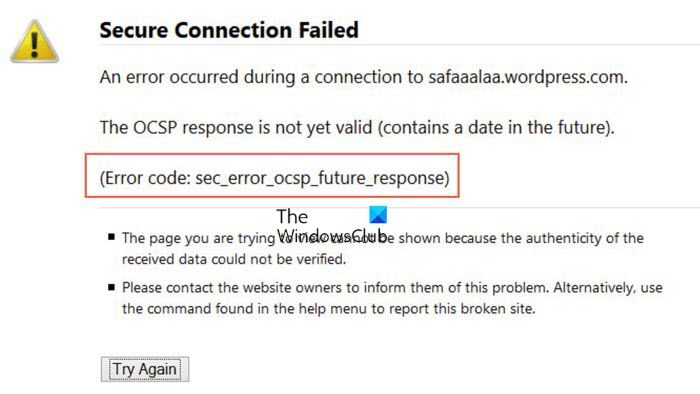
The issue can also be due to incorrect date and time settings on your computer. However, you can resolve it by making a few changes on your computer, which we’ll discuss in this article.
Fix SEC_ERROR_OCSP_FUTURE_RESPONSE Firefox error
If you get the sec_error_ocsp_future_response when trying to access something on Firefox, follow these suggestions:
- Update Firefox.
- Disable OCSP verification.
- Ensure your date and time are up to date.
- Make use of another browser
1] Update the Firefox browser
If you are using an outdated Firefox browser, that’s most likely why you’re getting the sec_error_ocsp_future_response error. And of course, the only way to resolve the issue, in this case, is by updating the browser. Here is how to update Firefox:
- On the Firefox window, click on the three-line menu at the top right corner of your screen.
- Select Help.
- Next, hit the About Firefox option and check for updates.
- After the update downloads, click on Restart to Update browser.
After this, try using the browser again and see whether the error message is fixed. If it hasn’t, try the next solution.
2] Disable OCSP verifications
You can also disable OCSP verification to open the address you are trying to access without getting any error. Yes, this will fix the issue because your browser won’t perform the OCSP check. However, disabling this verification puts you at some security risk. But if that’s not an issue for you, simply follow these steps to disable the function:
- Click the three-line icon at the top of your Firefox window to open the menu.
- Hit Settings on the menu list.
- Then click on Privacy & Security from the left-hand pane.
- Navigate to Certificates and uncheck the Query OCSP responder servers to confirm the current validity of the certificates box.
- Now, relaunch your browsers and try loading the failed address once again
3] Ensure your date and time are up to date
For many users, incorrect data and time settings are the reason for this issue. So if your date and time are incorrectly set, and you are getting the sec_error_ocsp_future_response error message, it may not be a coincidence. Therefore you should try to reset your date and time.
4] Clear browser cache
Corrupt Firefox browsers are the ones prone to this error which mean the issue can be due to a buggy cache or cookies on your browser. So you can also try to clear your browser’s cache and see if it helps fix this issue.
5] Make use of another browser
This isn’t a solution but will be recommended if you don’t want to disable OCSP verification, and other solutions aren’t working. Just try out other browsers like Microsoft Edge.
Related:
What is the OCSP response?
The OCSP response is a statement an issuer generates that indicates whether a request’s certificate is valid, revoked, or unknown. If the browser can’t process a submitted certificate, the response includes an error code. sec_error_ocsp_future_response is an example of this response, indicating that a certificate is revoked.
How do I disable OCSP in Firefox?
If you want to disable OCSP in Firefox, follow these steps:
- Press the three-dot menu on top of your screen.
- Click on Settings.
- Hit Privacy & Security.
- Then select Certificates and uncheck Query OCSP responder servers to confirm the current validity of certificates.
What are the causes of sec_error_ocsp_future_response error?
The OCSP error message that pops up when accessing some addresses in Firefox is mainly due to buggy or outdated browser versions. It could also result from incorrect date and time settings. Regardless, the article discusses the best ways to fix the problem.
