
QuickImageComment is a free software for Windows that lets you view and edit image metadata for JPEG, TIFF and other formats of digital images.
Image Metadata Editor for Windows PC
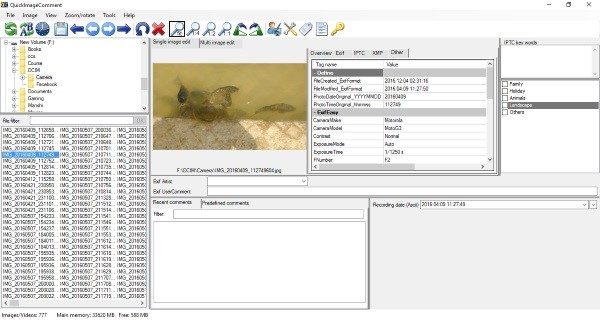
Whenever you capture an image from a camera or a mobile phone, image metadata is automatically generated and stored along with the image file. The image metadata can be read, and some fields can be edited. This metadata may reveal some important information and for some reason, you may also want to study metadata of some files, or you may want to delete metadata from your images. Quick Image Comment can handle all this very easily.
If you are not that deep into image editing and modification, you might want to know more about Metadata. Image metadata is the text information embedded in the file and includes details relevant to the image and its production. The Properties, Personal Information, and Metadata stored in files come in handy when you search for them on your computer, as they help in identifying the file, document, image, picture, or photo. This metadata includes information such as Date of creation, Author, Size, and so on.
Windows OS lets you easily remove Metadata from files, but if you want to view and edit image file metadata in detail, QuickImageComment, a free photo details finder and image metadata viewer and editor, can help you.
QuickImageComment is a powerful tool that can be used to display all EXIF, IPTC and XMP properties of an image file. Moreover, other properties like Recording date, modification date and comments can also be displayed. Some of the properties displayed are modifiable and for that can be done by configuring the list of modifiable properties first.
The tool can also be used to batch rename files; you can select fixed and dynamic text. The metadata fields provide a variety of dynamic text options. For example, you can rename files based on the camera model used to take the pictures.
Also, you can change the recording date and time of an image or multiple images at once. Add or subtract days, hours, minutes, and even seconds. You can add multiple images so that when you collectively change the date/time, all the images remain in the same order as they were taken. If you wish to delete the metadata from the images you captured, you can do so. Also, metadata from one image can be copied to other images.
If you are photo-savvy, then this tool is perfect for you. You can play around with the metadata to obtain valuable information about an image. The tool also includes more technical features that are not appropriate to discuss in this post. I would not say the tool is simple to use. Some parts of it require some knowledge of image metadata.
You can download QuickImageComment from here or visit the Microsoft Store.
Read next: How to edit or add Metadata to Photos & Video files in Windows.
