
Microsoft Copilot’s consumption-based pricing changes how organizations pay for AI services. Now, they can pay for the Copilot credits they use for AI tasks. This gives businesses more flexibility but requires careful planning. Therefore, organizations need to understand how Copilot credits work, estimate their expected usage, set spending limits, monitor costs, and train employees to use Copilot efficiently. In this article, we will talk about how to prepare your organization for Microsoft Copilot consumption-based pricing.
Preparing your organization for Microsoft Copilot consumption-based pricing
Microsoft Copilot consumption-based pricing is a billing model where you pay only for the AI services you use, rather than a fixed monthly fee. In Microsoft Copilot for business or enterprise, you are charged for AI services based on the Copilot credits you consume. The number of credits consumed depends on multiple factors, such as task complexity and AI agent features. While this model gives organizations greater flexibility, it also makes cost management more important. Without proper planning and controls, organizations may end up with higher-than-expected bills. Therefore, it is necessary to prepare your organization for Microsoft Copilot consumption-based pricing.
Understanding the types of Copilot consumption-based plans
Before discussing the best practices for Microsoft Copilot consumption-based pricing, let’s understand the types of Copilot consumption plans. Copilot Credits are a common currency for AI workloads across Microsoft 365, Copilot Cowork, Copilot Studio, Dynamics 365, Power Platform, and Work IQ APIs. Microsoft offers the following types of Copilot consumption-based plans:
- Pay-As-You-Go
- Copilot Credit Pre-Purchase Plan (P3)
- Copilot Studio prepaid capacity pack
Let’s talk about all these plans one by one.
1] Pay-As-You-Go
The Pay-As-You-Go plan is also called the Copilot Credit meter. It enables organizations to pay later based on the actual number of Copilot credits consumed by agents in a billing month. The Microsoft Copilot Pay-As-You-Go Credit Meter counts the total number of credits consumed by agents. This usage is billed in arrears at the end of the billing month. Currently, the pricing for Pay-As-You-Go is $0.01/Copilot Credit.
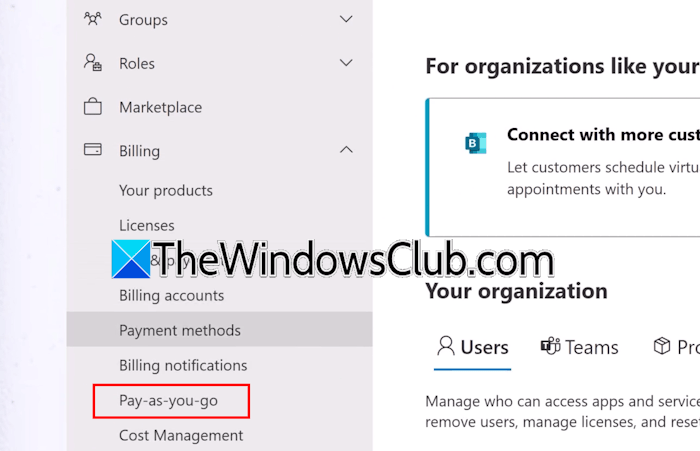
The following services are available in the Pay-As-You-Go plan:
- Microsoft 365 Copilot Chat
- SharePoint Agents
- Microsoft Copilot Retrieval API (Preview)
You must be a billing administrator, AI administrator, or global administrator to set up and configure the Pay-As-You-Go plan. Additionally, you must have an Azure subscription in the same tenant as Microsoft 365, an Azure resource group in that subscription, and Owner or Contributor rights to Azure subscription and resource group. You will find this option under the Billing section in Microsoft 365 Admin Center.
2] Copilot Credit Pre-Purchase Plan (P3)
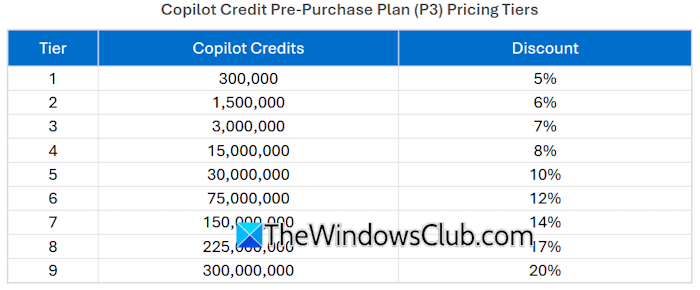
The Copilot Credit Pre-Purchase Plan (P3) is a one-year pay-upfront purchase option for Copilot Credits. Under this plan, customers purchase a pool of Copilot Credits. After the purchase, these credits are stored in your Copilot Credit P3 balance, from which they are automatically deducted as you use the Copilot Studio-supported services. If usage exceeds the available credits, you can purchase additional Copilot Credits or switch to Pay-As-You-Go to be billed at the end of the monthly billing cycle. Unused Copilot Credits expire at the end of the annual term.
3] Copilot Studio prepaid capacity pack
The Microsoft Copilot Studio prepaid capacity pack is a prepaid subscription option that provides credits for Copilot Chat and SharePoint Agent usage. Each capacity pack provides a fixed number of Copilot Credits (25000 credits per month per pack) that you can use across your tenant. The number of credits used by a Microsoft 365 Copilot Chat agent or a SharePoint agent depends on the agent design, how frequently customers interact with it, and which features they choose to use. Once 25000 credits are fully consumed, Copilot Chat and SharePoint Agent services stop working until additional capacity is added.
Usage-based billing for Copilot Cowork
Users rely on Copilot Cowork for complex and multi-step work across apps. Copilot Cowork credit usage depends on the type of AI agent you select, runtime, context, and tools.
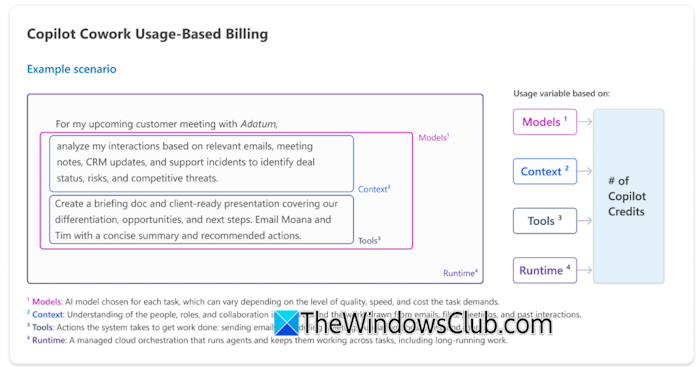
The number of credits consumed by Copilot Cowork also depends on the type of task you run. Usually, the tasks are divided into the following three groups:
- Light tasks: These tasks require few resources and consume 100 to 300 credits.
- Medium tasks: These tasks require many resources and consume 300 to 700 credits.
- Heavy tasks: These tasks require deep analysis and consume more than 700 credits.
Choose the right Copilot billing model
This is a crucial step for preparing your organization for Microsoft Copilot consumption-based pricing.
- Pay-As-You-Go: In this billing model, you are billed monthly based on the number of credits you consume. Therefore, this model is suitable for organizations with variable or seasonal workloads.
- Pre-purchase plan (P3): This plan requires an annual upfront purchase of at least 300K credits. Therefore, it is best for large enterprises with high-volume usage.
- Copilot capacity pack: This plan provides credits for Copilot Chat and SharePoint Agent usage. Therefore, it is suitable for smaller teams focused on Copilot Chat workloads.
You can also optionally pair Copilot Credit Policy with the Pay-As-You-Go billing policy for automatic overage billing when prepaid credits run out. This helps ensure your organization’s AI workflows continue without interruption, even after the prepaid credits are exhausted.
Set up policies for Copilot Credit usage
Organizations need to establish policies for credit use to prevent excessive billing costs. A well-planned strategy helps you control costs and allocate AI resources efficiently across departments.
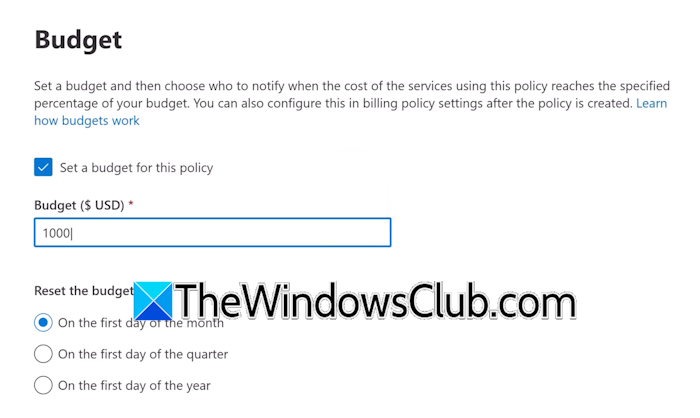
- Billing policies: Define clear rules for how credits are consumed, so costs stay predictable.
- Spending limits: Set monthly or project-based caps to avoid overspending and unexpected billing. You can select whether the billing policy applies to all users or a specific group.
- Threshold alerts: You can set a budget threshold policy to get a notification when the cost of services reaches a specified percentage of your budget. You can select more than one recipient to get the alert.
- Training and awareness: Educate users on how Copilot Credits are consumed and why it is important to use them responsibly.
- Scaling strategy: The right scaling approach is important. As your AI workloads change, evaluate whether it is the right time to move from Pay-As-You-Go to Prepaid Capacity Packs or the P3 plan, and vice versa.
Some common mistakes to avoid
Here are some common mistakes to avoid when using Microsoft Copilot consumption-based pricing. Ignoring them can lead to higher-than-expected costs.
- Skipping usage monitoring: If you do not track credit consumption, the result may be higher-than-expected bills.
- Not setting up alerts: If you do not set up alerts for your credit consumption, bills may exceed your expectations.
- Not analyzing demand: If you do not analyze demand properly, you may purchase fewer credits than required. This can lead to unexpected credit shortages, service interruptions, and additional unplanned costs.
- Insufficient training: Train your employees properly, so the credit consumption remains under control.
That’s it. I hope this helps.
What is the Microsoft 365 Copilot license cost?
Microsoft has designed different 365 Copilot pricing plans for individuals, businesses, and enterprises. Each of these plans is further divided into different categories. For example, the Business plan is categorized into Microsoft 365 Business Premium with Copilot, Microsoft 365 Business Standard with Copilot, and Microsoft 365 Copilot Business. For more information, you can visit the official website.
Microsoft Copilot consumption-based pricing calculator
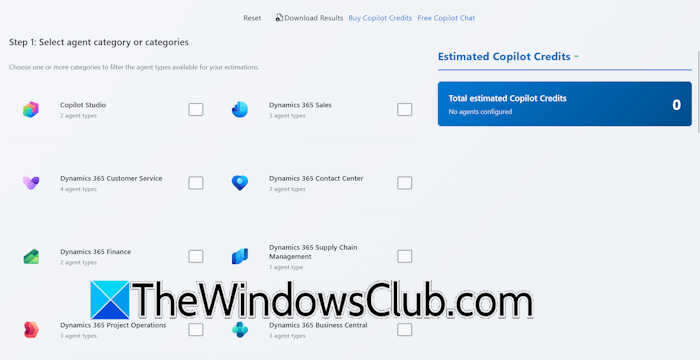
Microsoft has a dedicated pricing calculator, known as Copilot Credit Estimator. This calculator helps you calculate estimated Copilot credits. You just have to follow simple steps on the website.
Read next: How to master AI Triage in Copilot Cowork.
