
AI usage is enabled and limited by credits. Consumers buy credits from AI companies to use through their models. Some companies have reported exhausting their yearly credits within a quarter. This is possible when you do not set administrative controls, credit usage limits, and other limitations for users in your organization. An administrator has to implement the credit usage as suggested by the teams. Copilot Cowork is an agent that can carry out tasks on your behalf. It consumes a lot of credits if you do not set limitations. Let’s learn how to manage Copilot Cowork costs and also about usage-based billing for Admins.
Manage Copilot Cowork Costs: Guide to Usage-based Billing for Admins
When you deploy Copilot Cowork for your organizational users, you must understand how Copilot Cowork consumes credits, how to purchase credits, and how to opt for usage-based billing. Here’s what you need to know.
How does Copilot Cowork use credits?
Microsoft offers Copilot Credits for $0.01 each. Since we can’t predict usage across all Microsoft products, we cannot know how many credits to get. To make it easier, Microsoft offers post-usage pay at an organization level at the end of a billing month.
As we all know, Copilot Cowork is an AI agent that does tasks on our behalf using models and other data that we give it access to. For every task we assign Copilot Cowork, it consumes the necessary Copilot Credits to achieve it. Credit usage depends on five factors. They are:
- Models: Which AI model is chosen for the task based on our demand for quality, speed, and other demands.
- Runtime: The total time the agents take to achieve a task
- Context: Understanding of people, user roles, and collaborations for work, which is taken from emails, files, meetings, and past interactions
- Tools: Actions that the agent takes to achieve your tasks, like sending emails, updating documents, scheduling meetings, etc.
These four factors influence Copilot Cowork credit usage. To put it simply, Microsoft has divided tasks into three kinds: light, medium, and heavy for informational purposes on billing. When you assign a light task that only has one output, light reasoning, and few sources, it may consume credits somewhere between 100 and 300. For medium tasks that require accessing many sources, structured reasoning, and 2 or more outputs, it may consume between 300 and 700 credits. For heavy tasks that require many sources, deep reasoning, and many outputs, it consumes more than 700 credits.
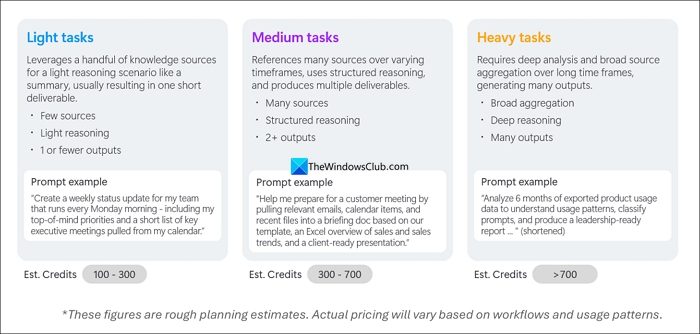
These are all just estimates, and the type of tasks you assign makes a lot of difference.
How does Copilot Cowork’s usage-based billing work?
Microsoft provides a Cost Management dashboard in the Microsoft 365 admin center. That’s where an admin can manage and optimize spending on AI experiences, including Copilot Cowork. Organizations can choose prepaid credits or a pay-as-you-go model. When you exhaust all your credits in the prepaid model, you’ll have to purchase again for further usage. It causes a lot of inconvenience, especially when you are on some important task. Also, the unused credits at the end of a year expire automatically. To prevent usage limitations or expiry after a year, usage-based billing is ideal.
An admin can enable usage-based billing with prepaid credits, pay-as-you-go, or existing billing terms. The admin must connect the Azure subscriptions to support billing at scale. Then, assign consumption controls, where Copilot Credits spending is allocated, etc. To prevent overusage and stay within the spending limits, the administrator has to set the limits.
Usage-based billing gives a clear path to use new AI experiences without spending much or going overboard on bills.
How to estimate Copilot Cowork usage to get Credits?
Microsoft provides a tool to estimate Cowork usage. The tool is called Customer Cowork Estimator. In the Customer Cowork Estimator sheet, you have to provide the number of users: Corporate Knowledge Workers, Customer-Facing Knowledge Workers, Technical Workers, and Managers & Senior Leaders.
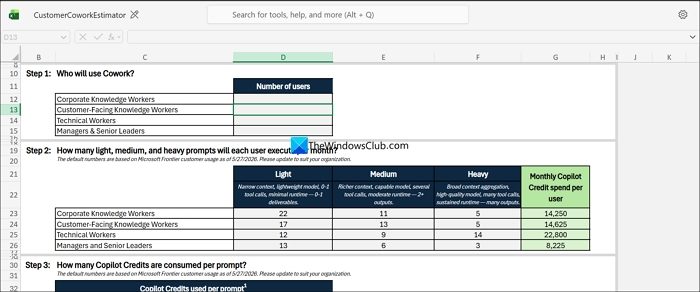
After you enter the number of users for each category, the sheet will automatically calculate credit usage based on Microsoft Frontier customer usage in your organization. Microsoft automatically pulls a lot of data from your organization. Then, in the Summary, you can see Estimated monthly Copilot Credits, Estimated monthly Cowork budget, and Average price per user per month.
Read: Copilot Cowork: Beginner’s Step-by-Step Getting Started Guide
Is Copilot Cowork expensive?
Each credit of Copilot Cowork costs $0.01, like every AI experience on Microsoft. Going by that margin, it is not expensive, but when you use it for heavy tasks, the credits burn through in no time and can become a lot more expensive. Even for a simple task, it roughly costs $2, on average.
Does Copilot Cowork cost extra?
Yes, Copilot Cowork costs extra, and you need Copilot Credits to use It. It is another AI experience offered by Microsoft that uses the credits. If you have access to an agentic tool, you can try Copilot Cowork by setting up spending and usage limits so you don’t go beyond the budget.
Read: How to Build, Share, and Import Custom Skills in Copilot Cowork.
