
Can we play music through our speakers while we are using the headphones? Yes, we can. We can actually use two different audio devices simultaneously. Today, in this post, we will learn about three methods by which we can use both our headphones and the speakers simultaneously on your Windows 11/10 PC.
Can you use headphones and computer speakers at the same time?
Yes, you can! Now, suppose you are wondering why anyone would want to use two audio devices at the same time. In that case, it typically occurs when one person in the family wants to enjoy the music through headphones, while others prefer to listen to it on the speakers. Additionally, some audio mixing artists may occasionally want to play audio files on two different devices simultaneously.
How to play Music through Speakers while using Headphones
You can play Music through Speakers while using Headphones on Windows 11/10 by following this procedure:
- Connect your headphones
- Go to the Sounds settings on your PC
- Set up the default audio device
- Adjust the Stereo Mixer settings
- Select the second audio output device
Connect both your speakers and headphones to your PC. Make sure that both the audio devices are connected properly to your PC.
Go to the volume icon in your system tray and right-click.
Select the Sounds option. This will open the Sounds settings on your PC.
You can also open the Sound settings directly by typing mmsys.cpl in the Start/taskbar search.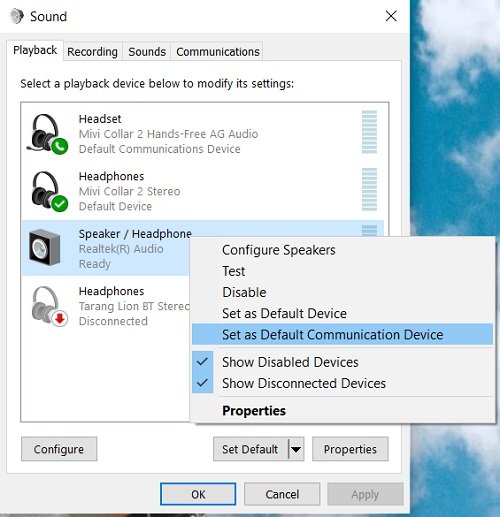
Click on the Playback tab and go to Speakers. Right-click and choose “Set as Default Device”. If is it already set as a default playback device, the options will be grayed out for you.
Under the Recording tab, go to Stereo Mix and right-click. Select properties. 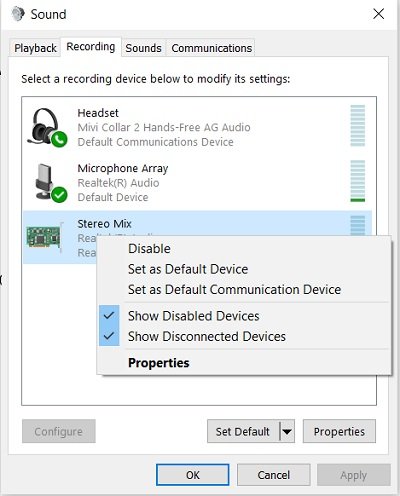
Go to the Listen tab, check the box saying “Listen to this device” and select your Headphones from the given dropdown menu. Click on Apply and you are done. 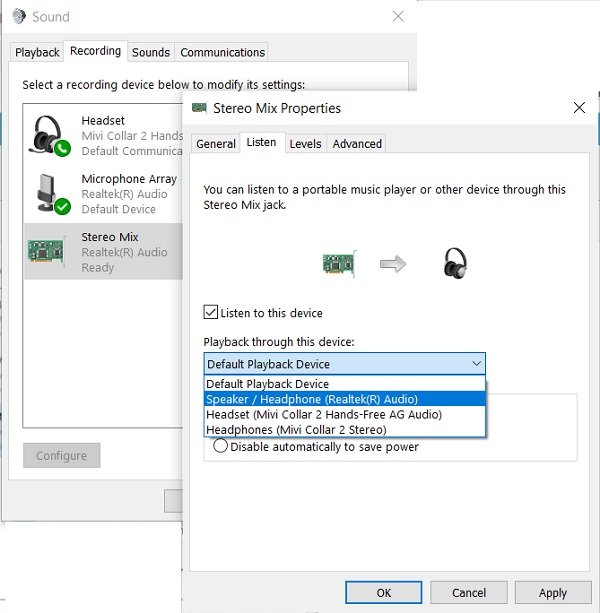
Check now, you should be able to play music through speakers while using your headphones.
While this method allows you to play music through both your headphones and speakers, the audio quality may not be optimal. Also, you may notice a little delay in audio output through both devices. Thus, if you need these settings for any of your personal or temporary use, that’s okay, but if you are looking for a professional quality audio output, you’d better try some good audio mixers.
Do let us know via comments if you have already tried this trick.
When I connect my headphones to my computer speakers still play?
This can happen due to your sound settings or a recent update. First, restart your computer and see. If it doesn’t help, try changing your Sound settings, updating your audio drivers, or changing your default sound device.
