
AI agents are becoming more useful for automating everyday tasks and managing workflows. Imagine having an AI assistant that can handle your everyday tasks, from browsing the internet to managing your workflows. This is what the recently launched AI agents Meta Muse and OpenAI Dots aim to do. Both can work in the background, even while you sleep and help you get things done. Meta and OpenAI developed Muse and Dots, respectively. But if you want to use them, which one would you choose? In this article, we will compare Muse and Dots and help you decide which one is the better AI assistant for you.
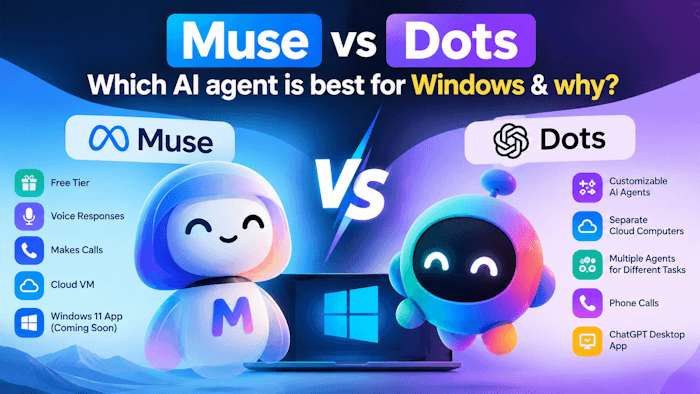
Compare Meta Muse and OpenAI Dots: Which AI agent is better?
Both Muse and Dots are AI personal assistants designed by two leading tech giants to automate your tasks and workflows. Both are always-on AI agents that can work in the background, use a dedicated cloud environment, connect your apps and services, remember the context over time, and ask for your approval when performing sensitive tasks. In this article, we will compare Muse and Dots AI agents, their features, pricing, and more.
Key features of Dots
Dots is an AI agent developed by OpenAI. Currently, it runs on GPT-6 Astra and has a separate cloud computer and a browser to execute tasks assigned by the user. You can use it through ChatGPT desktop, mobile, and web applications. Let’s have a look at some of its key features.
- Cloud computer
- Customizable AI agents
- Supports conversation over a phone call
- Task automation
- Can operate your PC remotely
Let’s see all features in detail.
1] Cloud computer
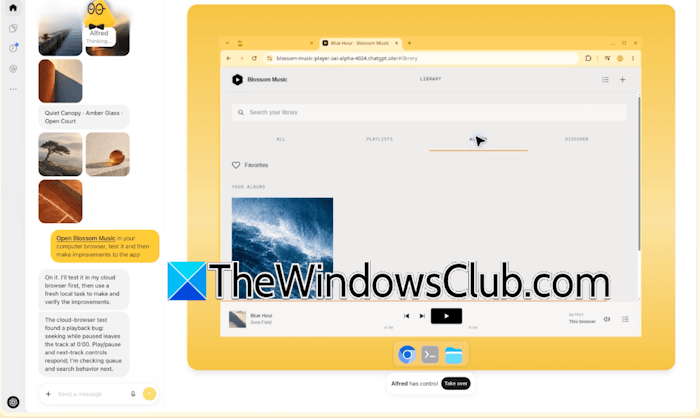
Dots has its own cloud computer and a web browser. It uses this environment to browse websites, conduct research, analyze data, create and edit documents, and perform other tasks assigned by you. One of the biggest reasons for assigning a cloud computer and a web browser to Dots is that it can work on the assigned tasks even when your computer is turned off. You can also view what it is doing on its cloud computer.
2] Customizable AI agents
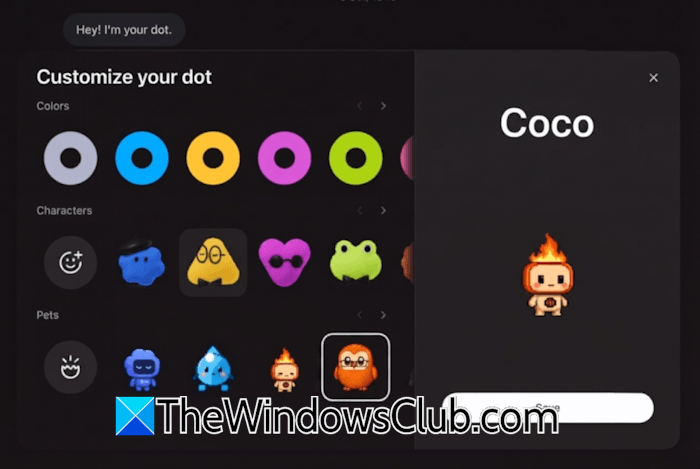
You can create different Dots for assigning different tasks. Each Dot agent is fully customizable and has its own cloud computer and web browser. This ensures that each Dot operates independently, keeping its tasks and workflows separate from other Dot agents. OpenAI has designed Dots as cute, animated characters. You can choose any of these characters to personalize your AI agent’s appearance. You can also name each Dot.
3] Supports conversation over a phone call
Dots support conversations over the phone, and this is the most useful feature. You do not need to type instructions every time you want to assign a task to your Dot. Simply call your agent, and it will answer and talk to you like a real human. You can discuss your work, share new instructions, or change task priorities on the phone call. You can also send messages while talking to it. When you are done, disconnect the call, and Dot will start working on the assigned task.
4] Task automation
You can assign multiple tasks to different Dots and get the work done quickly. Dots can search and purchase products for you based on your instructions. However, the payment is through a secure gateway. But if you do not want Dot to make payment, you can ask it to find the product and add it to your cart or send you the website link to purchase it. Dots can also perform tasks on connected applications. For example, if you connect your Dot agent to Canva, it can create new and edit existing images and documents. You can also monitor Dot while it is working on the assigned task. Dot can also submit support tickets on the customer support websites on your behalf.
5] Can operate your PC remotely
If you connect Dot to your PC, it can operate it remotely as well. For example, you can ask it to search for the required information in a particular file on your system, or you can ask it to shut down your system. However, your computer must remain online, with the ChatGPT app open, for this functionality to work. You can revoke its access at any time.
Key features of Muse
Muse is an AI agent developed by Meta. It currently offers a free tier. It runs in a secure, cloud-based virtual machine environment. Meta is also working on a dedicated gadget powered by Muse AI. That gadget won’t replace your smartphone. Instead, you could connect it to your smartphones. Let’s see some of its key features.
- Runs on a secure cloud-based virtual machine
- Has separate Ideas and Goals tabs
- Can generate voice responses
- Can perform automated tasks
- Can make phone calls on your behalf
- Offers a free tier
- Muse is coming to Windows 11
Let’s see all features in detail.
1] Runs on a secure cloud-based virtual machine
Muse runs in an isolated cloud-based virtual machine environment. This makes its automated activities completely isolated from your local machine. This also provides you with full privacy for your data, as it cannot access your local machine unless you connect it to your system.
2] Has separate Ideas and Goals tabs
Muse offers dedicated Ideas and Goals tabs to help you organize your workflows. Based on your previous conversations, you can find new ways to use Muse in the Ideas tab. Muse analyzes your conversations and generates new ideas that you can explore under the Ideas tab. The Goals tab, on the other hand, automatically generates a list of goals based on your previous conversations. For example, if you have a YouTube channel, say TheWindowsClub and you have given Muse a task to find some viral topic ideas for your channel, Muse can add it to the Goals tab with a checkbox. You can check it once you complete the task.
3] Can generate voice responses
We always do not have enough time to read the generated text responses. Muse can generate voice responses, making the conversation more convenient. You can use this feature to save time.
4] Can perform automated tasks
Like Dots, Muse can also work on the assigned tasks in the background, even if your computer is turned off. For example, you can ask it to work on a research paper, and it will generate a detailed report. Muse is also good at online shopping.
5] Can make phone calls on your behalf
Muse can also make phone calls on your behalf. But you cannot use it for personal calls. For example, if you want to book a table at a particular restaurant, you can assign this task to Muse, and it will call the restaurant on your behalf and book a table for you.
6] Offers a free tier
One of Muse’s biggest advantages is its free tier. This allows users to try its AI capabilities without paying for a subscription. However, access to certain features or usage limits may vary by plan and availability.
7] Muse is coming to Windows 11
Muse is also coming to Windows 11 as an app through MXC integration. Microsoft and Meta have officially confirmed this. However, few details have been disclosed about this update. In the future, you will be able to install Muse as a Windows app on your PC.
Muse vs Dots: A quick comparison
Let’s compare Muse and Dots based on their features and advantages.
- OpenAI does not offer a free plan to try Dots. On the other hand, Meta offers a free tier to all users. Muse also has an Invite plan that gives you 1 billion tokens for each invite.
- You can customize Dots. No customization for your AI agent has been provided yet.
- Dots work in their separate cloud computer, whereas Muse works in a safe, isolated cloud-based virtual machine environment.
- Muse has one Main chat and other side chats. You can create multiple Dot AI agents to assign different tasks.
- You can talk to your Dot AI agent on a phone call to assign a task. Muse can generate voice responses and also make calls on your behalf.
- Meta Muse is coming to Windows 11 as an app. You can also access Dots via the OpenAI desktop application.
Which Agent is the best for Windows?
Both Muse and Dots offer useful features, but the better choice depends on how you use your AI assistant. If you want a free AI agent that can handle automated tasks, generate voice responses, and even make calls on your behalf, Muse is the best choice. On the other hand, if you want to create multiple customised AI agents and assign separate tasks to them, you can go with OpenAI Dots.
Overall, Muse may be a better choice for users who are looking for a free AI agent on Windows that can automate tasks, while OpenAI Dots is best suited to users who need more customization with their AI agents.
That’s it. I hope this helps.
Which is the best AI for Windows?
The answer to this question is not the same for all users. It depends on your needs and which AI tool is best for you. If you are looking for deep research, Copilot or Perplexity will be the best AI for you. But if you want an AI tool that works with Google Workspace, Gemini is the best option.
Which AI comes with Windows?
Copilot is Microsoft’s official AI agent that comes with Windows 11. You can also install other AI agents on your Windows PC, such as ChatGPT. Moreover, Meta Muse is also coming to Windows 11 as an app.
Read next: How to check which local LLM can run on your laptop or Desktop PC?
