
Microsoft offers an on-demand anti-malware scanner called Microsoft Safety Scanner. MSS is a free downloadable security tool for Windows 11 and Windows 10 users, providing on-demand scanning to help remove viruses, spyware, and other malicious software.
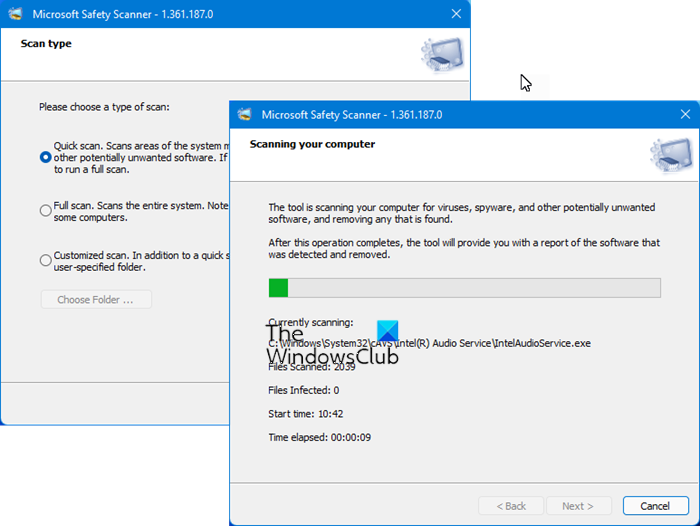
Microsoft Safety Scanner for Windows 11/10
The Microsoft Safety Scanner expires 10 days after being downloaded. To rerun a scan with the latest anti-malware definitions, download and run the Microsoft Safety Scanner again. Do note that it’s not exactly a small file … its msert.exe file is a 100 MB download!
The MSS is different from the Malicious Software Removal Tool – nor is it meant to be a replacement for using an antivirus software program that provides ongoing protection. It is meant to be used as an additional on-demand scanner in addition to your existing antivirus software, should you feel the need for a second opinion. It works along with your existing antivirus software.
It offers:
- Quick scan
- Full scan
- Customized scan.
If MSS detects Malware or an error occurs while running, a report is sent to Microsoft containing basic information about the Malware or error. The reports sent to Microsoft include technical information about MSS, Malware found, and your computer, such as, MSS version number, file names, cryptographic hash, size, date stamp, and other characteristics of any Malware removed from the computer, the success or failure of Malware removal, the computer’s manufacturer, model and processor architecture, etc.
If you do not want MSS to send any information to Microsoft, you can disable the MSS’s reporting component with the following registry key setting.
Subkey: HKEY_LOCAL_MACHINE\SOFTWARE\Policies\Microsoft\MSERT
Entry name: \DontReportInfectionInformation
Type: REG_DWORD
Value data: 1
Long back, Microsoft offered the Windows Live OneCare Safety Scanner which also performed additional tasks like PC clean-up, Tuneup, etc, and replaced it with this new Microsoft Safety Scanner.
Visit Microsoft here to download it.
This post will help you if Microsoft Safety Scanner is not working.
If you are looking for free antivirus software you can check out any one of these free recommended antivirus software for the Windows operating system.
Microsoft Safety Scanner vs Defender
Microsoft Safety Scanner is a portable, on-demand malware removal tool for Windows OS. It has to be manually downloaded, and its validity is for 10 days only. Windows Defender is built into Windows, offering real-time protection, automatic updates, and the ability to remove threats automatically. However, both use the same definition sets from Microsoft. Their use-case scenarios are different.
Microsoft Safety Scanner vs Malicious Software Removal Tool
Microsoft Safety Scanner is a portable on-demand antivirus software. Malicious Software Removal Tool (MSRT) is downloaded via Windows Update and runs automatically in the background. It specifically targets a set of prevalent threats. However, both can be downloaded from Microsoft.
