
Microsoft, like any other tech company, is focusing heavily on AI and releasing multiple products to its users. As they keep releasing products with different names, it becomes hard to keep track of and use them. If you are confused by the different names of AI products released by Microsoft, you are in the right place. Here, we explain three Microsoft AI products to you. Follow this guide to learn about Microsoft MAI, Azure AI Foundry, and Copilot Studio, along with their differences and use cases.
Microsoft MAI vs Azure AI Foundry vs Copilot Studio
We will explore how these products differ and how they can help you complete tasks more efficiently.
What is Microsoft MAI?
Instead of relying on OpenAI, Anthropic, and other AI companies for AI models, Microsoft has decided to develop AI models from scratch using clean data, without distillation from existing models. Microsoft’s AI Superintelligence Team successfully delivered seven models for thinking, coding, image generation and editing, audio transcription, etc. These models are called Microsoft AI models, or MAI models.
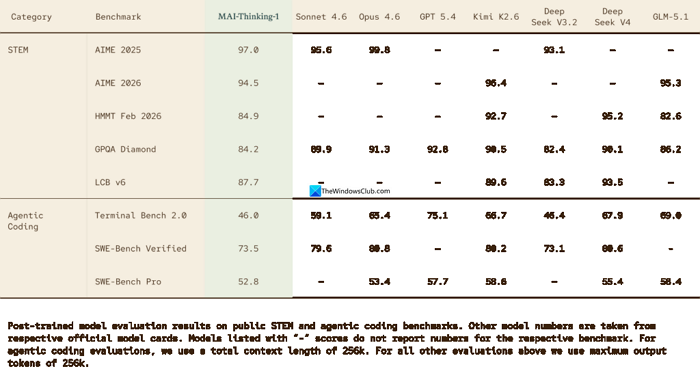
In the blind tests run alongside models of the same weight, MAI models scored better than others. The models currently in use are MAI-Thinking-1, MAI-Image-2.5, MAI-Image-2.6, MAI-Transcribe-1.5, MAI-Voice-2, and other flash models. Organizations can deploy them via the Microsoft Foundry portal.
According to Microsoft, the cost to use these models is much cheaper than the existing models from other companies, and works more efficiently. The MAI models are comparable to GPT models, Claude, and Gemini models. You can experiment with MAI models on the MAI-Playground portal before deployment.
Compared to Azure AI Foundry and Copilot Studio, MAI is like a brain to power other products. For example, if you want to use MAI models for coding, you can use MAI-Thinking-1 on GitHub. MAI models can be deployed to other products to improve the functionality of the other product better. Without MAI models, you must depend on GPT, Claude, or Gemini models to run AI-based products from Microsoft.
What is Azure AI Foundry?
Azure AI Foundry, or Azure AI Studio, is now called Microsoft Foundry. Microsoft changed the brand name to Microsoft Foundry so everyone can use it without confusion. Microsoft Foundry is a management platform where you can access agents, models, and tools that are enterprise-ready by default. You can just deploy the agents, models, or tools available on Microsoft Foundry and track, monitor, evaluate, and customize the configurations to suit your needs. To make the usage more robust, Microsoft Foundry has unified role-based access control.
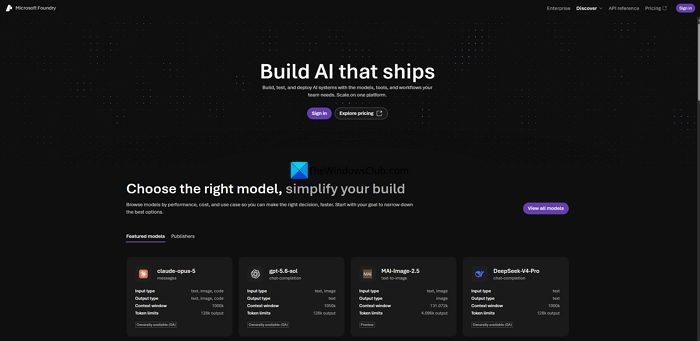
Microsoft Foundry lets you build declarative prompt agents and deploy hosted agents to run your own code. You can access more than 1900 models from Microsoft, OpenAI, Anthropic, Meta, and other AI companies. You will find all the models listed under the Foundry Models catalog.
Compared with Microsoft AI (MAI) and Copilot Studio, Microsoft Foundry unifies agents, models, and tools that you can deploy for your organization and configure user-based access and limits. You can use all MAI models on Microsoft Foundry, but not the other way around. Microsoft Foundry requires admin-level access for an organization, Microsoft 365 Enterprise plans, and an Azure subscription to get access. Billing for agents, models, and tools requires an additional usage-based setup. To control steep billing, implement user-based access and usage limits.
If you are an organization that builds and scales AI products and solutions, you can use Microsoft Foundry.
What is Copilot Studio?
Microsoft Copilot Studio works with prompts. It looks like the normal Copilot portal, but everything works through prompts. You can create agents with prompts or a graphical interface. Whatever you need, you can just enter a prompt, design, test, and publish agents. The agents you create on Copilot Studio can be used for personal use, or you can publish them to Microsoft 365 Copilot. Your organization can use the published agent, and you can integrate it with Teams, SharePoint, and Microsoft 365 Copilot Chat.
You can access Copilot Studio through your organizational account by purchasing tenant-wide Copilot Credit packs of 25000 Copilot Credits each for $200 per pack per month. In addition to the Copilot Credit packs, you can also sign up for a pay-as-you-go meter for flexible usage.
Comparison Table
| Feature / Platform | Microsoft MAI (Foundry) | Azure AI Foundry | Copilot Studio |
|---|---|---|---|
| Audience | Pro developers & ML engineers | Pro developers & ML engineers | Business analysts & low-code developers |
| Primary Purpose | Full-stack AI development platform for building, fine-tuning, and deploying custom AI apps | Engineering platform for designing, evaluating, and deploying AI agents/apps at scale | Low-code environment to customize copilots and build conversational agents |
| Build Approach | Code-first (supports multiple models, CI/CD, private networking) | Code-first with deep integration, observability, safety guardrails | Low-code (drag-and-drop, connectors, plugins, orchestration) |
| Integration | Deep Azure integration, supports OpenAI + other models | Azure-native, integrates with Prompt Flow, RAG, governance | Power Platform integration (Teams, web, Dynamics, etc.) |
| Governance & Security | Azure RBAC, enterprise-grade networking & compliance | Azure-grade security, observability, safety guardrails | Governed via Power Platform policies |
| Use Cases | Custom AI applications, production-scale deployments, multi-model orchestration | Enterprise AI agents, rigorous evaluation, private networking | Departmental bots, customer service agents, HR/IT helpdesk, quick automation |
| Complexity | High (requires coding & ML expertise) | High (requires engineering expertise) | Low (business users can build without coding) |
| Best For | Organizations needing bespoke AI apps with full control | Enterprises needing scalable AI agents with strict governance | Teams needing fast, low-code bots grounded in enterprise data |
| Examples | Custom AI-powered SaaS, advanced ML pipelines | Enterprise-grade AI copilots with CI/CD | HR chatbot, IT support bot, departmental copilots |
Conclusion
- Use Microsoft 365 Copilot if you want instant productivity gains for end users
- Use Copilot Studio if you want to build departmental bots quickly without coding
- Use MAI/Foundry if you need enterprise-scale, custom AI apps with deep integration and governance.
Read: Microsoft Scout vs Copilot vs Cowork: Which AI Tool do you need?
What are the main differences between MAI, Microsoft Foundry, and Copilot Studio?
MAI (Microsoft AI) is a collection of AI models developed in-house by Microsoft. You can access them in Microsoft Foundry, previously called Azure AI Foundry. You cannot deploy MAI models without Microsoft Foundry for your organization. To deploy any model from OpenAI, Meta, Anthropic, etc., you must need Microsoft Foundry. Copilot Studio, on the other hand, is a conversation-based platform where you can prompt via text to create agents, use them, or publish them for your organization.
What’s the difference between Azure AI Foundry and Copilot Studio?
Azure AI Foundry is currently called Microsoft Foundry, where you can deploy over 1600 AI models from various AI companies, including MAI models, to your organization. You can deploy models, agents, and tools via Microsoft Foundry. Copilot Studio lets you create agents using text prompts or a graphical interface. Microsoft Foundry is for organizational-level admins, while Copilot Studio is for users in the organization.
Read: How to set up Administrative Governance for Copilot Cowork.
