
ChatGPT has become one of the most commonly used AI apps or services by people around the world. When we enter a query, it finds answers on the internet and provides them for us to read. Asking questions and getting answers is okay, but when it refers to a question you asked or a detail you mentioned previously, it all boils down to data collection. Your questions, the details in your queries, and all other details together can make your profile. Apps and services are hungrier for data than ever before, thanks to AI models and the need for data to train them for better output. Don’t let your data become a training module. If you want to prevent or stop ChatGPT from using old chats, follow this guide.
How to stop ChatGPT from using old chats
When you ask ChatGPT a question and it contextualizes some old detail about you that you had given in some query, you can stop ChatGPT from such behavior this way.
- Open ChatGPT and go to the Personalization tab
- Scroll down to the Memory section
- Disable memory
- Then, delete Memory summary
- Go to Data controls
- Click Delete all chats
Let’s get into the details of the process.
To get started, open ChatGPT and click on your profile icon at the bottom-left to open the ChatGPT menu. Click Personalization.

In the Personalization tab that opens, scroll down to the memory section and toggle the button beside Enable memory.
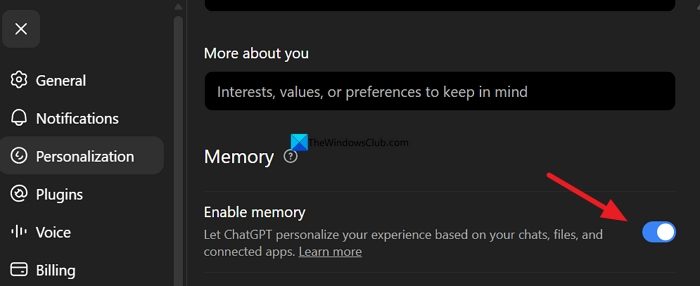
It disables the memory about you for ChatGPT. Then, click Manage beside Memory summary.
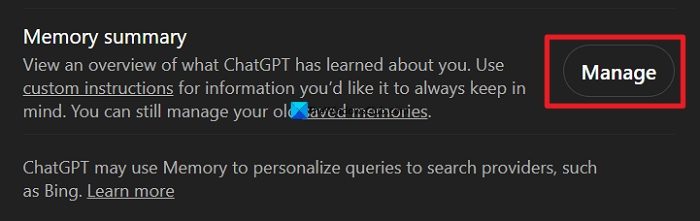
In the Memory summary, you can see paragraphs of data about you sourced from the queries you enter on ChatGPT. If you delete that, there will be no way ChatGPT can personalize your experience on it. It is updated with every query of yours. Click the three-dot icon beside Memory summary and click Delete and turn off memory.
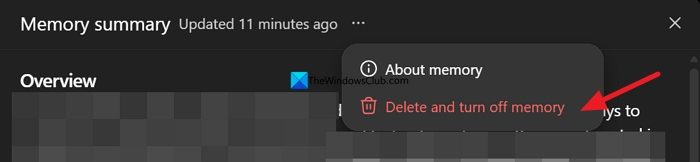
You have just deleted everything about you that ChatGPT has learned until now. To make it even better without any of your data, you can clear the About you section and leave it blank. Now, click the Data controls tab. Click Delete all beside Delete all chats. If you don’t want to lose your previous queries, you can click Export.
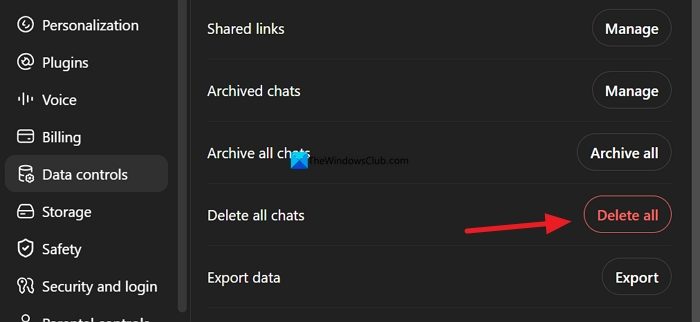
The thing is, if you do not delete all chats, even if you accidentally turn on the memory, ChatGPT will again create a personality for you, read through all the data, and write a memory summary. You can avoid it by just deleting all chats. After this, ChatGPT can never refer to your old chats and personalize answers based on your previous details.
Read: ChatGPT stuck on Loading, Sending, Thinking, Analyzing problem
How to make ChatGPT forget previous conversations?
To make ChatGPT forget previous conversations, toggle the button beside Enable memory to disable it. You must also delete the Memory summary it generates from your queries in the Personalization settings. Then, delete all chats in the Data controls settings to start with a clean slate.
Does ChatGPT delete chats after 30 days?
No, ChatGPT does not delete chats after 30 days. The chats will stay forever on the OpenAI servers as long as you do not delete them. By default, your chats are used to train their models like everyone else and improve models for everyone. You can disable it in the Data controls settings.
Read: ChatGPT Memory Full; What to do?
