
Icecream Video Converter is an all-in-one video converter that runs on the Windows platform. As the name suggests, Icecream Video Converter will give you the ‘tastiest’ experience of using a media converter. It is among the better video converters available, supporting most common formats and devices. The easiest-to-use interface makes it more lovable.
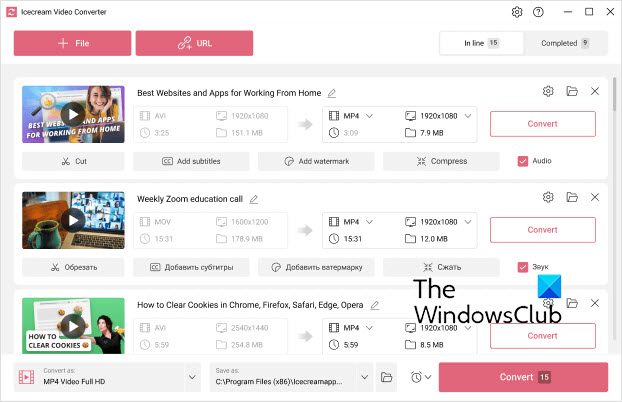
Icecream Video Converter for Windows 11/10
The freeware offers format-specific, as well as device-specific conversion. It shows support for many devices including iPad, iPod, Android Phones, Blackberry, PlayStation, Xbox, etc. So if you are looking for a video converter for any of your old devices then this one is going to be the most suitable.
If we talk about formats, Icecream Video Converter supports MP4, AVI, MKV, 3GP, WMV, MOV, M4V, MPG, M2TS, MTS and many other common as well as uncommon formats. You can even choose the quality of the resulting file. Quality is ranged between Best, Good, Average and Bad. It could have been more useful if the program allowed resolution-specific conversion as well.
The converted files are stored on the desktop by default. You can change this setting from the settings menu. Additionally, you can create a default set of configurations that the program must follow when converting files.
You can add as many jobs to the conversion queue and they will be automatically processed one by one. The program offers a video-to-audio conversion as well. Icecream Video Converter enables you to convert video to audio, too. You can export the soundtrack or background audio as MP3.
You can even convert video files available on the internet by simply pasting their URL into the software, due to the availability of such features you can easily download and convert YouTube videos as well.
The interface is nice and very easy to use. The program requires no configuration at all, it as simple as ABC. You just need to choose a video file, your device or format, quality, and that’s all, the video will be automatically converted according to your device or format. There are no advanced steps included. You can even view the history to check previously converted files.
Icecream Video Converter performs its tasks very well and completes them on time. It is faster than some of the media converters I’ve tried earlier and is a good combination of amazing features and a great user interface.
Click here to download Icecream Video Converter.
Which video converter is best for PC?
There are many free video converter apps available for Windows PC. However, you can try Icecream Video Converter, one of the best and free video converter tools available for use on both Windows 11 and Windows 10. No matter whether you need to convert the file extension, resolution, or something else, you can certainly change them all using this application.
Does Windows 11 have a video converter?
No, Windows 11 or Windows 10 doesn’t have an in-built video converter. However, if you are in need of a video converter app, you can try Icecream Video Converter. It is the easiest way to convert the file format of any video file you have on your computer.
Take a look at Icecream eBook Reader, Icecream Password Manager, Icecream PDF Converter, Icecream Image Resizer and Icecream Slideshow Maker too.
