
Portable Document Format (PDF) is a widely used file format for presenting protected documents. With the inception of the .PDF format almost two decades ago, one would have hardly imagined it becoming the de facto industry standard for exchanging files and documents.
The software industry has undergone significant changes since then, but nothing has yet replaced this ubiquitous file format. Be it your resume, recommendation letters, or application forms, PDF file format is one of those widely recognized and valid formats for sharing documents over the Internet.
If one manages a lot of digital documents in their daily life, getting this ubiquitous file format from a .Doc file or a .JPG image and vice versa is very often required. Converting between these file formats and getting the file in its desired output are often dilemmas faced by people handling digital documents.
Icecream PDF Converter for Windows PC
There are many times when you need to convert a file either from PDF format or to a PDF format. Icecream PDF Converter can help you perform such tasks. Icecream PDF Converter is a simple and effective freeware tool that allows you to convert various files formats to PDF and PDF files to formats such as docx, xlsx, html, jpeg and more.
It’s beneficial to have a tool that helps you convert between file formats, significantly saving you time and effort. This PDF converter tool is one among the powerful arsenal of tools developed by Icecream Apps that lets you convert between different file formats ranging from PDF, DOC, JPG, EPUB, HTML and so on. It lets you convert files into merged or individual PDF files or even convert PDF files into split individual image files. This free tool can be downloaded from their official website, and the download file size is approximately 95 MB. There are many paid tools available for conversion between different file formats, but this free tool works better and performs almost flawlessly in every aspect of the conversion process.
The home screen is as simple as it gets, providing access to all tasks in a clean and minimalist fashion. You do not require any special expertise to use this freeware. The user interface of this PDF conversion software is so simple that even a new beginner can use it quite easily. All you need to do is to download and install the software. Icecream PDF Converter, a freeware, will take care of the rest of the conversion tasks related to PDF files.
Many features make this PDF converter worth checking out. Some of them are:
- Simple to understand and easy to use
- Support drag and drop feature
- Supports multiple formats
- You can perform bulk conversion of files
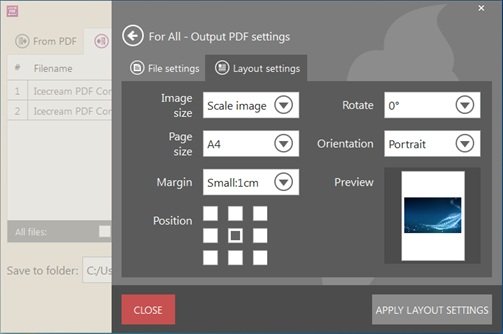
- Can customize layout setting as per need
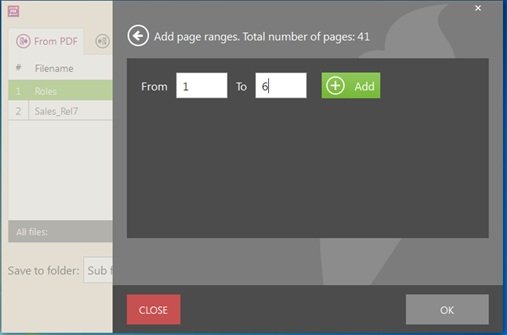
- You can select the page range of a PDF file to convert it to the images
- Can merge files
- Can edit page sequences while merging files into one PDF
- You can secure your PDF file by providing a password to it
Formats that can be converted to PDF using Icecream PDF Converter
Below are the listed popular file formats that you can convert to PDF easily by using Icecream PDF Converter software:
- Convert office documents to PDF- DOC, DOCX and ODT
- Convert spreadsheet files to PDF- XLS, XLSX and ODS
- Convert Hypertext files to PDF- HTML and HTM
- TIFF to PDF
- Convert photos to PDF- JPG and BMP
- Can convert PNG and GIF to PDF
- EBook format to PDF- EPUB, MOBI and FB2
- XPS to PDF
Formats that can be converted from PDF using Icecream PDF Converter
Formats of files that can be converted from the PDF are as follows-
- JPG and BMP
- DOC and ODT
- TIFF
- PNG and GIF
- EPS and WMF
- HTML
Conversion from PDF to other formats
Now, all that you will be required to do is decide between the options you have for file conversion: images, HTML, DOC, and any other files to be converted to PDF format, or the other way around. There’s room for both sets of tasks. First, we will be looking at the ‘From PDF’ conversion process. At the main menu, there is a provision for adding your PDF files to the queue and selecting the desired output file format. Click on the huge plus button at the center or drag and drop the files. Once done, you can click on the default JPG format beside the file and choose between a host of image formats that you prefer as output, then hit the Convert button. The entire conversion process takes just about a minute or two, which is more than sufficient.
Conversion to PDF from other formats
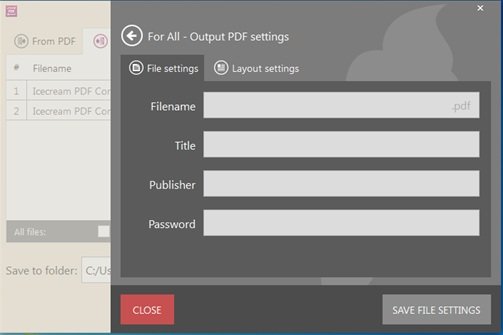
If you want to convert your files into PDF output, just select the ‘To PDF’ from the top menu, and adding files is similar to the above process. You can choose to merge the files into a single PDF file, or if you don’t choose to merge them, you can also get individual PDF files by selecting or deselecting the ‘Merge all files into a single PDF’. By selecting the ‘Wrench’ icon, you can edit the File or Layout settings; you can choose page orientation, size, margin and other such PDF layout settings. Once done, hit ‘Convert’ and you will get the converted files in just under a minute, depending on the number of files you will add.
How to use Icecream PDF Converter
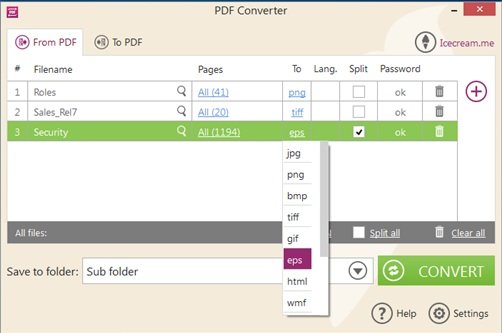
When opening the application’s user interface, you first need to select what you want to do. Do you want to convert any file to PDF or convert PDF to the required format? According to your requirement, select the ‘From PDF’ or ‘To PDF’ option in the first main window of the software.
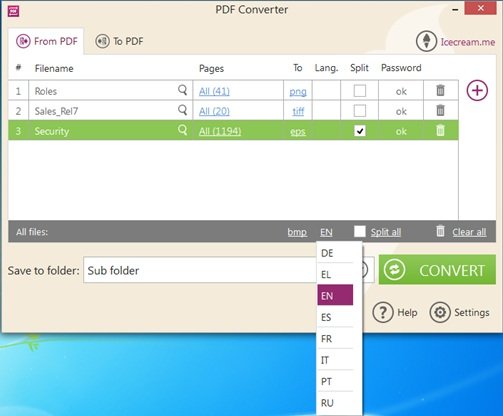
After selecting, click on the plus sign to add the file or you can just drag it also. After dragging or browsing, select the format to which you want the selected file to be converted. Meanwhile, you can change the page range of the PDF files, can split them, and can do other such tasks. After making all changes, select the folder where you want to save your file and click the Convert button. That’s it. Your file will be converted and will be there in the folder that you have selected as the destination folder.
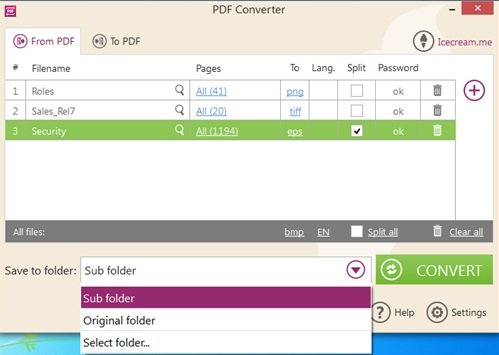
The Settings menu on the main screen offers a minimum of default preferences, including basic information such as folder location, language, and publisher name. With minimal tweaking of the file settings, this PDF converter requires very little effort on your part.
Icecream PDF Converter is a useful software for you if you frequently work with PDF files and often need to convert them. It is among the finest free PDF conversion tool for Windows users and an indispensable tool for people who deal daily with digital documents. With hardly any drawbacks, this tool is completely free and at your disposal for all things PDF. The total size of the software is is quite large; however, the features it offers are incomparable to those of other software in the same category.
Click on this link to download the software and start enjoying your work with this PDF converter software.
Take a look at Icecream Password Manager, Icecream eBook Reader, Icecream Slideshow Maker, Icecream Image Resizer and Icecream Media Converter.
