
In this post, we will show you how to make beats on your computer for free using these Online Tools or Music Beat Making software for Windows 11/10.
A Music Beat is an essential part of music and music theory. It basically defines the rhythm of a song or audio. Now, if you want to make your custom music beats, this post is for you. Here, we are going to discuss different methods that you can use to make custom beats. You can make your own beats and then add them to your songs using a music maker or an audio editor software. Let’s explore the methods for generating music beats on Windows 11/10 PCs now!
What software is used to make Music Beats?
There are various software that you can use to make music beats. However, if you are looking for a free one, you will need to do some searching. In this article, we have mentioned free software, such as LMMS and orDrumbox, that you can use to create music beats. These are dedicated software and you can also use some beat samples provided by these software to create your own beats. You can find out the details on these software later in this post.
How to create your own Music Beats on Windows 11/10
Here are the main methods to create your own Music Beats on Windows 11/10 PC:
- Use a free online tool to make your own beats online.
- Create music beats using free Music Beat Making software.
Let us discuss the above methods in detail!
1] Use a free online tool to make your own Music Beats online
You can try a free online tool to create your own beats online. There are numerous free online tools that allow you to create music beats online directly in a web browser. Here are some of the better free online tools that you can use to make your own music beats:
- Soundtrap
- Drumbit
- Amped Studio
Let us discuss the above online tools in detail!
1] Soundtrap
Soundtrap is a free online music maker tool that lets you create your own beats. You can sign up for this free service and then begin creating your own music beats. It also lets you use some beat samples to create your beats. The good thing is that it enables you to collaborate with other music composers to create music beats. Let us now check out the steps to create music beats online using Soundtrap:
- Firstly, open a web browser.
- Now, go to the Soundtrap website.
- Next, sign up for a free account and then log in to your account.
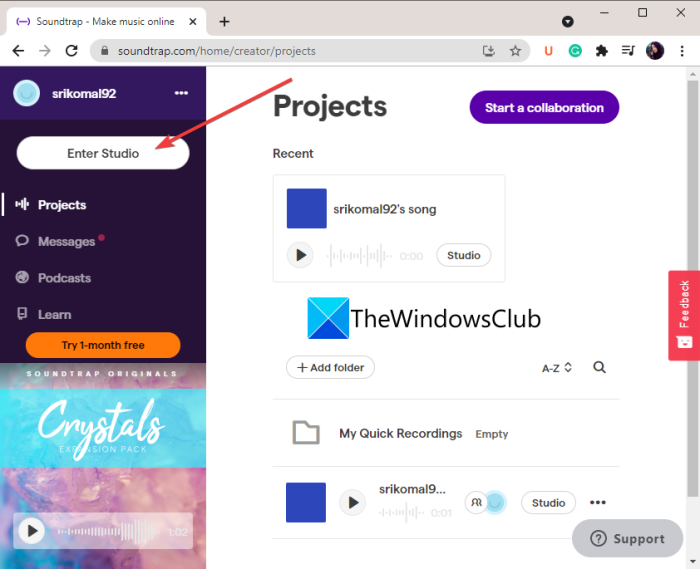
- Then, from the main Dashboard, click the Enter Studio button.
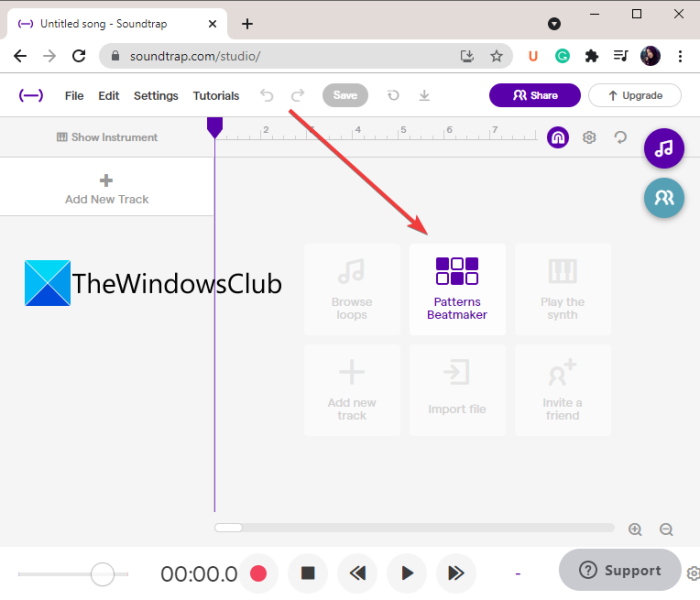
- After that, open its Patterns Beatmaker and add and create a custom music beat.
- Finally, export your music beats to an MP3 or WAV file.
Let us now discuss the above steps in detail!
Firstly, launch a web browser and then open the Soundtrap website. To use it, simply register for a free account and sign in with your login credentials.
Next, press the Enter Studio button from your main Dashboard to start creating a new music project.
After that, click on the Patterns Beatmaker tool to create your own music beats.
You can now start adding different kinds of beats by customizing various parameters. It lets you set up the BMP, music key, and enable or disable metronome. A lot of beats samples are provided in it which you can edit and customize as per your requirements. You can add beats like Kick, Crash, Ride, Hihat, Snare, Low Tom, and more.
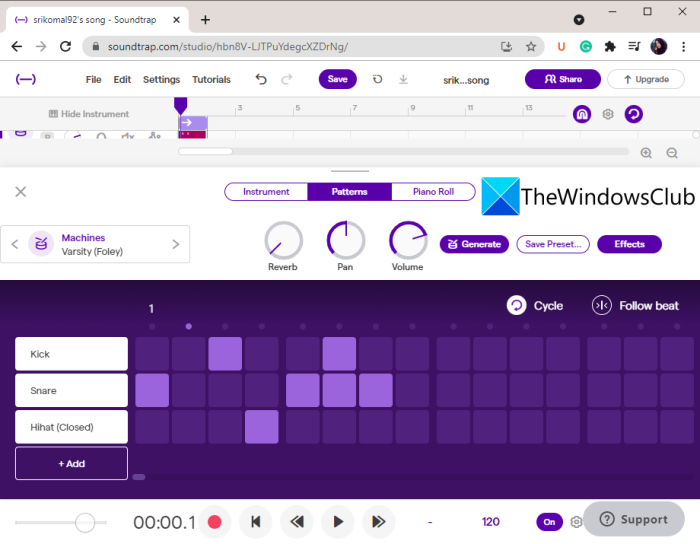
It also lets you add effects like reverb, pan, bass, treble, and more to your music.
When you are done creating your beats, you can save your project on the cloud and export the beats to a local file.
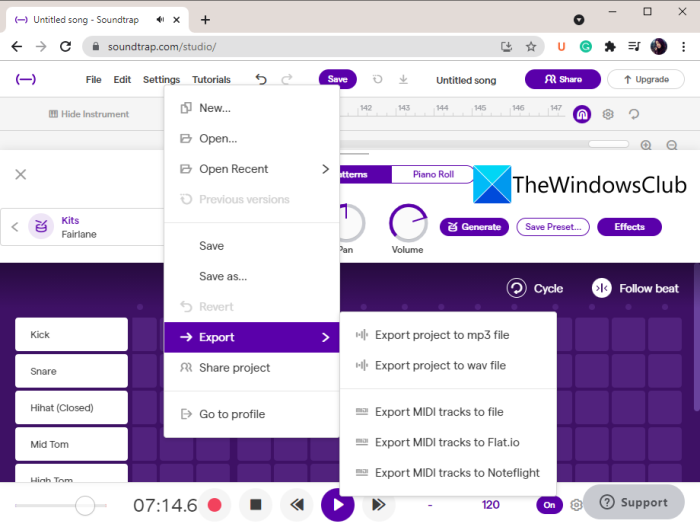
For that, go to the File menu and click on the Export option. You can then save the beats in an MP3 or WAV audio file.
This nice and handy free online beat maker can be used here.
Read: How to Change BPM or Tempo of a Song in Windows.
2] Drumbit
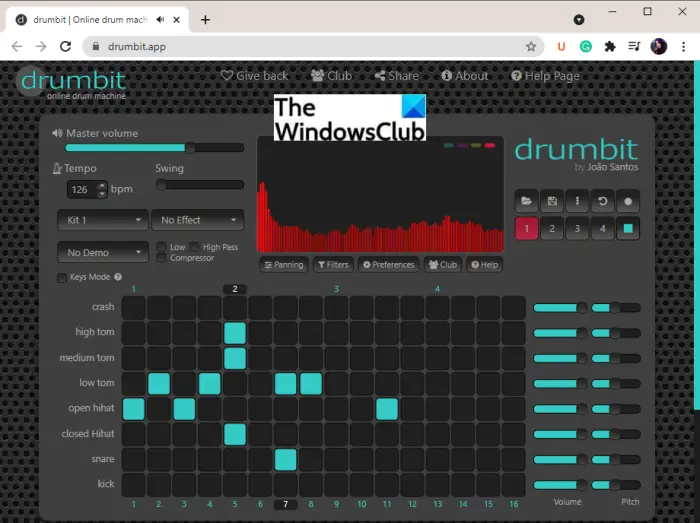
Drumbit is one of the easiest online tools to create your beats. You can visit its website and then start experimenting with music beats. No signup is required to use it.
It lets you add and create some standard music beats including Kick, Snare, Crash, High Tom, Open Hihat, etc. You can set up various parameters to make beats like master volume, pitch tempo, swing, etc. It also lets you select a beat sample from various available ones. You can also enable/ disable low pass, high pass, compressor, panning, etc,
It offers various effects to apply to your music like Large Hall, Spring Reverb, Telephone, Intercom, etc. Once you’ve finished creating your beats, you can listen to them and save them in JSON format.
You can try it here.
3] Amped Studio
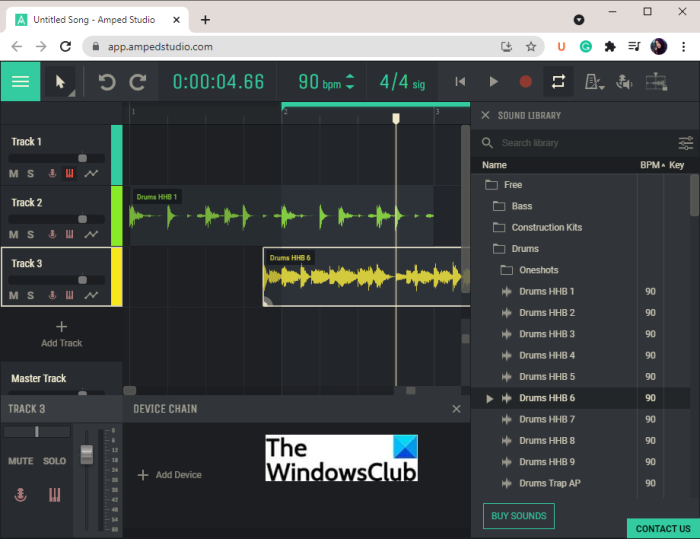
Try Amped Studio to create your beats online. It is a web-based DAW (Digital Audio Workstation) that enables you to make music using virtual instruments, effects, loops, samples, and more. You can create your music beats using it. It provides a lot of some samples using which you can make your own custom beats.
It lets you add multiple tracks to your music and then add individual beats to them. You can find a dedicated Sound Library in it. From here, you can browse various sound samples and beats (Kick, Top Loop, Drums EDM, Drums Punk, Snare, etc.) that you can drop over the timeline and customize. You can enter the BPM (beats per minute), time per beat, and key signature of the beats.
Furthermore, you can turn on/off the loop locator, metronome, etc. You can also adjust the sound level for each track and add various effects like delay, equalize, reverb, etc. One more great feature of this online beat maker is that it offers a MIDI recording tool to record sound from a connected MIDI device.
Once you have finished creating your beats, you can export the audio in WAV file format. It also lets you publish your songs. You can access these options from the three-bar menu present at the top-left corner.
Its free plan contains some limitations. To remove them, you will have to purchase a subscription to this online tool. Although its free version is good enough to create some nice music beats. You can check it out here.
See: Free Garageband alternative software for Windows 10 PC
2] Create Music Beats using free Music Beat Making software
Another method for creating music beats on a Windows 11/10 PC is to use dedicated, free software. Some freeware programs enable you to make your own custom beats. To help you out, you can use the following software to create your custom music beats on Windows 11/10 PC.
- LMMS
- orDrumbox
Let us discuss the above free beatmakers in detail!
1] LMMS
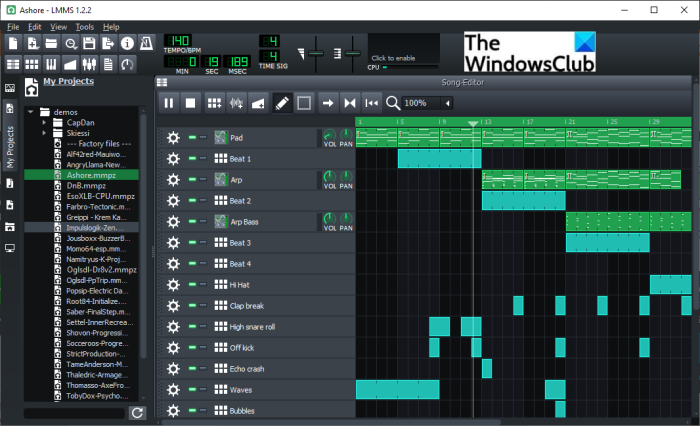
LMMS is one of the best free and open source beat maker software for Windows 11/10. It is complete software to create your music. You can find a lot of musical beats samples that you can use in your own projects. Enter the BPM and time signature of your song and then start creating beats in it. It lets you create multi-track beats with customized effects and filters. You can set up the volume, pitch, pan, and more effects for each of the tracks in your beats.
It offers a dedicated Song Editor, Beat-Baseline Editor, Automation Editor, FX Mixer, Piano Roll, and more tools. Play the created beats and if it looks fine, you can save your beats in a file. You can save your beats in MIDI and other audio formats including MP3, WAV, and OGG. To do that, you can go to the File menu.
See: How to Add and Embed Lyrics to MP3 files in Windows.
2] orDrumbox
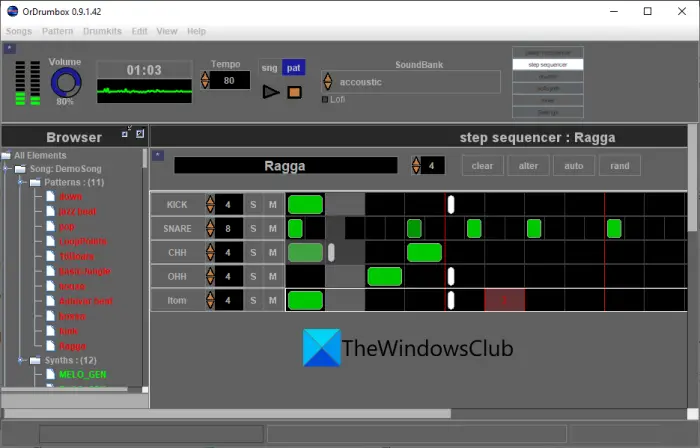
orDrumbox is a dedicated beat maker software for Windows 11/10. It is a free drum machine software that allows you to create various types of beat patterns, including Kick, Crash, Loop, Ride, Snare, Shaker, Medium Tom, Triangle, Clap, and many more. Start with entering the song tempo, add a track, and then choose a drumbeat to add to the track. You can then edit the beat according to your requirements. Additionally, it lets you import a MIDI file. So, if you have some beats saved in a MIDI file, you can open and edit it.
It also offers some sample patterns like jazz beat, pop, funk, kick, snare, cowbell, ragga, and more beats. You can use these samples to customize and create your own beats. Furthermore, you can edit parameters and filters like pitch, frequency, pan, volume, humanize effect, and more. The final beats can be export in formats like WAV audio and MIDI tracks.
You can download it from here at ordrumbox.com.
See: Audacity: Free Digital Audio Editor and Recorder.
What’s the best program to make Beats?
Both the listed program including LMMS and orDrumbox are good to make music beats. I personally liked LMMS better as you get plenty of sounds and beats samples to make use of. Besides these free software, you can also use a free online tool to create music beats. Soundtrap is a good one.
Now read: Best Free Open Source Audio Editor Software for Windows.
