
We all use VPNs to access content that is not available in the country we live in on streaming platforms. In this guide, we have some fixes if your Amazon Prime Video is not working with a VPN software.
Streaming platforms have gained popularity during the lockdowns and the pandemic. The content they produce and the stream are great, but they are geo-restricted due to licensing and laws of different countries. To bypass this geo-block and watch the content we cannot access normally, we use a VPN. Prime Video is one such streaming platform where we find great content, but it is restricted to particular countries. With a VPN, we can bypass those geo-blocks and access the Prime Video content. Some users are unable to access Prime Video with the VPN. Let’s see how we can fix it and stream the content on Prime Video.
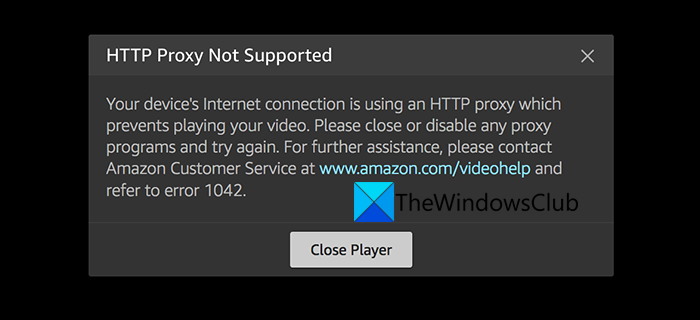
HTTP proxy not supported
Your device’s internet connection is using an HTTP proxy which prevents playing your videos. Please close or disable any proxy programs and try again.
Fix Amazon Prime Video not working with VPN
These are the following fixes you can employ to use Amazon Prime Video with a VPN.
- Use a Premium VPN service
- Select an IP that is not blacklisted
- Clear Cookies and Cache
- Choose Streaming Optimized Server
Let’s get into the details of the methods.
1] Use a Premium VPN service
If you are using a free VPN service to access Prime Video, it might not work. Those free VPN services have only a few IPs that are not feasible to access Prime Video. The speeds they offer won’t be enough to access or stream content. You have to opt for a premium VPN with better features that support streaming content.
2] Select an IP that is not blacklisted
Even if you use a premium VPN, they have a lot of users and their IP addresses are blacklisted regularly by Prime Video. You need to change IPs and check if Prime Video is working. You can find the IPs that are not blacklisted using the trial-and-error method.
3] Clear Cookies and Cache
The cookies and the cached data of the Prime Video website on your web browser might be restricting Prime Video with VPN. Clear the cookies and cache of your web browser and try accessing Prime Video.
4] Choose Streaming Optimized Server
Some VPNs offer servers that are exclusively made available for streaming purposes to users in various countries. Connect to those servers and try accessing Prime Video.
These are the ways you can access Prime Video using a VPN.
Related: This video is taking longer than expected to load, Prime Video error 7017.
Is it illegal to use a VPN for Amazon Prime?
It is not illegal to use a VPN for Amazon Prime, but the IPs are restricted for a reason, and as a user, we have to obey them. The content licenses are valid for certain countries, and they are only available in those countries.
Why does Amazon detect VPN?
Amazon has developed software that detects VPNs and blocks the IP addresses created by it. That’s why the IPs that worked for a certain time might not be working after a day. The software they developed is so powerful that it tracks every IP and blocks VPN usage.
