
While trying to download a file from the internet, Firefox may display an error message File could not be saved because the source file could not be read. In of ‘File’, the path of the file will be mentioned – like appdata\local\temp for instance. It can also ask you to try again later or contact the server administrator. If you encounter this issue even in Firefox Quantum, here is what you need to do to fix it.
File could not be saved because the source file could not be read Firefox error
To fix File could not be saved because the source file could not be read error in Firefox, follow these steps:
- Verify your internet connection
- Use about:config
- Check if Places.sqlite is set to Read Only
- Delete Compreg.dat file
- Try Safe Mode
- Refresh Firefox
To learn more about these steps, continue reading.
1] Verify your internet connection
The main cause of this problem is an unstable internet connection or the connection between your computer the source server. Whenever you click the “Download” button to download something from the internet, your PC connects with the source server, and if anything happens in between due to a broken internet connection, you will get the problem. So check that your Internet connection is not at fault.
2] Use about:config
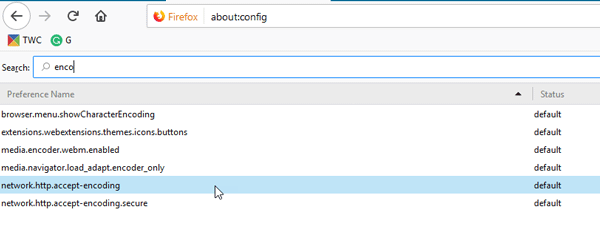
Firefox comes with an inbuilt configuration tab, where you can enable or disable certain functionalities. To open it, enter this in the URL bar about:config. You will get a warning message where you need to click on I accept the risk button. Next, search for enco in the search box. You will see a setting called network.http.accept-encoding. Double-click on it and delete all the values mentioned in the box.
3] Check if Places.sqlite is set to Read Only
Places.sqlite is a file that should not be set to Read Only. If so, you might get this download error in Firefox.
Enter this command in the URL bar about:support. You will see an Open Folder button next to Profile Folder item.
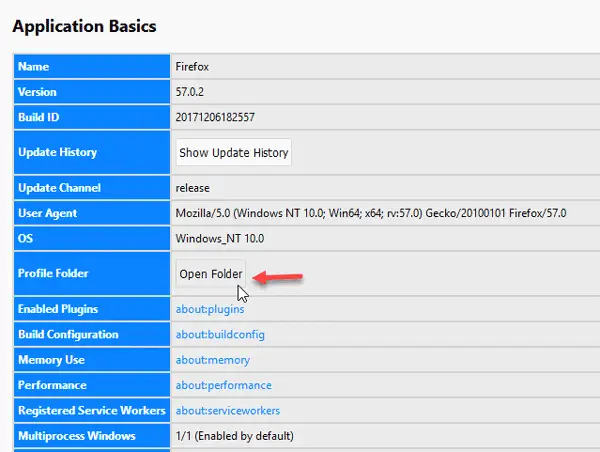
Click on it to open the Firefox profile folder. Alternatively, you can enter this path in the File Explorer-
C:\Users\user_name\AppData\Roaming\Mozilla\Firefox\Profiles\
In this path, C is the system drive. Also, don’t forget to replace user_name with actual username. In the Profiles folder, you should find your Firefox profile that you are using. In that folder, find out Places.sqlite file, right-click on it, and select Properties. Now, check whether the Read Only option is checked. If so, remove it and try downloading the file from the internet.
4] Delete Compreg.dat file
Whenever you install any Mozilla product such as Firefox, Thunderbird, etc. Compreg.dat gets created automatically. If this file gets corrupted in any way, you may face various issues in the browser.
Enter about:support in the URL bar and click on the Open Folder button visible next to Profile Folder item. In the profile folder, you will find the Compreg.dat file. Close the browser and then delete this file.
5] Try Safe Mode
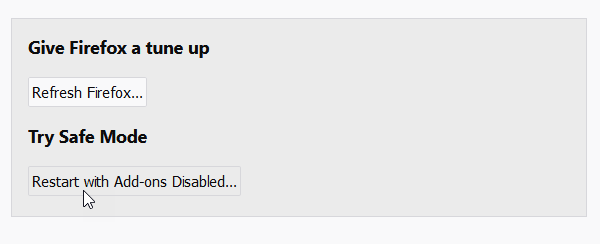
If you open Firefox in Safe Mode, all the add-ons will be disabled, and it will use minimum settings. In that way, you can check whether the problem is occurring due to an add-on or not.
Enter about:support in the URL bar and click on the Restart with Add-ons Disabled button. If you can download the same file in Safe Mode, you need to find out the offending add-on.
6] Refresh Firefox
If the above solutions are not working, you need to refresh your browser. You need to click on Refresh Firefox button on about:support page.
Let us know if anything here helped you.
How do I fix the Firefox source file could not be read?
To fix the “File could not be saved because the source file could not be read” error in Firefox, follow the aforementioned tips and tricks. You need to start troubleshooting by verifying the internet connection. Then, check the about:config settings. On the other hand, you can try Safe Mode as well as refresh the Firefox browser.
How do I fix Firefox not downloading files?
If Firefox is not downloading files, you can reset the Downloads folder, clear the download history, change file type settings, etc. The most important thing is to check whether the file is suspicious. At times, Firefox blocks users from downloading suspicious or malicious files to keep them safe.
