
When you open Microsoft Outlook or the new Outlook app to configure Email Security, you may receive an error — This setting can’t be applied to any of your accounts when trying to change some settings. In this post, we share what it means and what you can do about it when you receive it in Outlook.
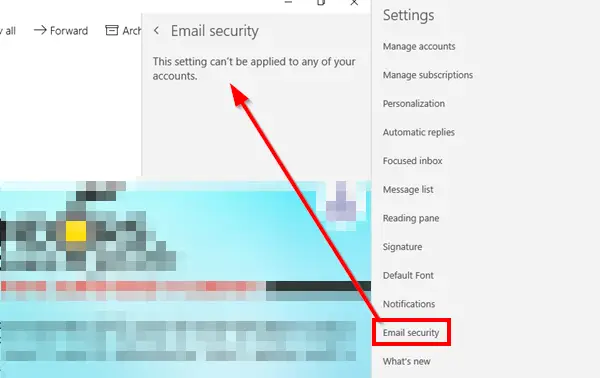
This setting can’t be applied to any of your accounts
The first thing you should know is that it is not an error. It’s a clear message that the settings are not available for the accounts you have in Outlook.
S/MIME Digital signature and Encryption in the new Outlook App
In the new Outlook app, the traditional “Mail” settings section no longer exists as it did in classic Outlook or the legacy Mail app.
- You must use an Exchange-based account (not personal Outlook.com or Gmail)
- A valid PFX certificate must be installed on your device.
- Your organization must allow S/MIME via Intune or Configuration Manager.
Why is Email security not available for your email account?
The Email security section allows you to change options for S/MIME Digital signature and Encryption. These options are only available for account types that support these features. You can configure it by going to Settings > Email security. However, if you do not see any option but only a message that says This setting can’t be applied to any of your accounts., then it’s because none of the accounts support it.
If your account supported it, this is how it would look. Here, you can choose to always sign with S/MIME, automatically select certificates, and turn on Encryption for all emails.
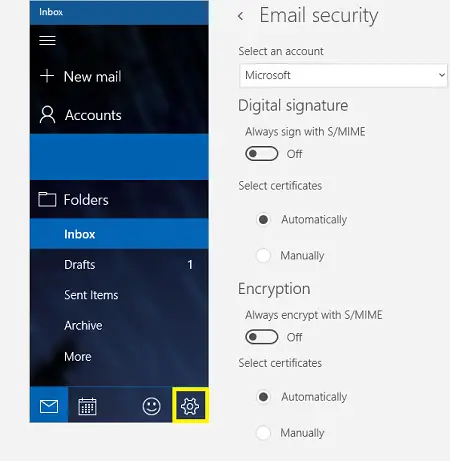
That said, you have a few options if it is already on for you, but you cannot see it in the Outlook app. You can try reinstalling the app or check if the certificates are installed. If enabled, you can configure it according to the options shown in the above image.
Pre-requisite for S/MIME Digital signature and Encryption
S/MIME is enabled only for Exchange accounts. You can’t use S/MIME signing and encryption with a personal account like Outlook.com.
Second, valid Personal Information Exchange (PFX) certificates should be installed on the device. To get these certificates, it is best to contact your IT admin. They should be able to create PFX certificate profiles in Configuration Manager or Microsoft Intune.
What do you mean by Encrypt Email Messages?
S/MIME, or Secure/Multipurpose Internet Mail Extensions, is a widely used and accepted protocol for sending digitally signed and encrypted messages. Many businesses make sure to encrypt their emails using S/MIME, and if you are using Office 365, then you have information rights management.
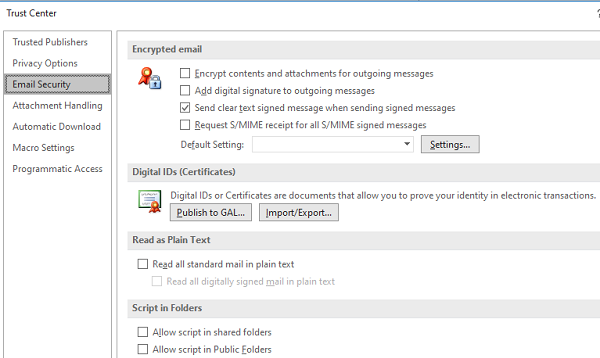
If you are using Outlook, it is available in the Trust Center under Options. You can import certificates and choose how to encrypt emails.
I hope the post helped you understand why you received the error This setting can’t be applied to any of your accounts error. If you were trying to figure it out, then I hope you understand.
However, if you have an Exchange account for which S/MIME is enabled, then check with the prerequisites.
Read: The snip could not be sent, Check that an email program is installed.
