
I switched to Microsoft Edge on both my Windows and Mac. Microsoft’s browser has come a long way, and thanks to the Chromium engine, it now offers many new features. Many Edge browser users reportedly face an issue wherein Edge does not remember passwords. In other words, the Edge browser is not able to save or remember passwords.

Microsoft Edge not saving passwords
Like any other browser, Edge lets you save passwords and additional information on the browser. This information is linked with your user ID and can be accessed on the Edge browser on any device. The browser gives prompts asking users whether they want to save passwords. Typically, passwords are stored, and next time, the browser will automatically use it to log in. This way, you don’t have to remember and enter a password every time.
Edge browser not saving passwords
Following recent updates, we have noticed that the Edge browser is unable to save passwords. The password is not saved and disappears after restarting the Edge browser. We attempted to repair and reset Edge, but it didn’t work. In this post, we are listing the fixes you could try:
1] Create Another profile on Edge browser
It is crucial to isolate the issue and resolve this problem. One way to do this is to create a new Edge profile. Once done, you can log in via your new profile and check if the Edge browser can remember passwords. Here is how you can create and manage multiple profiles on Microsoft Edge Browser.
2] Repair or Reset Edge
This troubleshooting step didn’t work for us. However, some Edge users have reported that they are able to fix the password issue by Resetting/Repairing the Edge browser. Also, you can try switching to a Local Account from Microsoft Account and check if the issue is resolved. Follow the steps in this article to Repair and Reset Edge browser.
Read: Microsoft Edge keeps deleting saved passwords
3] Disable Hosted app data
Ensure that you have not set Edge to clear cache & cookies on exit. If you have, then ensure that Hosted app data is Disabled.
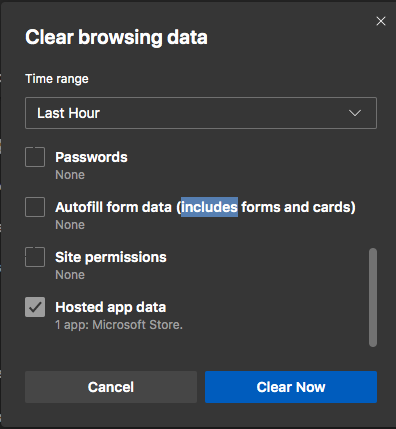
- Open a new instance of Edge Browser.
- Click on the Ellipsis icon.
- Go to Settings > Privacy, Search, and Services.
- Select “Choose what to clear every time you close the browser.”
- Scroll down and see if “Hosted App Data” is checked or unchecked.
- If it is checked, then uncheck it.
Microsoft Edge offers a pretty basic password management tool in Windows 10. However, it serves the purpose and helps us use different services without entering the password every time – like other browsers, it too can give problems at times.
Similar reads:
We hope the above resolution has fixed the issue. After you follow the steps above, the Edge browser should be able to store Password and other credentials.
Why isn’t Microsoft Edge saving my passwords?
If Microsoft Edge isn’t saving passwords, ensure ‘Offer to save passwords‘ is enabled under Settings > Profiles > Passwords. Clear your cache and cookies to resolve corrupted data issues. Check if custom login forms are used, as Edge might not recognize them. You should also disable extensions that could block password saving.
Where are Edge passwords stored in Windows 11?
In Windows 11, Edge passwords are stored in the browser under “Settings.” To find them, click the three dots at the top right corner of Edge, select “Settings,” navigate to the “Profiles” section, and click on “Passwords.” Here, you can view and manage your stored passwords.
