
Microsoft’s Edge browser is the most popular web browser among Windows users. Microsoft constantly releases essential updates to improve performance for end users. However, some users have reported that when playing audio or video in Edge, if you minimize the browser to the taskbar and then return to it to resume playback, the browser stops playing media altogether.
In a related context, the media and even audio stop playing when the screensaver starts. To resolve the issue, you may need to allow Microsoft Edge to run in the background, which is disabled by default. By allowing Edge to run in the background, it can receive information, stay up to date and even send notifications when users are not using the app.
Edge stops playing Video or Music when minimized
The only reason to turn off the apps running in the background is to conserve battery power. Turning on the Battery Saver would limit the background activity and reduces the power usage of apps that are running in the background. You can choose which apps run in the background, or allow only a few, to save battery power and improve battery life. Also note that this background setting must apply to any app that plays media or an audio file. In this article, we explain a solution to resolve the issue.
Allow Microsoft Edge app to run in the background
Windows 11
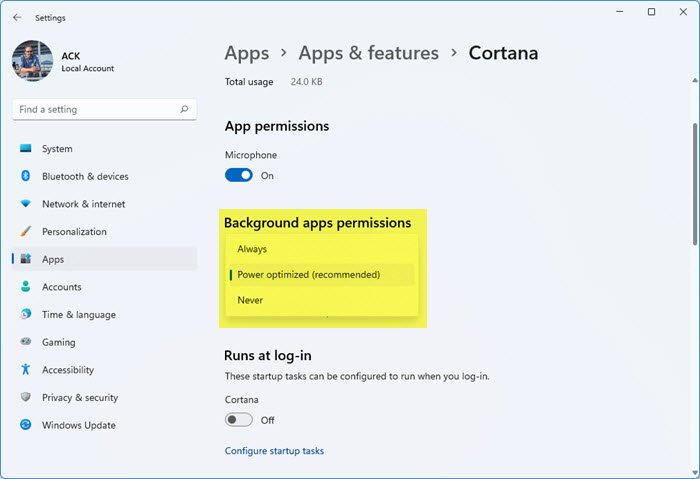
To prevent or allow Windows 11 apps from running in the background:
- Open Windows 11 Settings
- Go to Apps > Apps & features
- Locate the app you want to prevent from running in the background
- Click on Advanced options
- Open the Background apps permission drop-down menu
- Here you can select Always, Recommended, or Never.
Windows 10
In the Start menu, search for Settings and open Settings. Navigate to Privacy.
Search and locate Background apps from the list menu in the left column of the page.
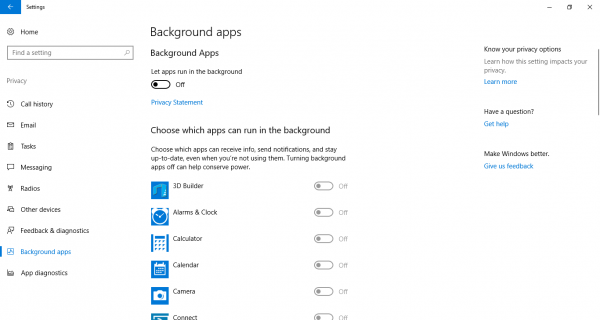
Now Choose the Microsoft Edge app and turn on the toggle button to let the Microsoft Edge run in the background.
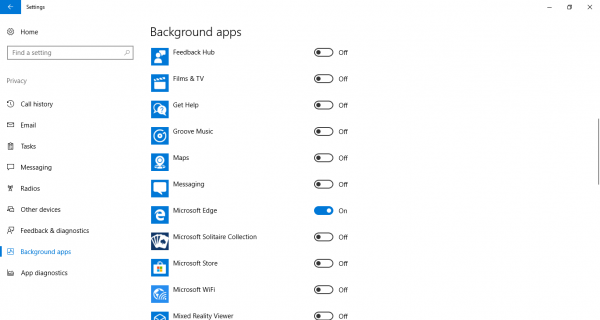
If the solution doesn’t work, check for the latest Windows updates and install them.
That’s all.
