
Do you want to convert EML files to PDF format on your Windows PC? EML (Electronic Mail Format) is a standard file format that stores email messages stored in the Internet Message Format protocol. It is supported by a variety of email clients including SeaMonkey, Mozilla Thunderbird, Apple Mail, Microsoft Outlook Express, etc. However, to view or convert EML files on Windows PC, you need a special application that supports the format.
If you want to save email messages from EML files to a document format like PDF, this post is for you. Here, we’ll share several free software and online tools that let you convert EML to PDF on Windows 11/10. So, without much ado, let us check out these free EML to PDF converters.
Convert EML to PDF using free online tools and software
Here are the free online tools and software you can use to convert EML to PDF on Windows PC:
- Email to PDF Converter
- Zamzar
- docupub.com
- CubexSoft EML to PDF Converter
- Coolutils Mail Viewer
- Xtraxtor
1] Email to PDF Converter

Email to PDF Converter is dedicated free, open-source software for converting EML files to PDF format. As it supports batch conversion, you can convert multiple EML files to PDF at a time. This software also lets you extract attachments from the source EML files. It extracts all text, images, and other attachments and saves them in a separate folder in their native format.
Using this converter is easy. Here are the steps to follow:
- Firstly, you need to download it and then install it on your PC.
- Now, start the application and add the source EML files or a folder containing the source files to it.
- Next, if you want to add email headers to the output PDF, enable the respective checkbox.
- After that, you can also enable the Extract Attachments option if needed.
- Finally, press the Start Conversion button and it will start the batch EML to PDF conversion process.
The output PDFs will be saved at the same location as your source EML files.
This is a nice, easy-to-use EML to PDF converter that lets you perform bulk conversion. You can download it from GitHub.
2] Zamzar
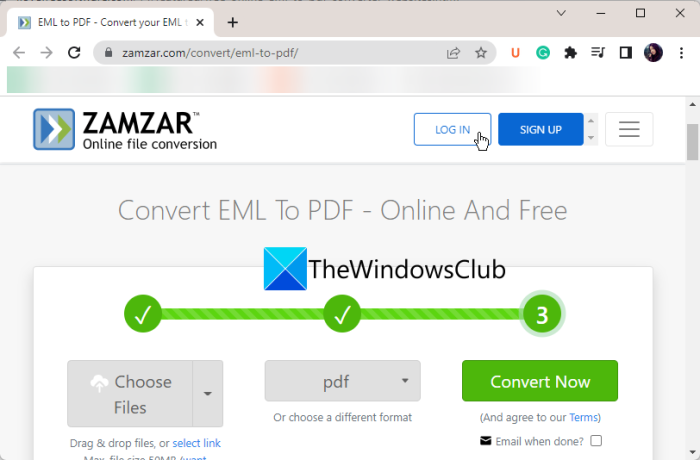
Zamzar is an online file converter tool you can use to convert EML to PDF. Using its free plan, you can convert up to a limited number of EML files to PDF format at a time. It also lets you convert EML files saved in your cloud account, such as Box, Google Drive, Dropbox, and OneDrive. You can even convert EML files to other formats, including PST, HTML, Images, RTF, TXT, etc.
How to convert EML to PDF online?
Here are the main steps to convert EML files to PDF online using Zamzar:
- Firstly, go to its website here and upload the source EML files.
- Now, set the output format to PDF.
- Next, press the Convert button and it will start converting your EML files to PDF.
- Once the process is done, you will be able to download the resulting PDFs.
It is a good online EML to PDF converter tool that you can use for free with limited features.
Read: How to save Gmail emails as an EML file to desktop?
3] docupub.com
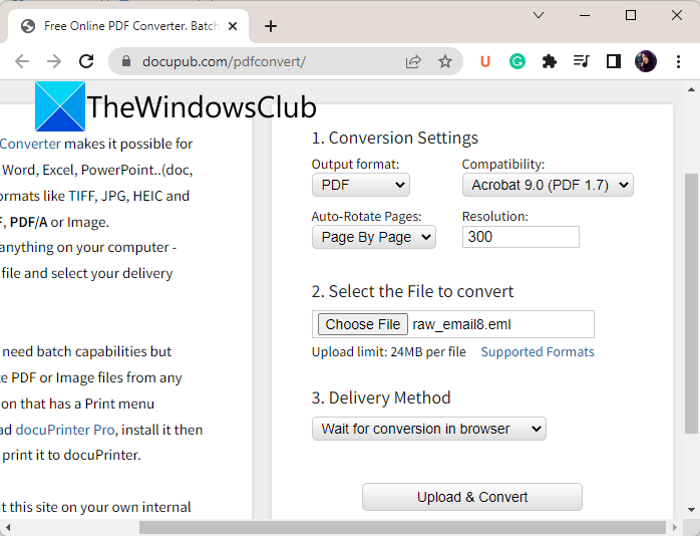
docupub.com is a free online document converter tool using which you can convert EML to PDF online. It lets you convert one EML file at a time. The maximum input file size is 24 MB. It also lets you email the output PDF once the conversion is done. Let us check out the conversion steps now:
- First, open docupub.com and choose PDF as the output format.
- Next, set the output settings, including compatibility (PDF version), whether to auto-rotate pages, and resolution.
- Next, select the source EML file from your PC.
- Then choose a delivery method: wait for conversion in the browser or email me a link to the document.
- Finally, press the Upload & Convert button and it will start converting your EML file to PDF.
You can download the resulting PDF once the conversion is finished.
Read: How to open MIME Emails and Attachments in Outlook?
4] CubexSoft EML to PDF Converter
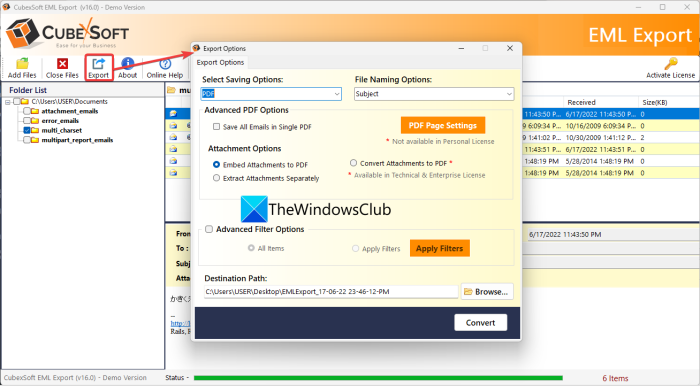
Another option is CubexSoft EML to PDF Converter. As its name suggests, it is a free desktop application dedicated to converting EML to PDF. It supports various other output formats for converting your EML files. Some of these formats include PST, MBOX, RTF, DOC, DOCx, MHT, Thunderbird, etc.
You can also convert multiple EML files to PDF format at once. However, in its free version, you can convert up to 2 messages per folder at a time.
To use it, download it from here and then install it on your PC. Then launch the software and click Add Files to import multiple EML files or a folder containing the source files.
After that, press the Export button from its main toolbar. In the new dialog window, set the output format to PDF and customize options like page settings, saving all emails in one PDF, etc.
You can also extract the attachments from the EML input files separately or in the same PDF. If needed, you can filter emails using advanced options like date range, subject, to, from, and more. Finally, choose the output location and press Convert to start the conversion.
It is a great free EML to PDF converter software that anyone can use without any hassle. You can also purchase the Pro version if you want additional features.
RELATED: How to export and download your Gmail emails as an MBOX file?
5] Coolutils Mail Viewer
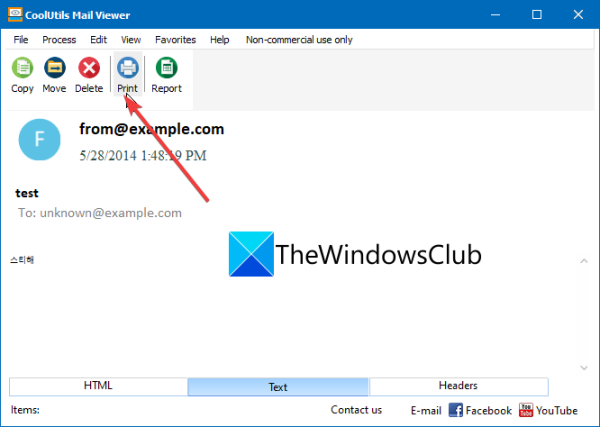
Coolutils Mail Viewer is a dedicated free mail file viewer software for Windows 11/10. Using it, you can view EML files as well as convert them to PDF. It includes a Print function you can use to convert EML to PDF. Let us check out how.
First, download and install this free application on your PC. After that, open an EML file in it. You can view the file in HTML, Text, or Headers format. Switch to the format you want to print as a PDF. Next, press the Print button and a Print Preview window will open up. Now, set the printer as Microsoft Print to PDF and configure properties like orientation, page setup, etc. Once done, click on the Print button and you will be able to save the file as a PDF.
Apart from EML, it also lets you view DAT and MSG files. You can download it from its website. Do note that it is free for non-commercial, private use only.
Read: How to convert NSF files into PST files for free?
6] Xtraxtor
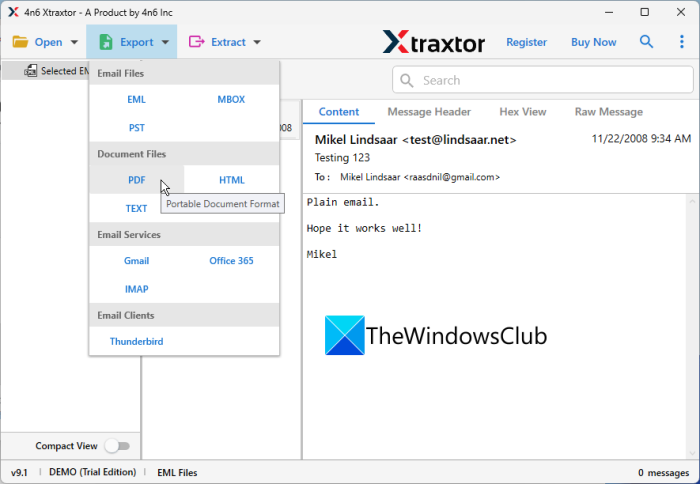
The next EML to PDF converter software on this list is Xtraxtor. It is a batch converter that lets you convert various email files to PDF. You can also convert MSG, MBOX, DBX, OFT, and more files using it.
To use it, download and install it on your PC, and then open its main interface. After that, go to the Open > Email Data FIles > EML Files option and choose the source EML files that you want to convert. Once you import the files, you will be able to view their content. Now, go to the Export option and choose the output format as PDF. You can now set up output location and some options like include mail headers, include raw message, save attachments in folder, show page numbers, and more. Finally, press Save to start the conversion.
Besides PDF, it also supports many other file formats to convert your EML files. These formats include HTML, Text, CSV, VCard, ICS, Gmail, MBOX, IMAP, and more.
The free edition limits you to converting only 10 email files from a folder at once. To remove this limitation, you can buy its professional edition.
Read: How to convert PST to EML in Windows 11?
How do I convert EML to PDF?
There are two methods to convert EML to PDF. First, you can use a free online tool like Zamzar to upload EML files and convert them to PDF online. Second, you can use a free desktop application to convert EML to PDF offline. Plenty of free software options, like CubexSoft EML to PDF Converter and Email to PDF Converter, let you do so. We have shared a full list of EML to PDF converters below, so check it out.
What opens an EML file?
To open an EML file on a Windows PC, you can use a free desktop application or a free online tool. EML file viewers like Coolutils Mail Viewer, GroupDocs, Aspose, and more let you open and view EML files.
See: How to preview EML files in Windows File Explorer?
