
Are you seeing an error called object ReadableByteStream when trying to open your Outlook.com email? Worry not, little one; we’ve got the sauce as usual. OK, so this issue is widespread, and it appears to only happen in Google Chrome for some strange reason, unknown to us.
Google Chrome is the top web browser on the market today, but that doesn’t mean it without any problems. We have no interest in highlighting the numerous issues with this web browser; therefore, we will focus on the ReadableByteStream error in Outlook and how to resolve it. We suspect that if you are using a Chromium-based web browser and experiencing the same problem, it’s possible to follow the instructions here, provided the browser hasn’t been deeply customized.
ReadableByteStream error in Chrome when opening Outlook.com
If you are seeing the object ReadableByteStream error when opening Outlook.com using Google Chrome, then be sure to follow these instructions to a tee if you are not too versed with digging into the settings area in Google Chrome:
- Disable Chrome cache
- Keep local data until a browser restart
Let us see how to do it.
1] Disable cache
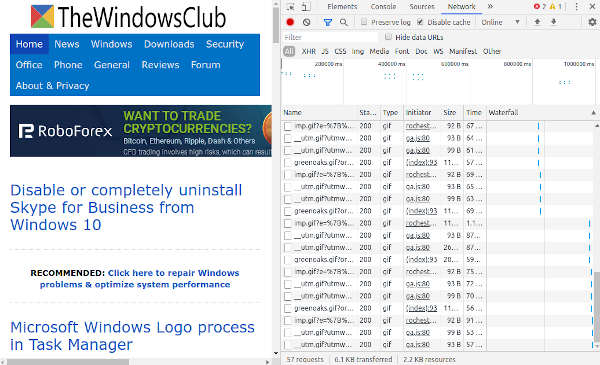
First, we need to disable the cache in Google Chrome. This can be done relatively easily, so don’t worry too much about any form of difficulty.
After opening Chrome, the first step is to select the Menu button, and then click on More Tools, followed by Developer Tools. For an easier way to get this screen, please press Ctrl + Shift + I on your keyboard for Windows.
Now, once the Developer tool section appears on your screen, please select Network from the options, then go ahead and make sure Disable cache is checked.
2] Keep local data until a browser restart
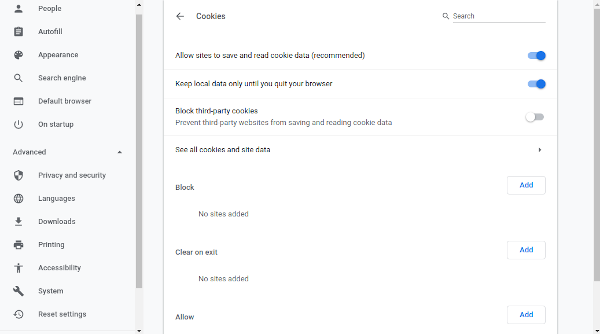
Go to the Settings area on Chrome, then make sure to select “Show advanced settings. In the section that says Privacy, click on Content settings, then navigate to Cookies. Under this section, be sure to select Keep local data only until you quit your browser.
Finally, restart Chrome, and everything should be working just fine now.
If not, we suggest using an alternative web browser like the new version of Microsoft Edge Chromium.
Read: Specified logon session does not exist error in Outlook.
