
We have been writing about Online Privacy and covering tools that claim total privacy: Proxies, VPNs and similar software. But we did not think about this, that websites already know who you are! The method is known as Device Fingerprinting or Browser Fingerprinting. In this post, we’ll discuss what a Browser Fingerprint is and then explore methods to avoid being tracked or traced.
What is Browser Fingerprinting – Meaning?
Bowser Fingerprinting is a collection of your data by websites you visit using any browser and identifying you based on that data. Almost every Internet user has different settings for his or her browser. It is not only browser information; websites can also run JavaScript or Flash scripts to determine the type of computer screen you have, the fonts on your system, Cookies, and so on.
But do these things matter if you are using a Proxy and a VPN? A Proxy just changes your location. It does not add or remove extensions from your browser or change its settings. Likewise, a VPN too will not change your screen resolution and pixel depth. None can stop the website from querying the fonts installed on your computer, or hide the sequence to make it appear as if it came from a different computer.
In other words, they cannot modify or erase your Browser Footprints. Though there are options now, in most browsers, to ask websites to Not Track you, the website(s) may or may not accept the request. You can also use some third-party tools to help reduce, track, and trace you. They do work, but they cannot block queries coming from the websites.
Read: How to protect Personally Identifiable Information on the Internet.
Returning to Browser Fingerprinting, some third-party companies take up the task of identifying you among millions of others visiting a particular site. Most of the data is obtained by querying your browser: the number of extensions, the installed extensions, your browser settings, the cookies you are permitted to store on your computer, and similar data. Some companies add a script to help you understand your system configuration. In short, they first identify you and then track you, usually for profit!
Now that you know that websites can identify you using different methods, you might want to know how to escape this kind of snooping.
Browser Fingerprinting Test
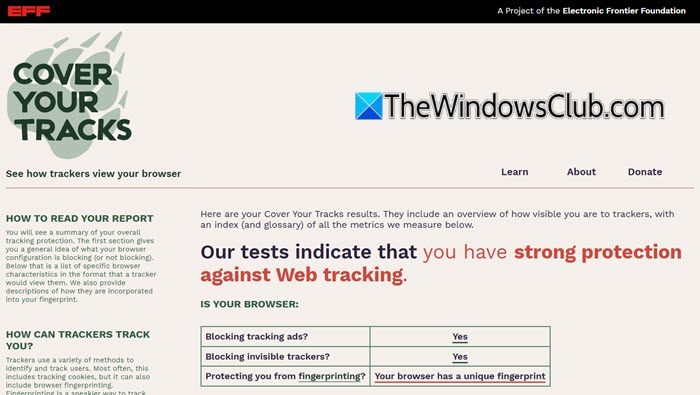
If you are inclined to, you can test your browser’s uniqueness by visiting this link. This site tells you how easy or tough it would be to figure out the browser fingerprints.
Read: Website Traffic Fingerprinting.
Browser Fingerprinting Disable and Prevention
Though some Chrome and Firefox plugins claim to do the task by randomly enabling and disabling add-ons, I do not think this can really work. It would also tell websites which browser you’re using and which specific plugins you have installed. Plus, they only enable or disable the other plugins, so websites can always read which plugins and extensions are present, even if they are disabled.
You can manually add some plugins before starting the browsing session. And each time, you may remove them and add some other plugins. This too is not a solid answer to preventing or disabling browser fingerprints.
The main problem is that they can query your computer using Javascript or Flash code. A Flash code can give away good information about your system.
I am not sure, but I think I read somewhere that you can disable system querying by disabling Flash on your computer, as the websites use Flash scripting to query your computer. If any of you have information on this, please share.
Some might think that using InCognito or InPrivate mode might help. But without extensions, it still gives a unique identity to your browser, “Hey, this is the guy who always uses InCognito mode… but I can read the extensions he has on his browser… wait, I can also see his browser settings.”.
Read: What is Web Tracking? What are Trackers in browsers?
Among the several steps you could take to prevent or disable browser fingerprinting, you could try these too:
- Disable JavaScript. Disabling JavaScript is a powerful defense against browser fingerprinting because it cuts off the code that websites use to detect plugins, fonts, use of supercookies, etc. But this could affect your browsing experiences.
- Use TorButton. It standardizes most browser characteristics and strings and can block JavaScript. Plugins are also available for browsers.
- See how to block Canvas Fingerprinting in Chrome and Firefox.
- CoverYourTracks website shows you how trackers see your browser, providing you with an overview of your most unique and identifying characteristics.
Cross-browser fingerprinting
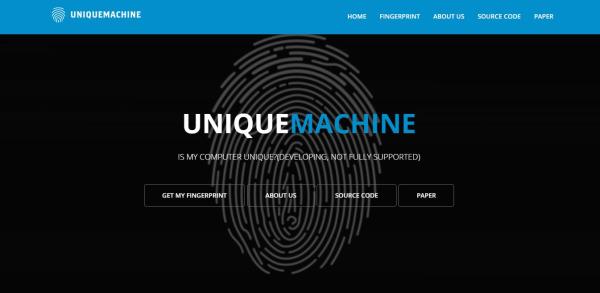
You need to visit the Unique Machine website and scroll down to the option that says Get My Fingerprint. Once the process begins, the website will proceed to collect information from your web browser, fonts, computer’s GPU, and other things not explained.
Interestingly enough, the developers are not shying away from providing the source code to whoever might need it. The source code is available via the company’s GitHub page right now, so take a visit and swipe it for yourself.
The company wrote a research paper on cross-browser fingerprinting where it explains that a user can perform a test on the same computer with a different web browser and still come away with a unique print.
“In the paper, we propose a (cross-) browser fingerprinting based on many novel OS and hardware level features, e.g., these from graphics card, CPU, audio stack, and installed writing scripts. Specifically, because many of such OS and hardware level functions are exposed to JavaScript via browser APIs, we can extract features when asking the browser to perform certain tasks through these APIs. The extracted features can be used for both single- and cross-browser fingerprinting.”
Overall, we like what is being done here because it shows that attackers can obtain information from a browser and possibly identify who it belongs to. If you would like to take the test, visit uniquemachine.org.
How do I check my browser fingerprint?
To check your browser fingerprint, you can find an online tool called UniqueMachine. It is a web tool that helps you check the browser fingerprint, regardless of the browser. For your information, you do not need to install third-party software or pay any money to find the fingerprint of any browser.
Can your unique browser fingerprint be used to track you?
Yes, it is possible to track you using your browser fingerprint. It is more like your own fingerprint, used in various government IDs. Every computer has a unique browser fingerprint that can be used to track or recognize any user from anywhere in the world.
Seeing as it uses JavaScript to get the job done, we recommend users to install NoScript or a similar browser add-on to block any illegal fingerprinting of your web browser and computer.
This is what I could gather about browser fingerprinting. The only good news is that not many sites employ this technique – yet!
PS: Now read about Cross-browser fingerprinting and how to find out your Browser and Computer’s unique Fingerprint.
