
Windows 8 introduces an amazing new feature – something which will prove to be a life-saver at times! How often has it happened that you have faced a situation of a major PC failure and realized that you are now going to have to spend several hours just to be able to restore your PC back to the way things were!? Spending hours or paying someone else money to reconstruct your Windows computer, is something which we could all do without, right?
Note: Windows 11/10 user? This post will show you how to Reset Windows 11/10.
Windows 8 provides a consistent experience to get the software on any Windows 8 PC back to a good and predictable state. It has streamlined the process so much so that you can get your PC back to the desired state quickly in a matter 0f 1-20 minutes, rather than taking up your whole day. And the best part is, that you do not lose your data and files in the process.
In short, Windows 8 provides you with a “button” to fix “everything”! Windows 8 now comes with 2 options to restore your PC to its original state – the Refresh option and the Reset option!
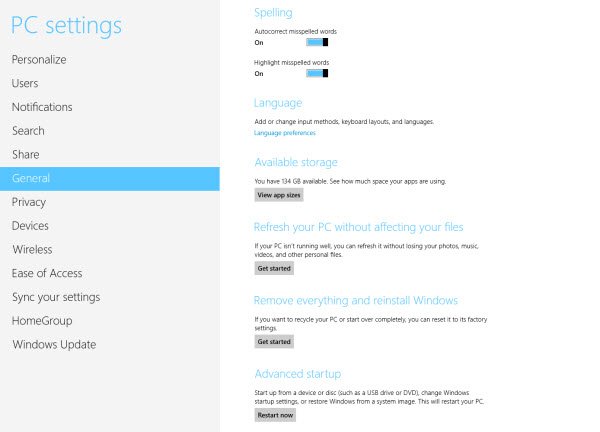
Refresh PC in Windows 8
The Refresh button gives you an easy option to restart fresh while retaining all of your documents, accounts, personal settings, and even the apps you’ve downloaded from the Windows Store.
To carry out this Refresh or basic reset:
Open Windows 8 Control Panel > General > Setting > Refresh.
If your PC isn’t running well, you can reload Windows without losing your media and personal files.
When you Refresh Your PC, your files and personalization settings won’t change. Even the Windows Store apps will be retained – but software and programs may get removed. Your PC settings will also be restored to default values.
See this screenshot tutorial on how to Refresh Windows 8.
Reset PC in Windows 8
Windows 8 will also allow you to carry out a Complete Reset. This will restore your PC to its virgin state, viz to the state it was in when originally purchased.
To carry out this complete reset:
Open Windows 8 Control Panel > General > Setting > Reset.
If you are about to give your PC away, you can put it back to the way it was originally and remove your files.
When you Reset Your PC, all personal files will be removed and settings restored to default values.
ADVANCED RESET OPTIONS IN WINDOWS 8
Offers System Restore, System Image Recover, Automatic Repair and Command Prompt options. You can create a reset disk, which is great for power users who have invested time to personalize and configure their PC. You can now restore from USB Key or from a thumb drive, thereby saving space and giving you a convenient backup tool in the event that your hard drive is damaged and needs to be replaced.
Windows OEM computer users always have the option to Restore Factory Image.


