Troubleshooting computer problems could never have been easier. Windows 11/10/8/7 has some excellent in-built troubleshooting wizards which will help you resolve any problems which your Windows PC may be facing. Let us see how we can access these Windows Troubleshooters.
Windows Troubleshooters
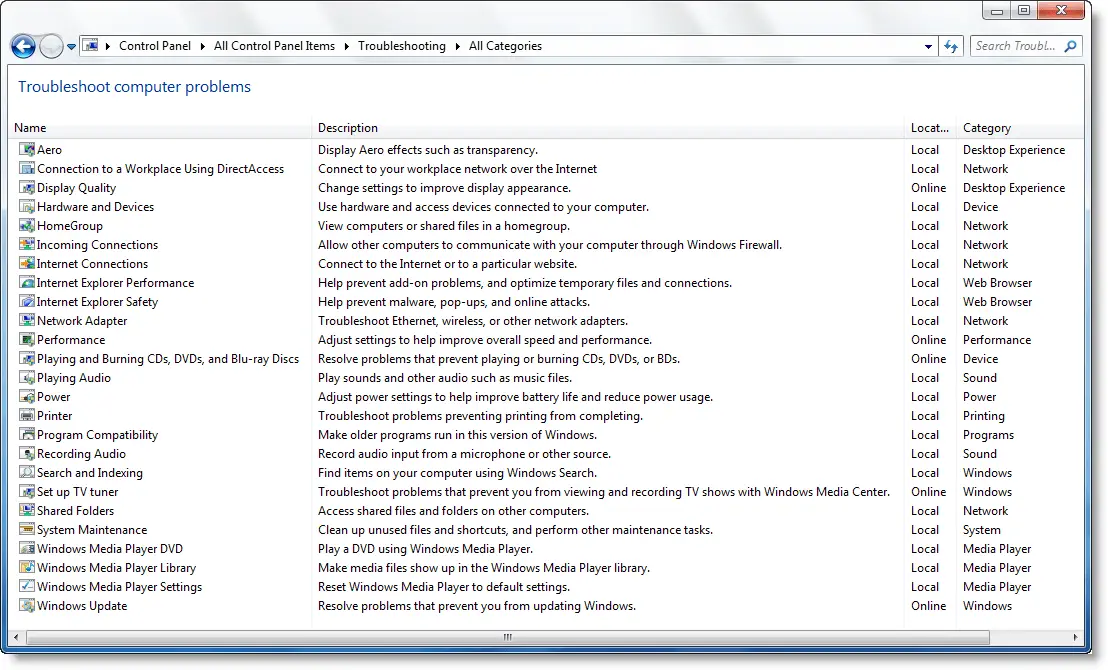
To access these Windows Troubleshooters and wizards, Open Control Panel > All Control Panel Items > Troubleshooting > All Categories
Here you can see all the wizards which will help you to troubleshoot the following problems, in Windows:
– Aero issues
– Connect to workplace network
– Improve Display Appearance
– Hardware & devices
– HomeGroup issues
– Incoming Connections which allow other computers to communicate with your computer
– Internet Connections
– Internet Explorer performance problems
– Internet Explorer safety issues to prevent malware attacks
– Troubleshoot Ethernet, wireless & other network adapter problems
– Adjust settings to improve overall PC performance
– Resolve problems which prevent playing or burning of CDs, DVDs or BDs
– Troubleshoot if unable to play Sounds or other Audio files
– Improve battery life and reduce power usage
– Troubleshoot Printer
– Make older programs run in Windows 7
– Troubleshoot Recording Audio issues
– Troubleshoot search & indexing
– Troubleshoot problems that prevent you from viewing and recording TV shows with Windows Media Center
– Unable to access shared files
– Perform maintenance tasks
– Unable to play DVD with WMP
– Unable to make media files show in WMP
– Reset WMP to default settings
– Troubleshoot Windows Updates
Clicking on Advanced in any module will give you the option to uncheck ‘Apply repair automatically’, should you wish to do so.
TIP: You can now run Troubleshooters using the Troubleshoot page in Windows Settings.
Here is a list of Direct Commands to open Windows Troubleshooters directly. You can also run a Troubleshooter from the command line.
To troubleshoot & fix specific problems in Windows 11, Windows 10, Windows 8, Windows 7 & Windows Vista, download and use our freeware FixWin Utility.