
The Microsoft .NET Framework is a software framework that can be installed on computers running Microsoft Windows operating systems. It includes a large library of coded solutions to common programming problems and a virtual machine that manages the execution of programs written specifically for the framework. The .NET Framework is a Microsoft offering and is intended to be used by most new applications created for the Windows platform.
Microsoft .NET Framework
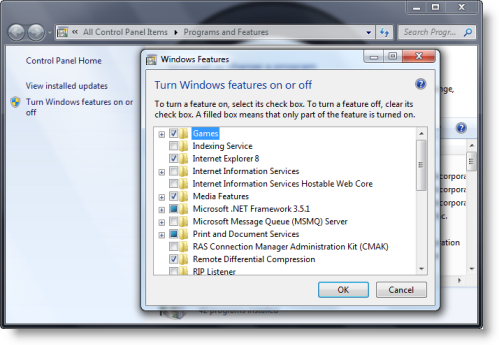
You cannot uninstall the .NET framework via the Uninstall Programs Control Panel applet, as you will not see it listed there. You will have to click on Turn Windows features on or off.
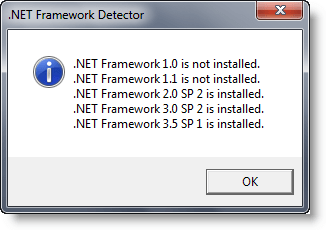
This will show the version of the .net framework which is installed on your Windows computer.
If you need details, you may also download and use any of these portable freeware apps like FrameworkDetector (codeplex.com/FrameworkDetector) or .NET Version Detector.
.NET Framework Cleanup Tool
If you wish to completely remove some/old versions of the .NET framework you may want to check out .NET Framework Setup Cleanup Tool. Go here to know which version of .NET Framework is included in which version of Windows.
This .NET Framework Setup Cleanup tool is designed to automatically perform a set of steps to remove selected versions of the .NET Framework from a computer. It will remove files, directories, registry keys and values, and Windows Installer product registration information for the .NET Framework. The tool is intended primarily to return your system to a known (relatively clean) state in case you are encountering .NET Framework installation, uninstallation, repair or patching errors so that you can try to install again.
While one may need to troubleshoot .NET Frameworks Install Issues on Windows manually, or run the .NET Framework Setup Cleanup Utility and try to install the .NET Framework again, running the new .NET Framework Repair Tool from Microsoft should now be the first option, should you be facing any .NET Framework issues on your Windows computer.
If you need to verify the installation state of the .NET Framework on your computer, you may use .NET Framework Setup Verification Tool.
Take this step if you want to block the installation of .NET Framework on your Windows system.
Read: How to check .NET Framework version installed.
.NET Framework download
Download Page for the latest version: .NET Framework. Currently, .NET Framework 9 is available.
Go here to learn how to enable or install .NET Framework 3.5 on Windows 11.
