
Microsoft has released a tool called Microsoft .NET Framework Repair Tool that will help you resolve issues you may face with the .NET Framework on your Windows 11/10 computer.
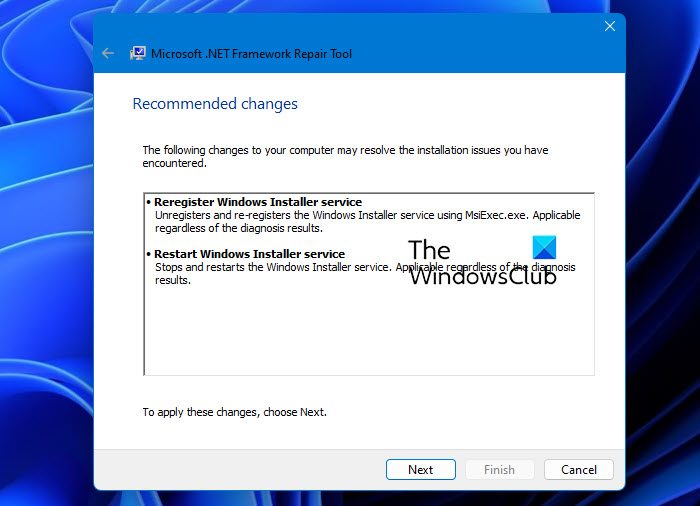
Microsoft .NET Framework Repair Tool
This tool troubleshoots common issues with the setup of or updates to the Microsoft .NET Framework installation. Additionally, this tool tries to resolve these issues by applying known fixes or by repairing the installed product.
The .NET Framework Repair Tool follows a four-step process:
- Tries to troubleshoot setup issues
- Applies the fixes (requires user consent)
- Tries to repair all installed versions of .NET Framework
- Collects logs (requires user consent).
Specifically, the tool will typically carry out the following tasks:
- Re-register Windows Installer service. It unregisters and re-registers the Windows Installer service using MsiExec.exe. Applicable regardless of the diagnosis results.
- Restart the Windows Installer service. It stops and restarts the Windows Installer service. Applicable regardless of the diagnosis results.
If any additional fixes need to be applied, those will also be recommended upon completion of the run.
While one may need to troubleshoot .NET Frameworks Installation Issues on Windows manually, or run the .NET Framework Setup Cleanup Utility and try to install the .NET Framework again, running the new .NET Framework Repair Tool from Microsoft should now be the first option, should you be facing any .NET Framework issues on your Windows computer.
You can download the Microsoft .NET Framework Repair Tool from Microsoft.
The tool now also supports Microsoft .NET Framework 4.8.x, 4.7.2, 4.7.1, 4.7, and 4.6.2. Therefore, the fix and repair options also apply to these products.
TIP: The .NET Framework Setup Removal & Cleanup Utility will help you remove old .NET Frameworks.
