
These tools will help you kill or terminate ALL running processes or open applications instantly with a click on Windows 11/10. Use them if you need to do it frequently. I, too, prefer to use one of these rather than closing each app individually.
Terminate or Kill ALL open apps or running processes instantly in Windows 11/10
1] Use BAT file
Here is a batch file that determines all the processes started by the user and terminates all these processes. It kills only the processes started by the user. These processes include tray applications and background applications.
Using this batch file, you can free up lots of RAM before starting any memory-intensive application like Games or Video Encoders. You don’t have to terminate each and every application to free up RAM.
This batch file cannot terminate protected applications, such as antivirus and Firewall Software.
To kill all running apps, just download the kill.bat and double-click on it.
2] Force close all open apps using the Command Prompt
Execute the following command in an CMD:
PowerShell -Command "Get-Process |? {$_.MainWindowTitle -ne \"\" -and $_.Id -ne $PID -and $_.ProcessName -ne \"explorer\"} | Stop-Process -Force"
This will close all open apps except File Explorer and the Windows Registry Editor.
3] Force close all open apps using PowerShell
Open Terminal and select PowerShell. Copy-paste the following and hit Enter:
Get-Process |? {$_.MainWindowTitle -ne "" -and $_.Id -ne $PID -and $_.ProcessName -ne "explorer"} | Stop-Process -Force
4] Use KillThem All tool
KillThemAll, created by a Neowin user, performs the same function but provides the user with the option to save their data. It leaves Explorer.exe open, however.
Read: How to kill multiple processes at once.
5] Use Tasklist & Taskview
See how to kill Processes via Command Prompt using Tasklist & Taskview commands.
Read: Different ways to close running apps on Windows 11
6] Use CloseAll tool
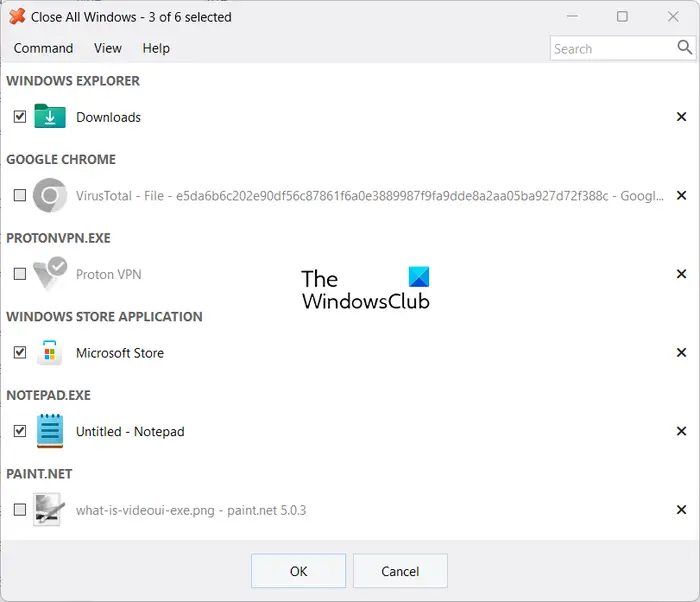
CloseAll is a freeware tool that helps you to close all running applications & windows instantly with one click. Do note that the free version of this software lets you close 3 apps at once. To unlock this limitation, you need to purchase this software.
Please let us know if you are aware of any other tools.
TIP: How to kill a process instantly when a Program is Not Responding may also interest you.
How do you kill a process immediately in Windows?
To immediately kill a process in Windows, open Task Manager by pressing Ctrl + Shift + Esc, then navigate to the “Processes” tab. Locate the process you want to end, right-click it, and select “End Task.” This will forcefully terminate the process.
How do I close all apps and turn off my computer?
To close all apps and shut down your computer, go to the Start menu, select Power, and click Shut Down. This will automatically close all running applications and safely power down your system.
