
A self-extracting archive is useful; it allows you to extract archives without additional software. All you have to do is double-click the archive and it will automatically extract the files within. In this post, we will guide you on creating self-extracting archives using the native tools that ship with your Windows 11/10 operating system.
Before we jump right into it, a little background.
What is a self-extracting archive (SFX/SEA)?
A self-extracting archive (SFX/SEA) is a computer-executable program that contains compressed data in an archive file combined with machine-executable program instructions to extract this information on a compatible operating system and without the necessity for a suitable extractor to be already installed on the target computer. The executable part of the file is known as the stub and the non-executable part of the archive.
While you can create a self-extracting archive in Windows and Linux, the created archive is not cross-platform compatible. You can’t make a self-extracting archive in Windows and expect it to work in Linux. Even in Linux, the archive might not be compatible with each distro. If you plan to send a self-extracting archive to your friend, ensure you are using the same OS platform as they are.
A self-extracting archive can pose a risk if you are unsure of its contents. Unless you are expecting to receive a self-extracting archive from a trusted source, do not open any self-extracting archive, particularly those you downloaded from some shabby websites.
IExpress in Windows OS
In the System32 folder of your Windows, you will see an application called IExpress. IExpress is a Microsoft tool that is included in Windows Server as well as Windows 11/10.
This tool allows you to create an executable file around your script to distribute it as a .exe file instead of a .bat or .vbs file. It can be used to create a single self-extracting package from a set of files. Such packages can install applications, executables, drivers, and system components. It uses a Self-Extraction Directive (.sed) file to store information about your package. When you run the IExpress Wizard, you can start with an existing .sed file or create a new one using the wizard. The .sed file contains information and instructions about the setup package.
Open or Create an executable file from script using IExpress command line
Using its step-by-step wizard, IExpress will help you create self-extracting files, also known as Self Extraction Directive (SED) files, that automatically run the setup program contained within.
They include compressed files that can be unzipped with a double-click. If you want, you can also add a licensing agreement, messages for the users to whom you send SEDs, etc. The setup program can be an .inf file or an executable program.
After installation, IExpress automatically removes the setup files, saving the user time.
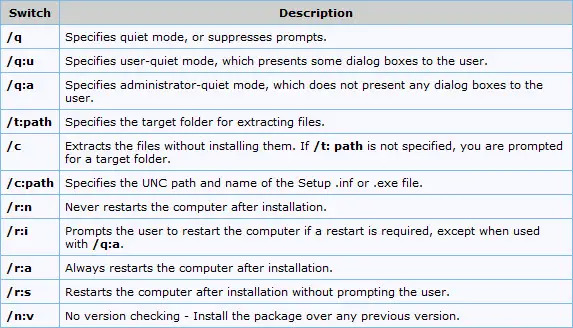
The IExpress Wizard can also assist you in carrying out specialized installations of your customized browser package, such as determining whether the computer needs to be restarted after installation. Certain choices you make in the wizard correspond to particular batch-mode setup switches.
How to create self-extracting archives in Windows
To create self-extracting archives on Windows, you can use the inbuilt tool – IExpress.exe.
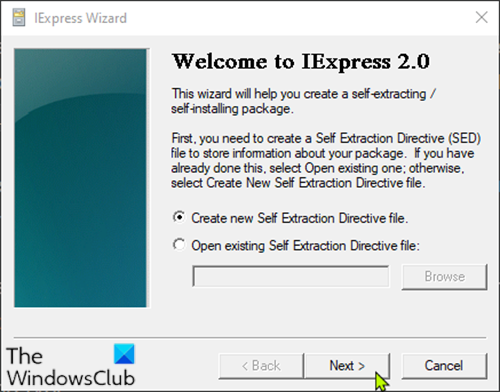
Here’s how:
- Press Windows key + R to invoke the Run dialog.
- In the Run dialog box, type iexpress and hit Enter.
- On the first screen, select Create a new Self-Extraction Directive file.
- Click Next.
- On the next screen, select Extract files only.
This will create a self-extracting archive, rather than an installer.
Continue to click Next and follow the wizard to create the archive.
Once completed, you will have an EXE file where you can double-click to extract its content.
That’s it on how to create self-extracting archives on Windows 11/10.
TIP: You can also convert a PowerShell script (PS1) file to EXE with IExpress.
