
When you press a letter on the keyboard, the focus shifts to the icon that starts with that letter. Or, when you select an icon with your mouse pointer, the icon is focused by a pale white box. This is called the Universal Focus Rectangle. The Universal Focus Rectangle in Windows 11/10 lets you know where you were before your current click.
When you shift focus elsewhere or click on the desktop, the box is expected to disappear. Now, in some cases, while the box may disappear, the dotted white square border still remains. Now, this is not something to worry about; it happens at times. If you frequently encounter this issue, here are some suggestions that may help.
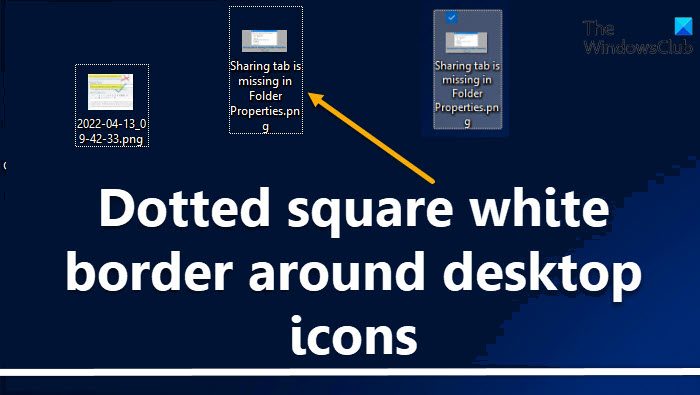
Dotted square white border around desktop icons in Windows 11
If this issue annoys you and occurs often, try the following suggestions to make the white border go away:
- Press the Tab key
- Refresh Desktop
- Restart Explorer
- Change Ease of Access Center settings
- Change Icon Size
- Use Universal Focus Rectangle Remover
1] Press the Tab key
Press the Tab key to shift the focus away from that icon.
2] Refresh Desktop
Right-click on the desktop and select Refresh to refresh the Desktop.
TIP: You can change the Background Color of the selected or highlighted Text.
3] Restart Explorer
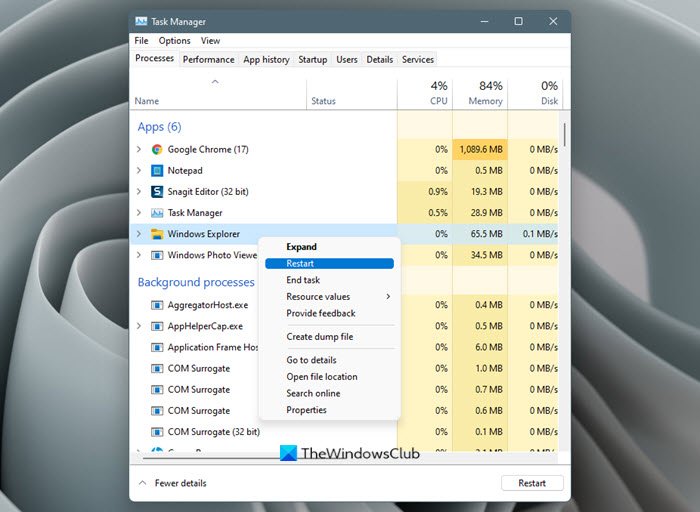
Open Task Manager, right-click on Windows Explorer and select Restart to restart Explorer.
4] Change Ease of Access Center settings
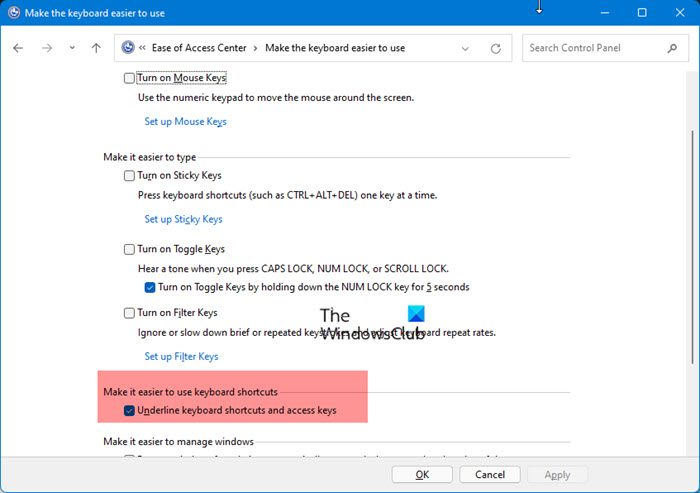
Open Control Panel > Ease of Access Center > Make keyboard easier to use > Uncheck Underline keyboard shortcuts and access keys > Apply.
Change Icon Size
Read next: How to change Translucent Selection Rectangle Box color.
5] Change Icon Size
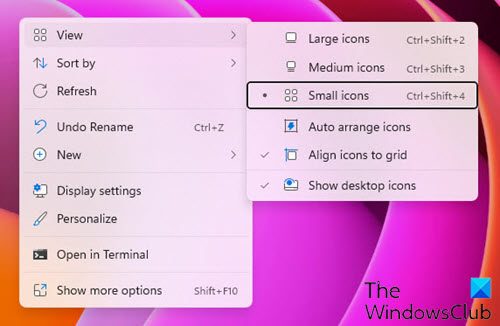
As a last resort, you may need to change your icon size. If your current icon size preference is larger than the largest available image size in the icon file, a border is shown, with the icon inside the border. To resolve this issue, right-click on the desktop > Select View. If you have chosen large icons, set them to Medium and see. If you have chosen Medium, which is the default, set them to Small icons and see.
6] Universal Focus Rectangle Remover
Download Universal Focus Rectangle Remover.
- Put RemoveFocusRect in your system32 directory.
- Click Start and select Run.
- Type “regsvr32 RemoveFocusRect.dll” (without the quotes) and press OK.
- Next time a program is started, it won’t have focus rectangles.
If you change your mind and want it back:
- Click Start and select Run.
- Type “regsvr32 /u RemoveFocusRect.dll” (without the quotes) and press OK.
- Restart your computer.
- Delete RemoveFocusRect from your system32 directory.
All those steps should be done with administrative privileges. Get it from Neowin.
Read: How to disable Pop-up description for folder & desktop items
Why is there a white square on my desktop?
When you select an area on your Windows desktop, the selected area is highlighted in a semi-transparent blue. On other occasions, the Desktop appears, completely transparent with a dotted outline marking its borders. But if you wish, you can hide or show Translucent selection rectangle. But it the white square appears to be permanent, you may need to update your Display drivers.
Why are there dotted lines around my desktop icons?
The white dotted lines indicate that the icon has been selected and it is normal Windows OS behavior. The box goes away when you shift focus. But if it does not, then the tips given in this post may help you.
Related: How to disable the light blue border box when you hover over icon.
