
A firewall is a software or hardware that checks information from the Internet or a network. Depending on your firewall settings, it blocks or allows it to pass through to your computer. A firewall can help prevent hackers or malicious software from gaining access to your Windows 11/10 computer through a network or the Internet. A firewall can also help stop your computer from sending malicious software to other computers.
How to configure Windows Firewall
You can customize most settings of your Windows Firewall through the left pane of the Firewall applet in Control Panel.
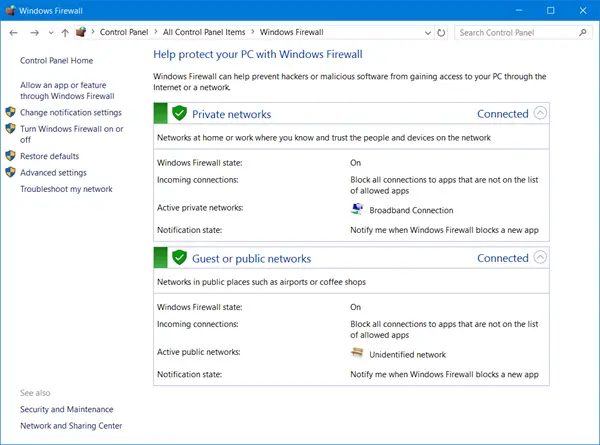
1] Turn on or off Windows Firewall
This setting is selected by default. When Windows Firewall is On, most programs are blocked from communicating through the firewall.
To turn off Windows Firewall, open Control Panel and click on the Windows Firewall applet. Here, clicking on the Turn Firewall On or Off setting in Control Panel will enable or disable the Windows Firewall on your computer.
2] Block all incoming firewall connections, including those in the list of allowed programs
This setting blocks all unsolicited attempts to connect to your computer. Use this setting when you need maximum protection for your computer, such as when you connect to a public network in a hotel or airport, or when a computer worm is spreading over the Internet. With this setting, you are not notified when Windows Firewall blocks programs, and programs in the list of allowed programs are ignored. When you block all incoming connections, you can still view most web pages, send and receive an e-mail, and send and receive instant messages.
Read: Unable to change Windows Firewall settings
3] Turn off Windows Firewall
Avoid using this setting unless you have another firewall running on your computer. Turning off Windows Firewall might make your computer more vulnerable to damage from hackers and malicious software. Clicking on the Turn Firewall On or Off will let you enable or disable the Windows Firewall on your computer.
Read: Windows Firewall has blocked some features of this app.
4] Block or Allow Programs through the Windows Firewall
By default, most programs are blocked by Windows Firewall to help make your computer more secure. To work properly, some programs might require you to allow them to communicate through the firewall. Here’s how to do that:

Click Allow an app or feature through Windows Firewall. If you are prompted for an administrator password or confirmation, type the password or provide confirmation.
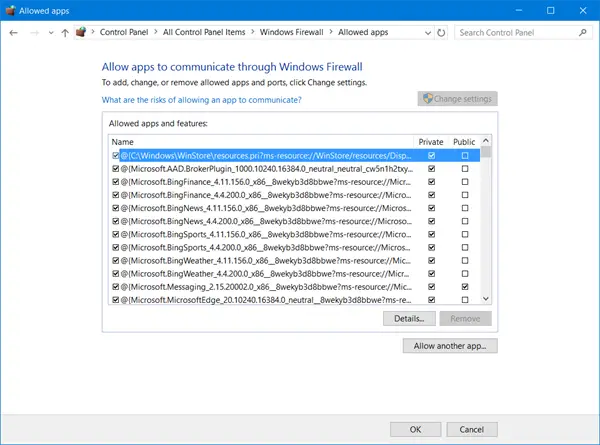
Select the check box next to the program you want to allow, select the network location types you want to allow communication on, and then click OK.
If you want to allow a program to communicate through the firewall, you can add it to the list of allowed programs. For example, you might not be able to send photos in an instant message until you add the instant messaging program to the list of allowed programs. To add or remove a program to the list, click on the Allow an app or feature through Windows Firewall link to open the following panel, where you will be able to get more details about allowed programs and allow another app to communicate through the firewall.
Read: Block Active Attacks using Shields Up mode in Windows Firewall
5. How to open a port in Windows Firewall
You can also block or open a Port in Windows Firewall. Suppose the Windows firewall is blocking a program and you want to allow that program to communicate through the firewall. In that case, you can usually do that by selecting the program from the list of allowed programs (also called the exceptions list) in the Windows firewall. To learn how to do this, see Allow a program to communicate through Windows Firewall.
However, you might need to open a port if the program isn’t listed. For example, to play a multiplayer game with friends online, you might need to open a port for the game so that the firewall allows the game information to reach your computer. A port always stays open, so be sure to close ports you don’t need anymore.
Click to open Windows Firewall. In the left pane, click Advanced settings.
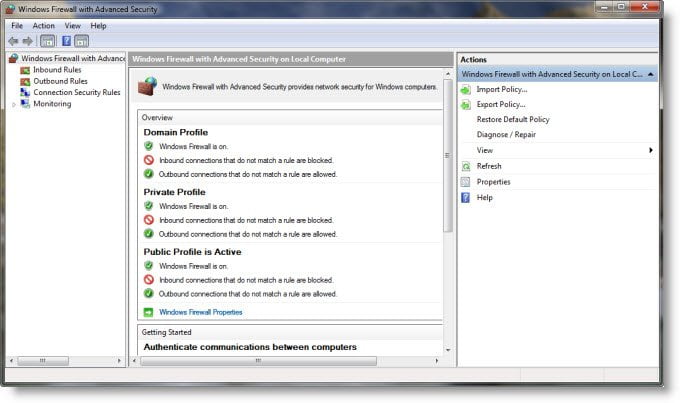
In the Windows Firewall with Advanced Security dialog box, in the left pane, click Inbound Rules, and then, in the right pane, click New Rule.
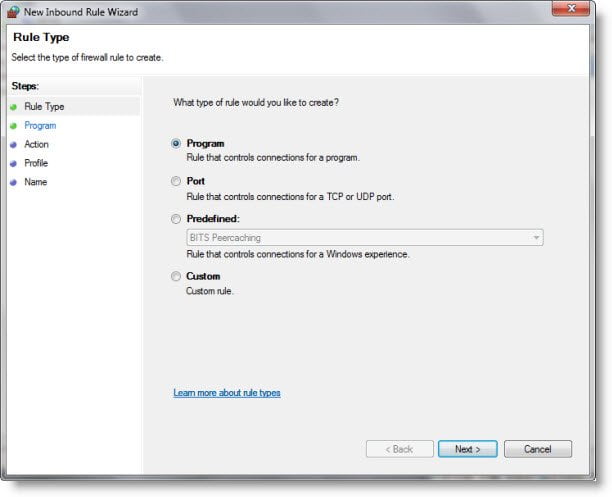
Next, follow the instructions on your screen to its logical conclusion.
Also read: How to manage Windows Firewall Rules with PowerShell
Manage Windows Firewall
Windows 11/10 allows you to access the advanced settings, including the configuration of filtering for outbound connections, through its Control Panel. Windows gives you three choices-
- Public network,
- Home network
- Work network.
By default the Windows 11/10 firewall blocks connections to programs that are not on the list of allowed programs. With all network types, it now allows you to configure the settings for each network type separately. This is what is referred to as Multiple Active Firewall Profiles.
Most would just prefer to have the Windows firewall set to its default and forget about it. The default settings are good enough. Those who want to fine-tune it can manage the Windows firewall in the following ways:
1) Windows Firewall Control Panel application.
This is the simplest one and good enough for routine tasks.
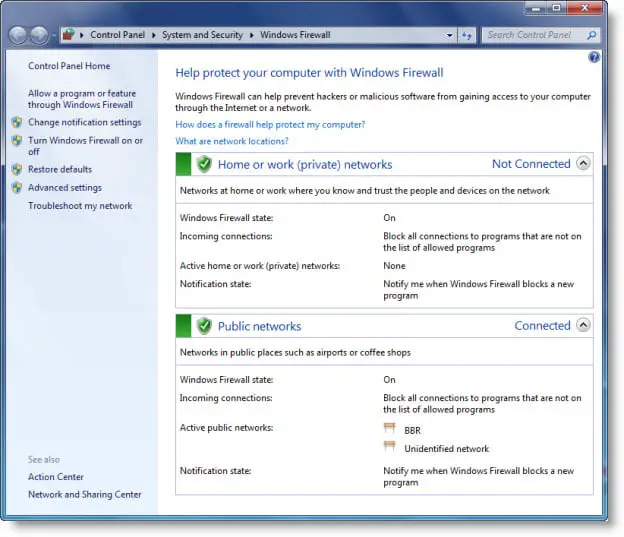
It is the simplest—and the least capable. But with it, you can complete routine tasks, such as allowing a program through it or blocking all incoming connections. This Technet link true will help you get started.
Read: Difference between Microsoft Defender, Windows Defender, Windows Security, Windows Defender Firewall
2) Windows Firewall – Advanced Security
Windows Firewall – Advanced Security is a snap-in and predefined console for Microsoft Management Console offers much more granular control over rules, exceptions, and profiles. You can access it through the Control panel app too.
3) The Netsh utility
The Netsh utility, in particular its Firewall and Advfirewall context, lets you make firewall settings from a Command Prompt window or a batch program.
Read: How to allow Pings (ICMP Echo requests) through Windows Firewall.
4) Group Policy Object Editor
This incorporates the Windows Firewall With Advanced Security snap-in under:
Computer Configuration\Windows Settings\ Security Settings\Windows Firewall With Advanced Security
In addition, Windows Firewall can be managed with a number of policies, which can be found in:
Computer Configuration \ Administrative Templates \ Network \ Network Connections \ Windows Firewall
Incidentally, nearly a total 0f over 3000 settings can be configured through Group Policy Editor (gpedit.msc). However, Group Security Policy is not included in Windows Home Edition.
You can also test your Firewall using these free online Firewall tests.
Theis freeware will help you manage the Windows Firewall better: Windows Firewall Control
See this post if you ever need to repair the Windows Firewall.
