
How often has it happened that you have inadvertently hit the Caps Lock key and continued to type? While the Caps Lock key is a useful tool, when you want to write everything in capitals, it can create problems, if you have accidentally clicked on it and everything gets typed in capitals. This can create problems, especially when typing passwords.
Most of us, tend to use Shift to write a capital letter. However, sometimes, it gets enabled automatically and that can be very annoying, that’s why it is better to know when the key is On. In this article, we are going to see how to get voice Notification if Caps Lock, Num Lock or Scroll Lock is On in Windows 11/10.
Enable Caps Lock, Num Lock or Scroll Lock warning in Windows 11/10
In Windows 11/10, you can set it so that a warning tone is heard when you press the Caps Lock, Num Lock, or Scroll Lock keys. You can do it via Settings or Control Panel.
1] Via Settings
The sound is controlled by the Toggle Keys. They not only control the Caps Lock, but it also controls Num Lock and Scroll Lock. So, when you enable the setting, you will not only hear a sound when your turn Caps Lock On but also when you enable Num and Scroll lock. Unfortunately, you cannot choose to enable sound for one of the mentioned, you have to do it for all of them.
Windows 11
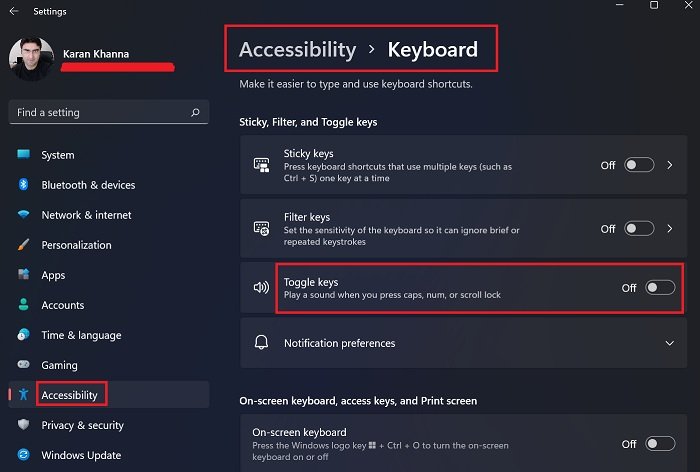
The best part about Windows 11 was giving a huge boost to Accessibility features. A lot of Settings were added and many settings changed positions. One such case is with the Toggle keys. The Toggle keys option enables Caps Lock, Num Lock or Scroll Lock warning sound in Windows 11. The procedure to do so in Windows 11 is as follows:
- Right-click on the Start button and select Settings.
- Go to the Accessibility tab on the list on the left-hand side.
- In the right-pane, scroll down to the Interaction section and select Keyboard.
- Under the section for Sticky, Filter, and Toggle keys, you would find the switch for Toggle keys.
- You can turn it ON or OFF using the switch.
Windows 10
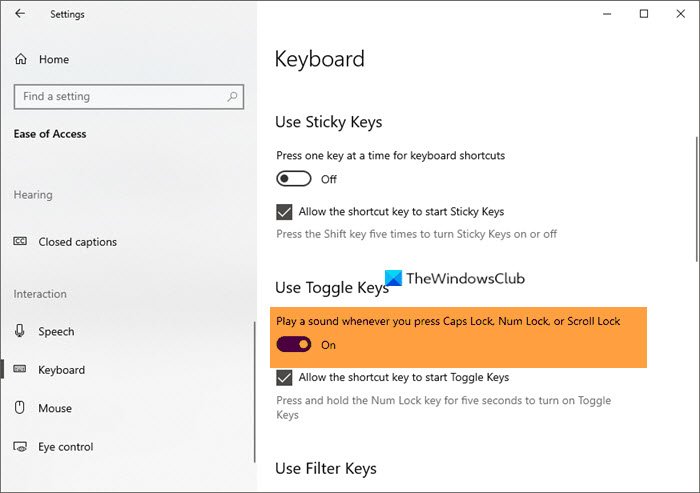
To play a sound when you activate a special key in Windows 10:
- Open the Settings
- Go to Ease of Access > Keyboard
- Find Use Toggle Keys”
- Toggle the switch to ON.
That’s all.
2] Via Control Panel
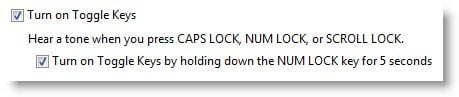
To enable this feature in Windows 11/10, using Control Panel, go to Ease of Access Center > Make the keyboard easier to use.
Check the Turn on Toggle Keys checkbox.
Click Apply > OK.
Now you will hear a tone when you press Caps Lock, Num Lock, or Scroll Lock.
Windows will play an alert beep warning each time you press the Caps Lock, Num Lock, or Scroll Lock keys. These alerts can help you prevent accidentally pressing this key.
TIP: You can also use free Keyboard Status Indicator software like TrayStatus, 7Caps or CapsLockIndicator to display the status of the Scroll, Num, Caps Lock, and other keys in the Windows Taskbar or Screen.
I hope this small tip helps!
See this post if Caps Lock is key not working.
How do I turn off Caps Lock sound in Windows 11?
You can easily turn off Caps Lock sound in Windows 11 following the steps that you have used to enable it. You just need to make sure that you are turning off the toggle instead of turning it on. Just go to Settings > Accessibility > Keyboard and then disable Toggle Keys.
Why is there a beep when I press Caps Lock?
If you are seeing a beep when you hit Caps Lock then there is nothing to worry about. It’s just that, you have enabled Toggle Keys. These keys are used by users to indicate when Caps Lock, Num Lock, or Scroll Lock is enabled. If you are not happy with the sound then turn it off.
How do I know if Caps Lock is on or off?
If you want to know if Caps Lock is on or off, see if there is some light glowing on the key. Most of the keyboards have a small LED light on all Lock keys. You can also, try typing something on a text editor. If everything that you are writing is in a Capital letter then Caps Lock is enabled. You can also enable the Toggle Keys and try pressing the Caps Lock button if it makes the ‘disabled’ sound, then that key was disabled.
What is the use of enabling Toggle keys?
The option for Toggle keys falls under the Accessibility section. It would be very helpful for people with audio and visual disabilities. The sound would make sure that you don’t start typing in upper case or lower case, numbers, etc just out of error.
It is a boon for blind people who have learned typing. While they can type well, unlike in a typewriter, the Caps Lock key is simply an ON/OFF switch. Without the Toggle keys option, a blind person may end up typing a whole essay in upper case without the knowledge of it.
How would I know which key I pressed and whether I enabled or disabled the mentioned lock?
The Caps Lock and Num Lock keys are the same for both enabling or disabling the option. So, the sound for enabling and disabling them has been made different.
Read Next:

