
Auto Hide Desktop Icons is a freeware application that can hide your Windows desktop icons and even your taskbar after a set time interval – and works better than the Auto-hide taskbar feature. If you usually have a cluttered desktop and would like to peek behind them at your wallpaper every once in a while, go check it out.
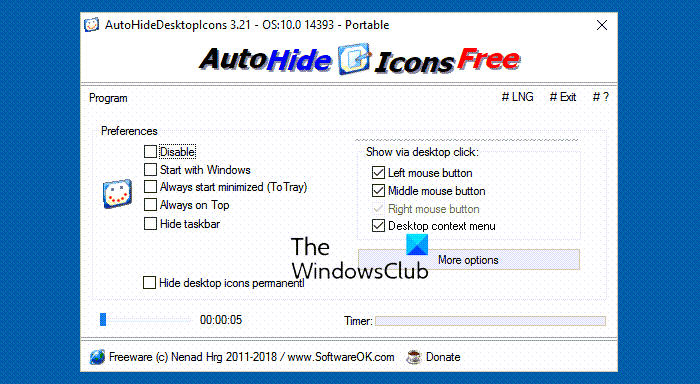
How to Auto Hide Desktop Icons & Taskbar in Windows 11/10
You can set the time using the slider. It allows you to set the time of inactivity between 3 secs and 100 secs. The tool also offers to hide the taskbar should you select the option.
The app offers the following setting options:
- Disable the app
- Start with Windows
- Start minimized
- Always on Top
- Hide Taskbar.
If you are working in say a Notepad, and there is no activity on the desktop, the app still hides the desktop icons. To get the icons back, you have to left-click on the desktop. You can, of course, configure this setting to show icons on right-clicking or using the middle mouse button.
One thing which is noticeably missing is the option to Exit the app. It would be have been nice if the notification area icon were to have offered this option. A pity, actually! The only way to kill the app then is via the Task Manager.
You will find the app useful if you want to hide your desktop icons when you are away from the desktop – or even simply to enjoy your beautiful wallpaper. This is how your desktop will look – before – and after the icons and taskbar are hidden.

You can download AutoHideDesktopIcons from its home page.
You can also use our freeware HIDE TASKBAR. Take a look at it!

