
Frustratingly common for PC users, boot problems can stem from a variety of software and hardware glitches. A particularly frequent issue is when a Windows computer only boots up after a hard reset. This article shares the potential causes of this error and explores the most effective solutions to get your PC booting normally again.
![PC only boots after Hard Reset [Fix]](https://www.thewindowsclub.com/wp-content/uploads/2024/03/PC-only-boots-after-Hard-Reset-Fix.jpg "PC only boots after Hard Reset [Fix]")
Why is the PC booting only after a hard reset?
Incorrect boot settings, such as misconfigured boot orders or device priorities, prevent the system from starting up successfully. Hardware detection failures within the BIOS/UEFI due to settings mismatches or unrecognized hardware components can be temporarily resolved by a hard reset. Firmware corruption may cause erratic startup behavior, and a hard reset can briefly cut off the power, potentially aiding in resetting the corrupted firmware.
Fix Windows PC only boots after Hard Reset
If your Windows computer boots up only when you reset the BIOS or CMOS, follow these suggestions: The key to resolving this error lies in identifying the actual cause of the problem.
- Reset CMOS Jumper
- Replace CMOS Battery
- Update BIOS
- Contact Support.
Make sure to back up all your data before attempting any of these.
1] Reset CMOS Jumper
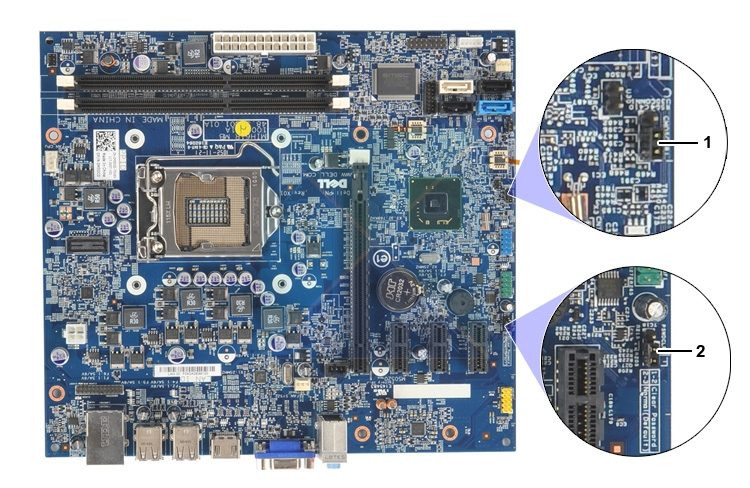
Resetting the CMOS Jumper resets the BIOS settings to its factory defaults, thereby fixing any misconfigurations that prevent the system from booting normally. To reset the jumper:
- Power off the system and open the cabinet cover.
- Locate the CMOS jumper, a 3-pin combination beside the CMOS battery.
- Move the jumper from the default 1-2 position (covering the pins) to the 2-3 position (jumper covering pins 2-3 instead of 1-2).
- Wait a few minutes, then move the jumper back to the default position (1-2) and power on the system once done.
Note: It is advised that the jumper resetting should be performed after checking the motherboard’s manual, as the location of the jumper and the settings may not be the same for every manufacturer.
Related: Windows PC only boots after Restart
2] Replace the CMOS battery
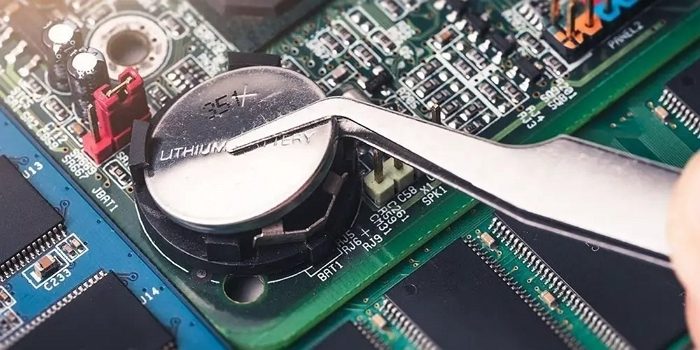
If the CMOS battery dies, the motherboard loses its BIOS settings and fails to boot normally. However, the power is still applied, and the BIOS resets to default settings; hence, the second boot is successful. Hence, replacing the old CMOS battery with a new one can help the system retain its startup configurations when powered on, allowing it to boot generally at the first instance.
3] Update the BIOS

BIOS updates can help fix compatibility issues and improve system stability. If the system needs to be reset manually due to issues with the BIOS, the update can also be a possible fix.
Disclaimer: It is strongly advised to follow the manufacturer’s guidelines while updating BIOS to avoid any undesired changes in the system.
Read: Laptop won’t turn on even when plugged in and charging
4] Contact Support
If none of the above methods fail to resolve the issue, we can safely conclude that the fault is at the hardware end. A faulty chip on the motherboard or the graphics card can cause the issue; hence, a hardware replacement might be the best solution.
I hope the post was easy to follow and that you could fix the issue where the PC would only boot after a hard reset.
Read: Computer boots after several attempts
PC only starts when I reset CMOS
If your Windows PC only starts when you reset CMOS, take these steps:
- Update your BIOS firmware
- Check boot device priority
- Reseat RAM and GPU, and check loose cables
- Test with another PSU
- Replace the CMOS battery.
Computer not starting unless I reset the BIOS
If your Windows computer is not starting unless you reset the BIOS, take these steps:
- Disable Fast boot
- Disable Overclocking
- Update your BIOS firmware to the latest version.
- Check RAM and GPU seating and ensure that there are no loose connections.
- You may need to replace the CMOS battery.
Can we hard reset laptops?
We can try the clean boot on the laptop, but resetting the CMOS battery might not be as easy for a laptop. Hence, contacting the hardware vendor would be the best option.
How to do a hard reboot on a laptop?
A hard reboot involves completely shutting down the device, disconnecting the wires and all external devices, and keeping them unplugged for at least ten minutes. This ensures any holding charge is depleted. You can perform a hard reboot on a laptop.
