
PageFile is a system file Windows uses when it runs out of physical RAM or needs to store temporary data and needs RAM for something else. That said, you can always change the location of the Page File and save it on another hard drive connected to your PC. However, some users noticed that Windows kept using the HDD instead of the SSD for the Page File when the RAM was full. Since SSD will perform better, it looks like a better choice. In this post, we will look at a solution to fix the problem.
One user noticed in Task Manager that the secondary hard disk (HDD 5800 RPM) was heavily used. So the user disabled the page file in the disk settings and rebooted the PC. However, to his surprise, the PC kept using the HDD even though the page file was no longer there. He even tried to delete the file manually, but it didn’t work.
Windows keeps using HDD instead of SSD for Page File when the RAM is full
The solution is straightforward. When a user wants to unhide files, there are two settings— Show hidden files and folders and Show/hide protected operating system files. The option can be seen when you open the File Explorer Options. If you want to delete the page file, then you need to enable this option and then go and delete the file.
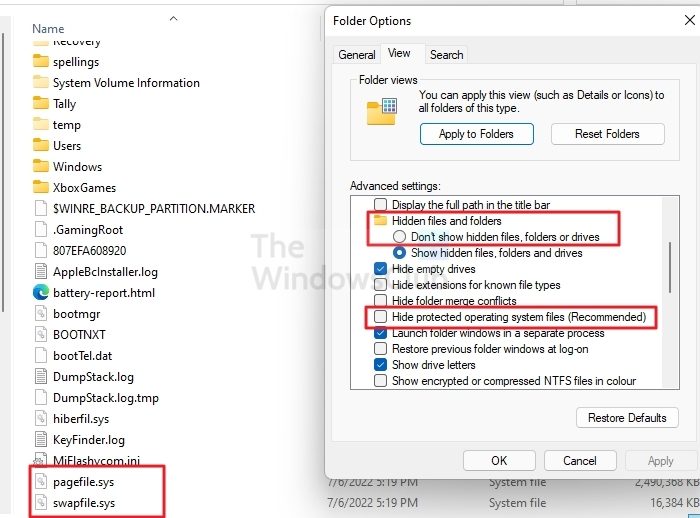
- Open File Explorer and click on the three-dot menu to open Folder Options
- Switch to the View tab, and then click on the radio button next to the Show hidden files, folders, or drives.
- Check the box next to Hide Protected operating system file types
- Go to the HDD, locate the Pagefile.sys, and Swapfile.sys, and delete them
- Open Win + R to open the Run Prompt
- Type sysdm.cpl and press the Enter key
- Switch to the Advanced tab and click on the Settings button under Performance
- In the Performance Options window, switch to the Advanced tab and click Change under Virtual memory.
- Here you can configure the amount of Virtual memory or Page file.
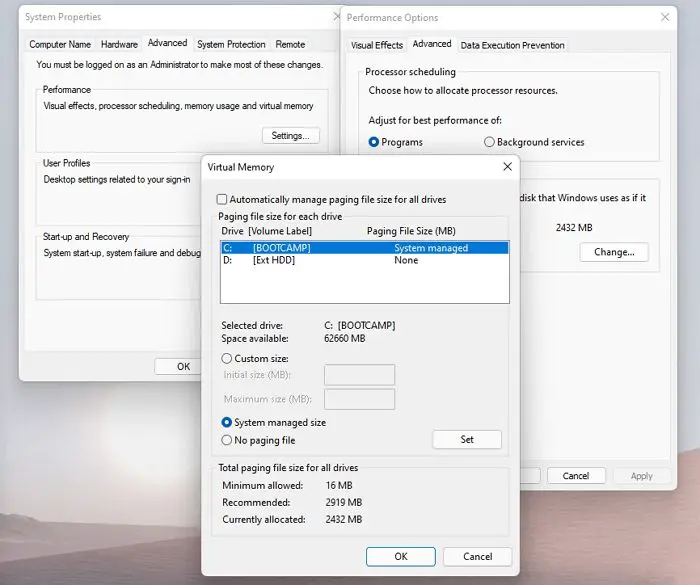
After that, your HDD shouldn’t be under pressure when RAM is full; instead, the PC should deliver better performance with the SSD.
I hope this post helps and that you know how to configure virtual memory on your PC.
Do I need a page file if I have enough RAM?
Page files are still necessary since all operating systems reserve enough swap space before launching a program just in case its RAM is needed urgently. If you have enough storage space, you should allocate 10% or let the system manage it.
What is Swapfile.sys?
It is a system file used as virtual memory when the OS needs to temporarily save files, and create more space for other applications in physical RAM. This file can increase available memory and help prevent crashes when running multiple programs. The file is stored in the system drive, along with pagefile.sys and hiberfil.sys. The best part is that you can change the amount of virtual RAM, and now that most have SSDs, it improves performance.
